


Get Advanced Insights on Any Topic
Discover Trends 12+ Months Before Everyone Else
How We Find Trends Before They Take Off
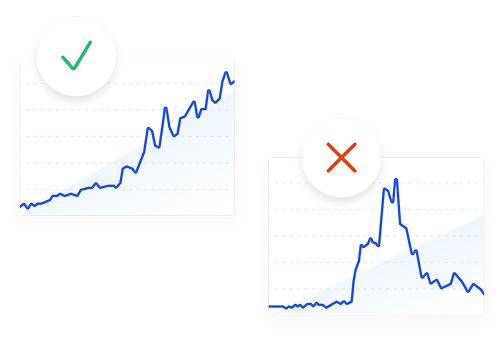
Exploding Topics’ advanced algorithm monitors millions of unstructured data points to spot trends early on.
Keyword Research
Performance Tracking
Competitor Intelligence
Fix Your Site’s SEO Issues in 30 Seconds
Find technical issues blocking search visibility. Get prioritized, actionable fixes in seconds.
Powered by data from
Latest Blog Posts
Featured Case Studies
See what's trending before everyone else
Each week, we'll send you our best Exploding Topics. Plus, expert insight and analysis.
How to Find Trending Topics: 10+ Proven Methods (2026)

 Add Exploding Topics on GoogleAdd Exploding Topics as your preferred source to see more of our stories on Google.
You can find trending topics by browsing social media platforms, industry websites, trend detection tools, and forums like Reddit and Quora.
It's important to develop some familiarity with different trend detection tools and techniques to spot meaningful trends for your business and ignore the fads.
In this post, I'll share some of my favorite tools for trending topics, ideas, and products and how you can use them for real trend research.
1. Use a Specialized Trend Discovery Tool (Exploding Topics)
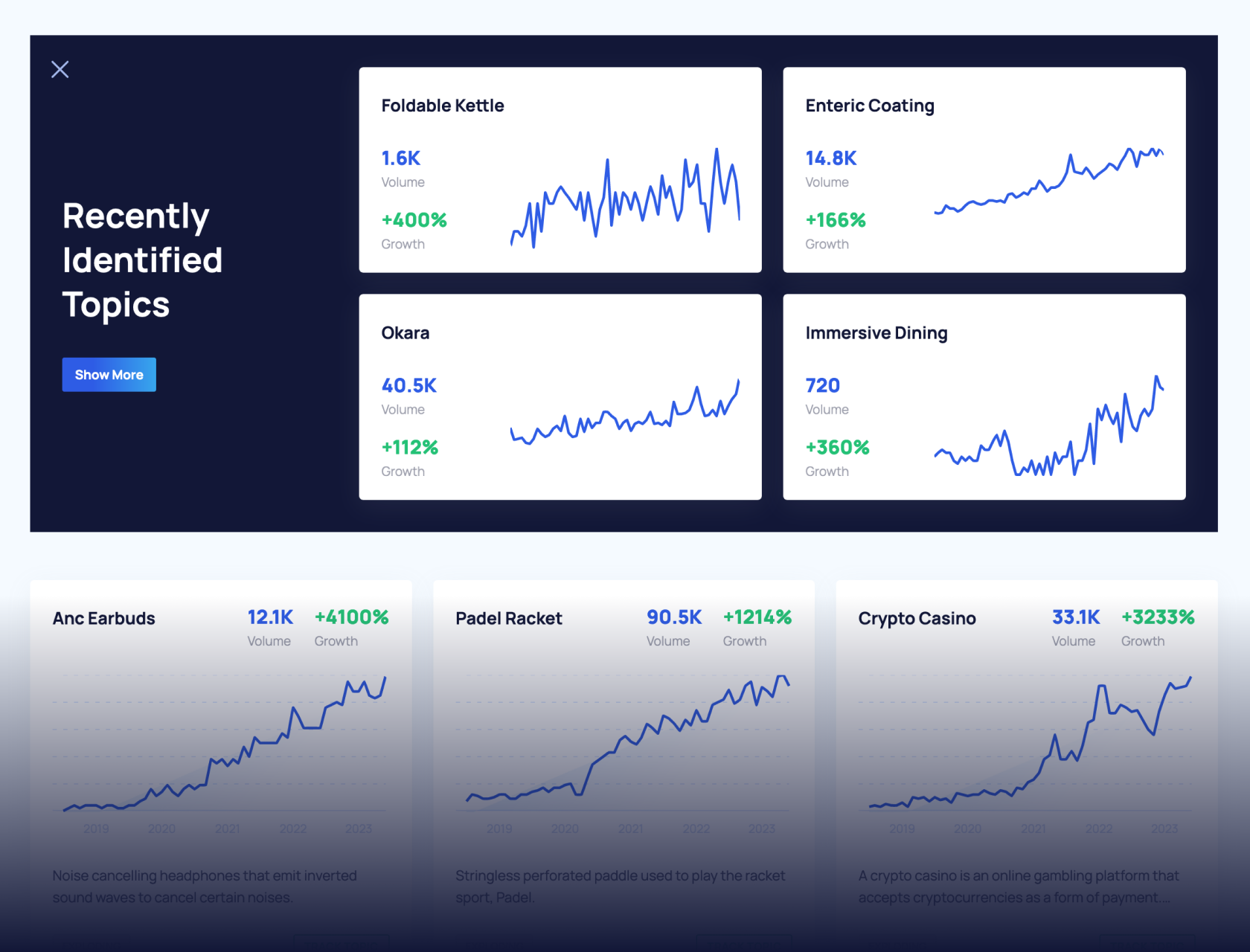
Exploding Topics analyzes Google searches and social media buzz in a wide range of industry niche to expose rising opportunities.
Here’s how:
Browse the Trends Database
The Trend Database is where you’ll find the hottest trends in your niche.
Exploding Topics tracks trends in a variety of distinct categories. To start your search, select a category and sub-category that you want to explore from the Trends Database page.
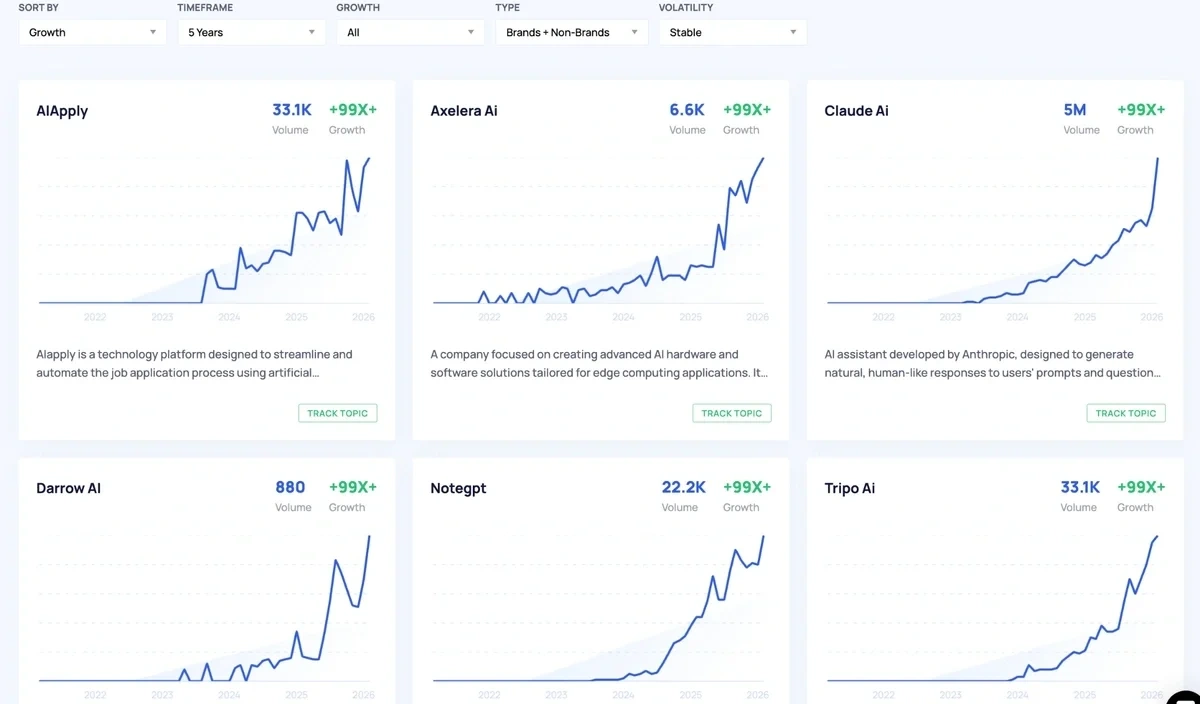
Once inside a category, you’ll find trending searches and topics with a small glimpse into the search volume chart for each topic.
You can find tons of great ideas simply by exploring the database with the default view.
But not all trends are equal. Some topics might be in the early days of their rising popularity. Others might have already peaked.
The Trends Database filters are incredibly handy for finding viral trends you need to keep an eye on.
Set the growth filter to Exploding and the page will show all trends displaying rapid search volume growth over your selected time period.
You can also filter out stable trends from volatile ones if you need to separate trends with consistent growth from the more mercurial ones.
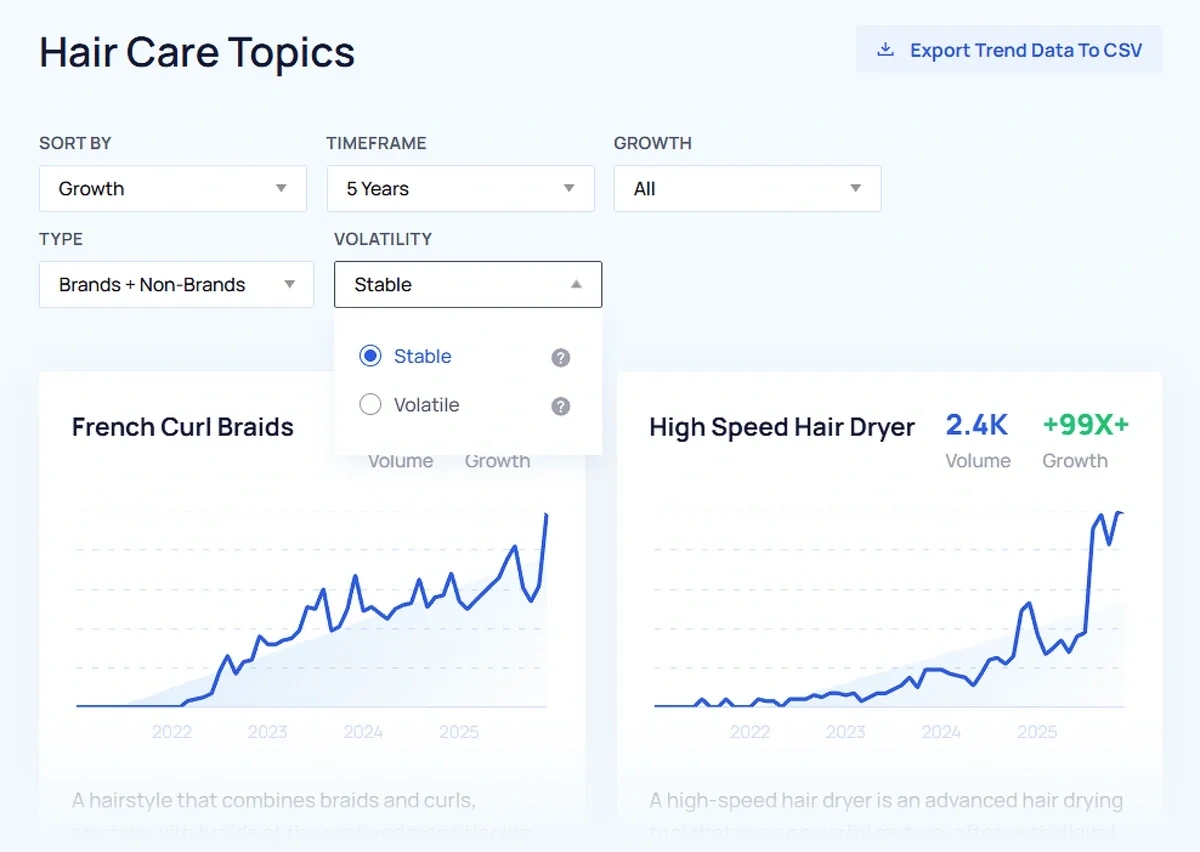
Take a quick look at this report and you’ll easily find several good ideas for strong trends relevant to your business.
It’s easy to dive deeper to validate if the trend is just appealing on the surface or if it has enough substance to warrant consideration in your marketing and business strategy.
Review Key Indicators and Channel Breakdown
Every trend in the database also has a dedicated page that provides additional details and context about the trend.
Apart from the search volume chart itself, the Key Indicators section is super valuable.
That’s because it classifies the trend using attributes that enable you to make better sense of how promising the opportunity is:
-
Growth: Indicates the growth trajectory of the trend
-
Speed: Highlights how fast the trend is growing
-
Seasonality: Measures the periodicity of the trend
-
Volatility: Senses the fluctuation rate of a trend’s growth
-
Sentiment: Shows prevailing user attitudes about the trend
- Forecast: Predicts future direction of the trend
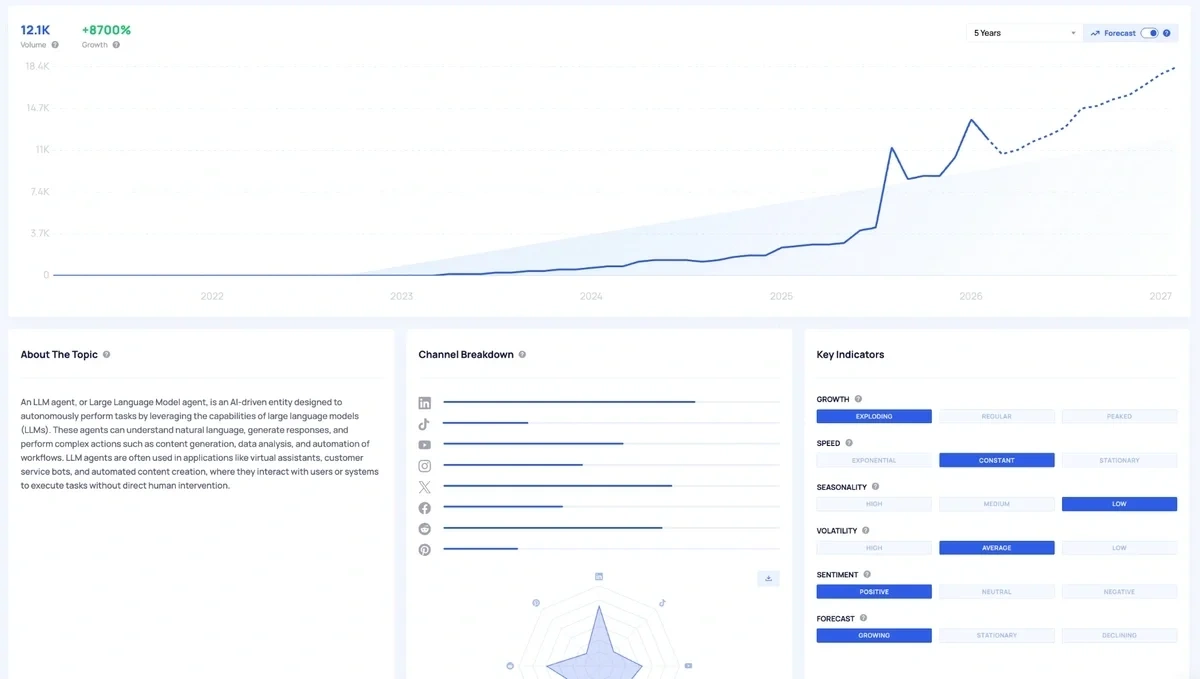
With these indicators, you can find explosive trends, or ones that are growing with consistency fairly easily.
Ultimately, the trends that you should focus on are the ones that align with your goals.
If you want to be covering the latest stories with recency being the prime factor, you want trends with explosive growth without worrying about their volatility or seasonality.
And if your goals are different, you can look for trends having the right indicators aligning with your plans.
In addition to the trend indicators, Exploding Topics also gathers social media activity around the topic.
Looking at the channel breakdown gives you more confidence in the popularity of a trend when there are high activity levels across different social media platforms.
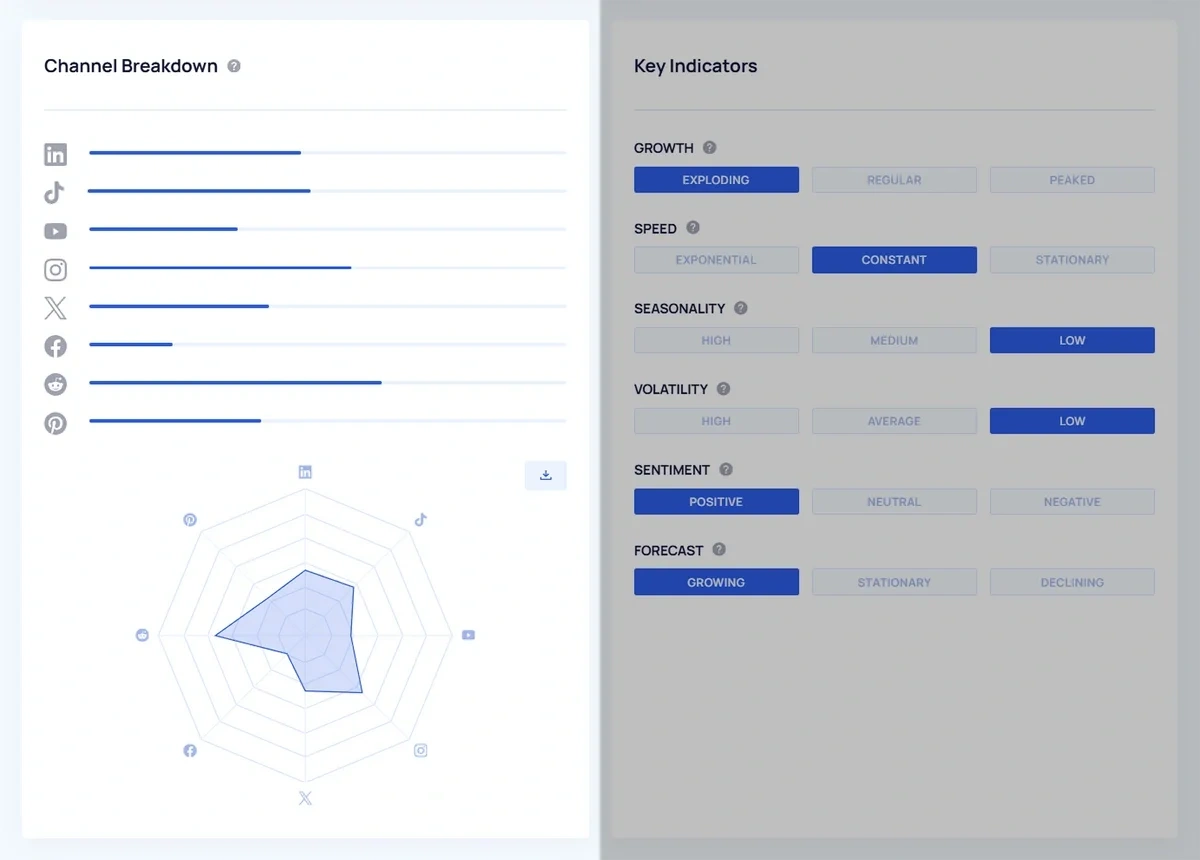
Plus, you’ll know the exact social media channels responsible for driving engagement for the trend.
So you can perform further research on those channels and participate in conversations to understand the context around the trend even better.
Want to Spy on Your Competition?
Explore competitors’ website traffic stats, discover growth points, and expand your market share.
Identify Related Trends
One of the most powerful ways to understand the broader themes around a main topic and explore sub-topics is reviewing the "Related Trends" table inside the main trend page.
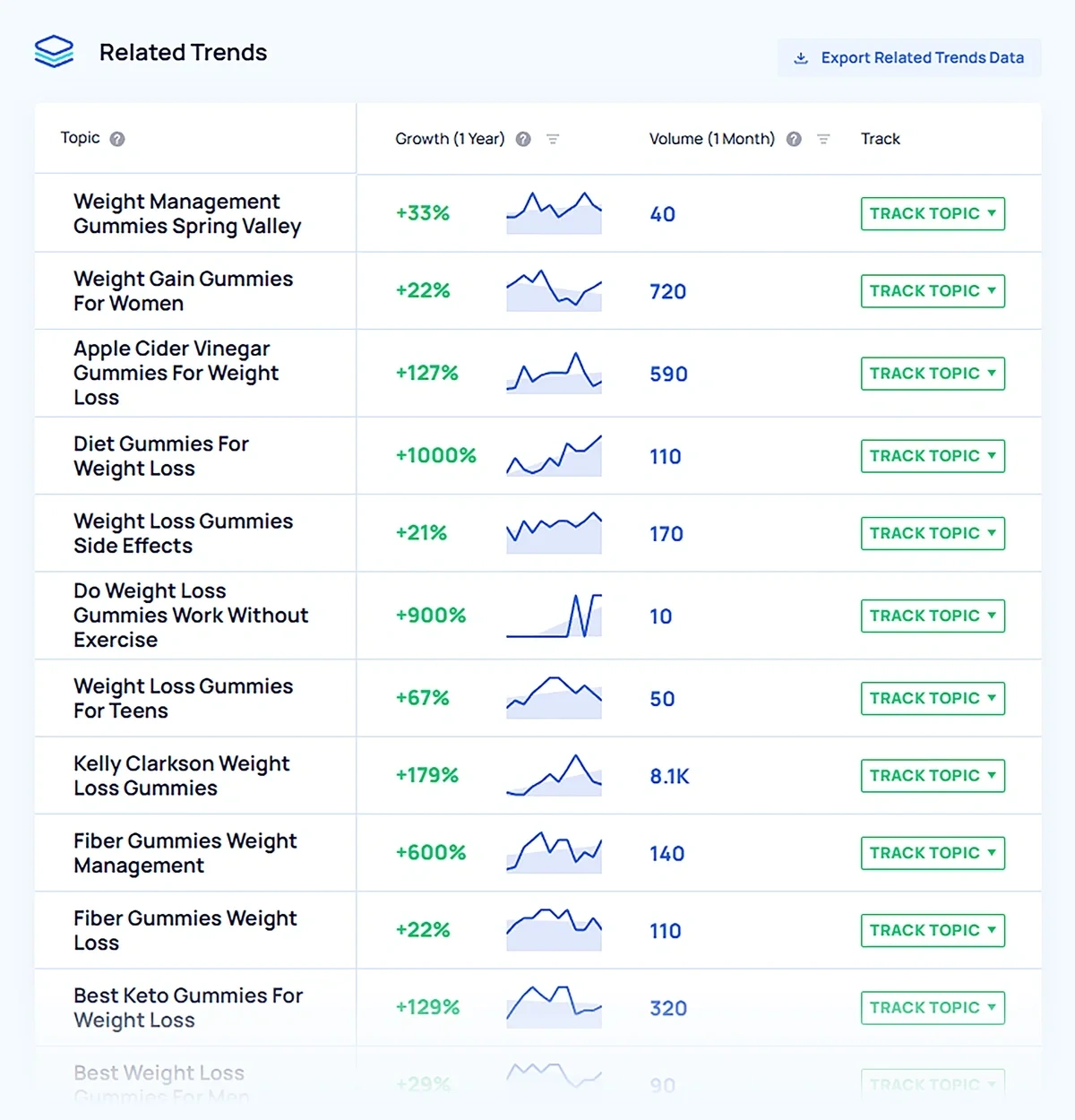
It’s a goldmine of information for content marketing efforts. Use these ideas to build a cluster of related topics, allowing you to establish topical authority around your core topic areas.
Pro Tip: Try these strategies for finding related content and topics to consolidate your key topic coverage.
Together with the search metrics of the main trend idea, these related trends paint a much more comprehensive picture about what users are searching when they’re interested in a topic.
Exploding Topics tracks dozens of related trends for most big topics in its database.
Find Trending Products
It can be difficult for online stores and retailers to find trending products specifically from a generic database.
Exploding Topics maintains a separate product database so you can focus on products without noise from general topics and concepts.
The Trending Products screen shows you a bunch of important indicators that reveal the product’s performance and profitability.
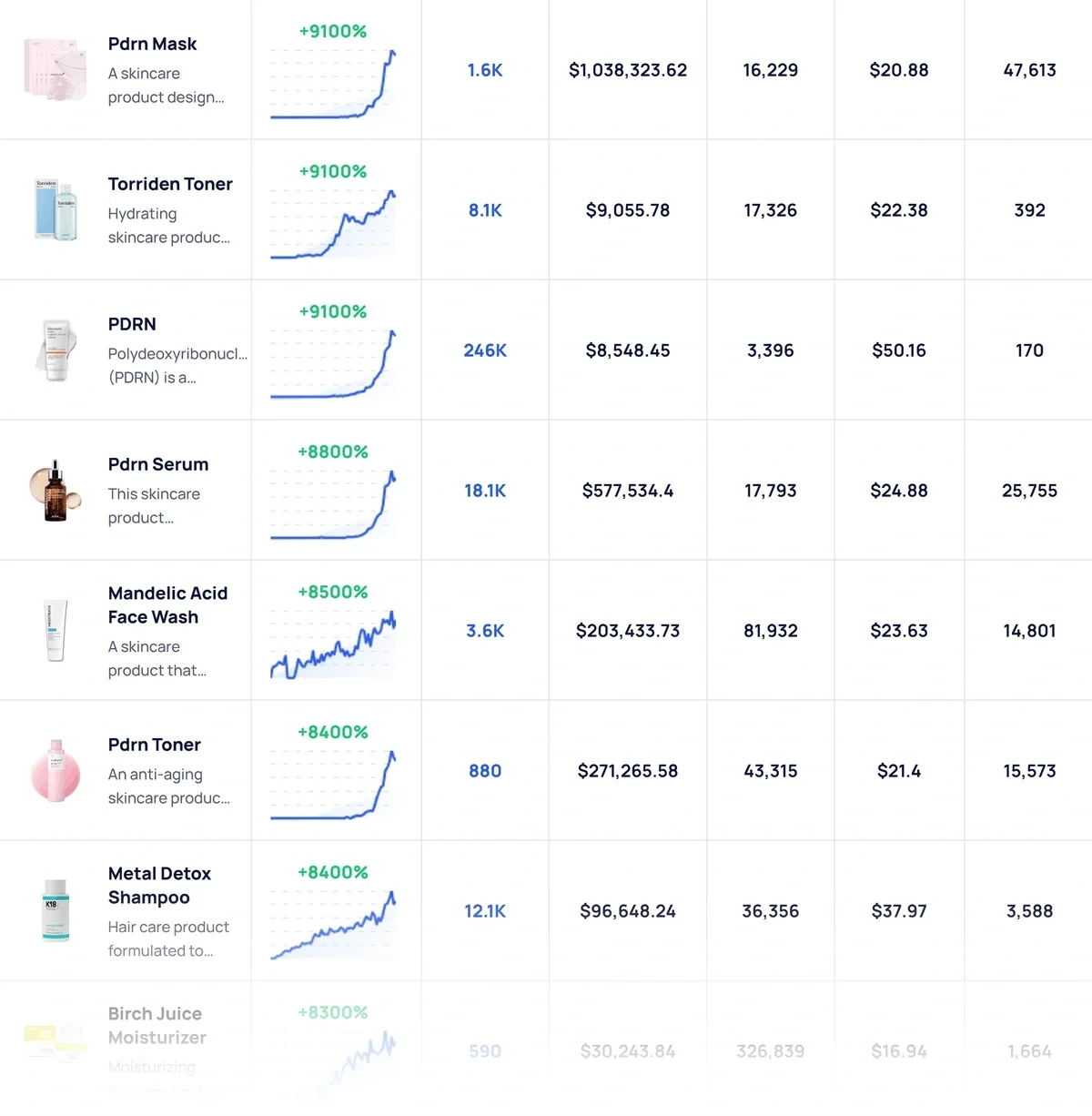
Having access to search volume data is great for understanding popularity around a trend. But it’s not enough to actually make stocking decisions for your store.
You also need hard figures like revenue, price, sales, and reviews on big stores like Amazon.
The Trending Products table gives you just that.
Just like topics, every product has a dedicated page that contains more details about its trend indicators. You can also discover related products, top sellers, and topics related to the product.
Simply put, it’s all the information you need to find products you need to add to your catalog, understand what’s already working and why, and discover content ideas for marketing while you’re at it.
2. Google Trends
Google Trends is one of the best ways you can discover trending keywords, completely for free.
Start by going to the “Explore” tab and enter a seed keyword.
Google Trends requires you to have a very clear starting point and know the keyword you want to be researching before you can start finding relevant trends.
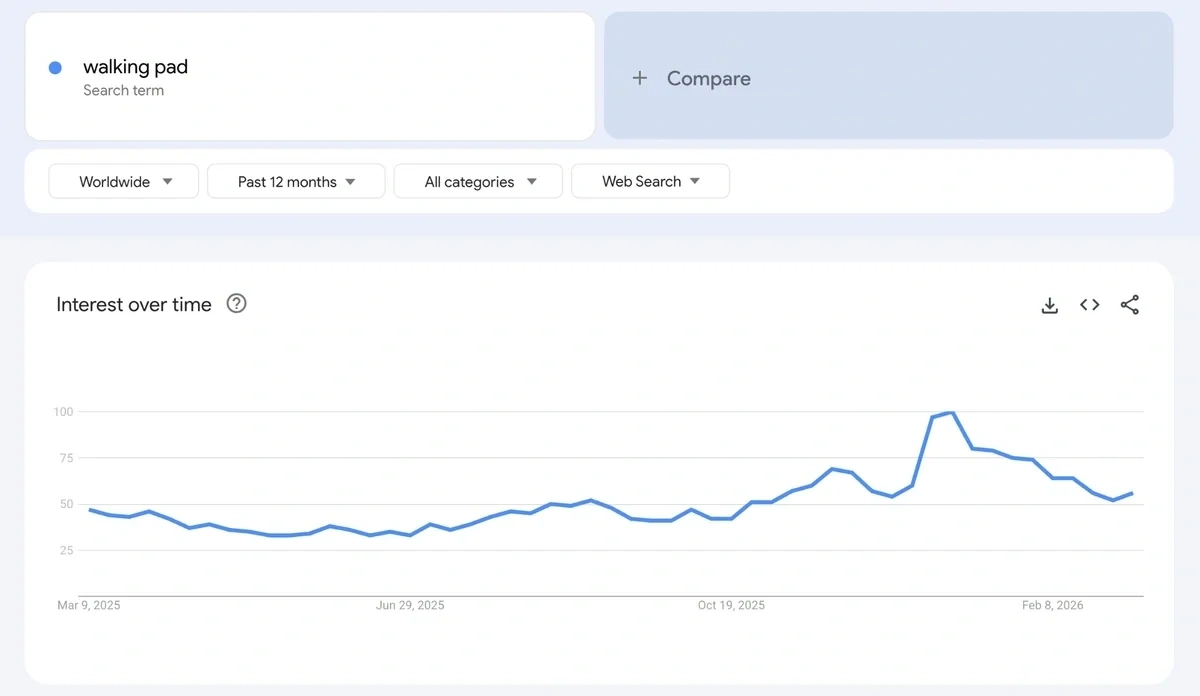
The tool will show you the interest level of your typed search term over time.
This helps you gauge how popular the topic is right now.
But since Google Trends only measures relative popularity rather than search volume, it can be a bit confusing to interpret the trend chart.
You’ll find the Top Queries and Rising Queries chart at the bottom of the page. These are quite useful.
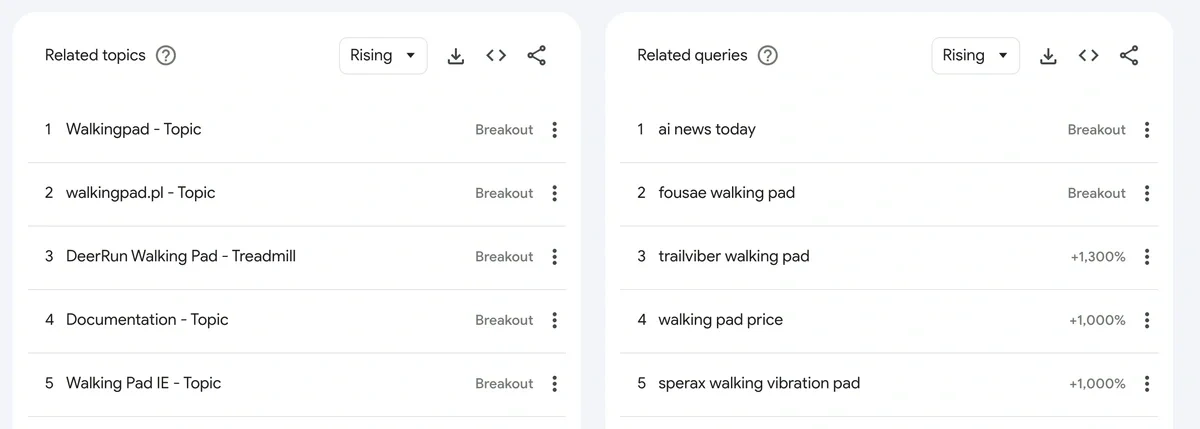
The Top Queries table gives you a list of search terms related to your main term that are the most popular in your measured time frame.
The Rising Queries section reveals the breakout queries that have grown the fastest over a time frame.
This data is quite similar to the Related Trends report in Exploding Topics.
The difference is that Exploding Topics shows you the growth trend in terms of absolute search volume, while Google Trends only measures relative growth on a normalized scale of 0-100.
That said, I like being able to compare search terms with Google Trends. Add multiple terms and you can observe their interest over time on the same chart.
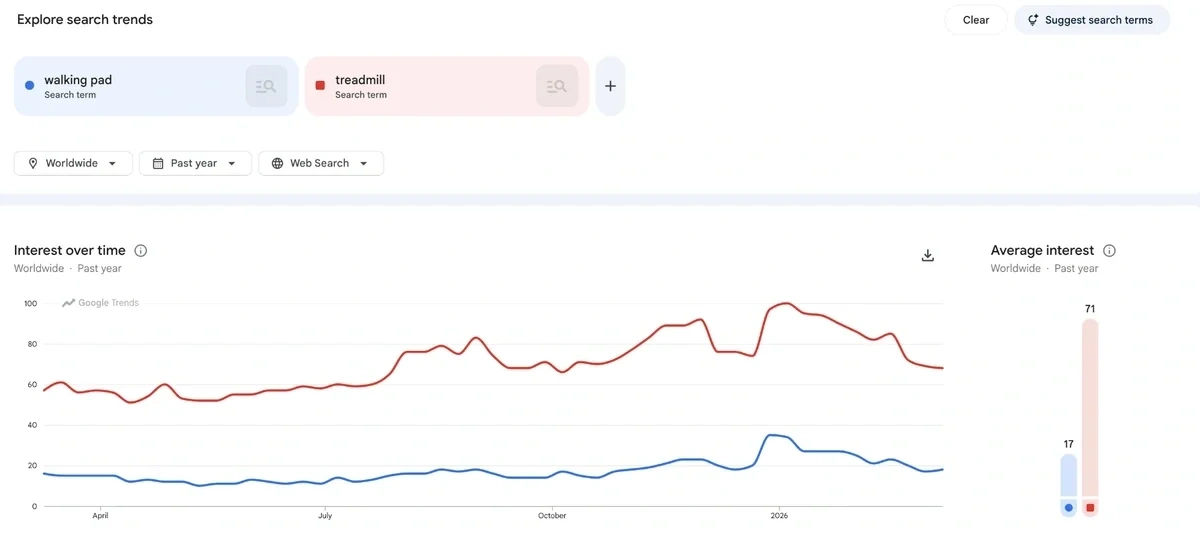
It’s a pretty handy feature when you need to analyze multiple search trends and gauge their relative popularity in one go.
In fact, the new version of Google Trends is integrated with Gemini in super interesting ways. You can have Gemini auto-generate search terms based on your area of interest.
It will populate a bunch of terms related to your core search interest, so you can compare all of them at once.
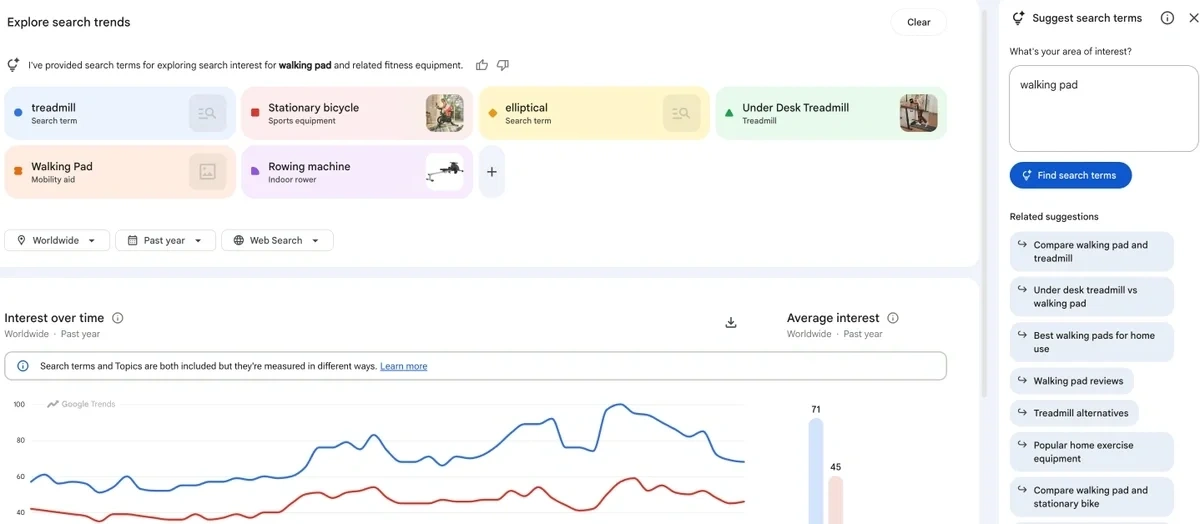
For the related queries section, you can cycle through each search term by clicking on colored tabs to see the Top and Rising queries for each term, one by one.
These are some of the best features that Google Trends has added lately. They meaningfully improve your ability to discover trends when you aren’t sure where to begin your search.
Get More Search Traffic
Use trending keywords to create content your audience craves.
3. Social Media Platform Explore Pages
Social media is the best source for discovering the latest trends relevant to your niche.
You can gather useful insights directly by monitoring top social media platforms:
TikTok
TikTok gives you lots of ways to explore trends. First, you have the For You Page (FYP), which shows you trending content matching your interests.
The search feature also suggests keywords associated with trending content.
However, these suggestions are highly personalized and depend on your engagement and search history.
You can create a strategic burner account that strictly engages with the niche you are interested in analyzing for trends. This way, your FYP suggestions will be curated to match your interests.
Additionally, you can go to TikTok studio in your app and find trending posts for inspiration.
You can filter this page by category and region, which makes it a powerful trend discovery tool.
The TikTok Creative Center is another incredible tool where you can find trending content, hashtags, and promotional posts.

Of all the social media platforms, TikTok provides the most detailed trend data for every niche. It’s why I think TikTok has no match for trend-focused content creators and businesses.
X (Twitter)
Trends on X are largely focused around world affairs and politics. You can use the “Explore” tab to find trending news in your “For You” page.
The “Trending” tab in the “Explore” page shows you trending topics and hashtags, focused on your region.
If you’re a publisher, X can provide you interesting trend ideas to publish content around. But its utility is pretty limited for conventional businesses due to the nature of the platform.
Instagram is a decent platform for finding trending hashtags and latest popular content.
It doesn’t give you nearly as much information as TikTok does about trending content and search terms.
The platform is more focused on pushing content that best matches your preferences rather than supplying analytical info about trends.
Even if you’re a professional account, the content inspiration page shows you ideas similar to what you’ve posted. You don’t get the category and region filters to dive deep into any niche for trend ideas like you can with TikTok.
So Instagram isn’t the primary tool I’d recommend for trend discovery, but it can be helpful at a pinch.
4. Reddit
Reddit is one of the busiest forms on the internet, making it an ideal place for finding trends.
Your chances of finding interesting trends early are higher if you’re hanging out on niche subreddits that align with your business and keeping an eye on rising topics.
That said, it’s not so easy identifying a broad trend on Reddit since every thread is unique. A rapidly rising thread doesn’t necessarily represent a complete topic that you should be chasing for your business.
This is where I think Reddit Answers can be quite useful.
Instead of sifting through individual posts on different subreddits, you can have Reddit’s AI summarize threads for you and find trend themes.
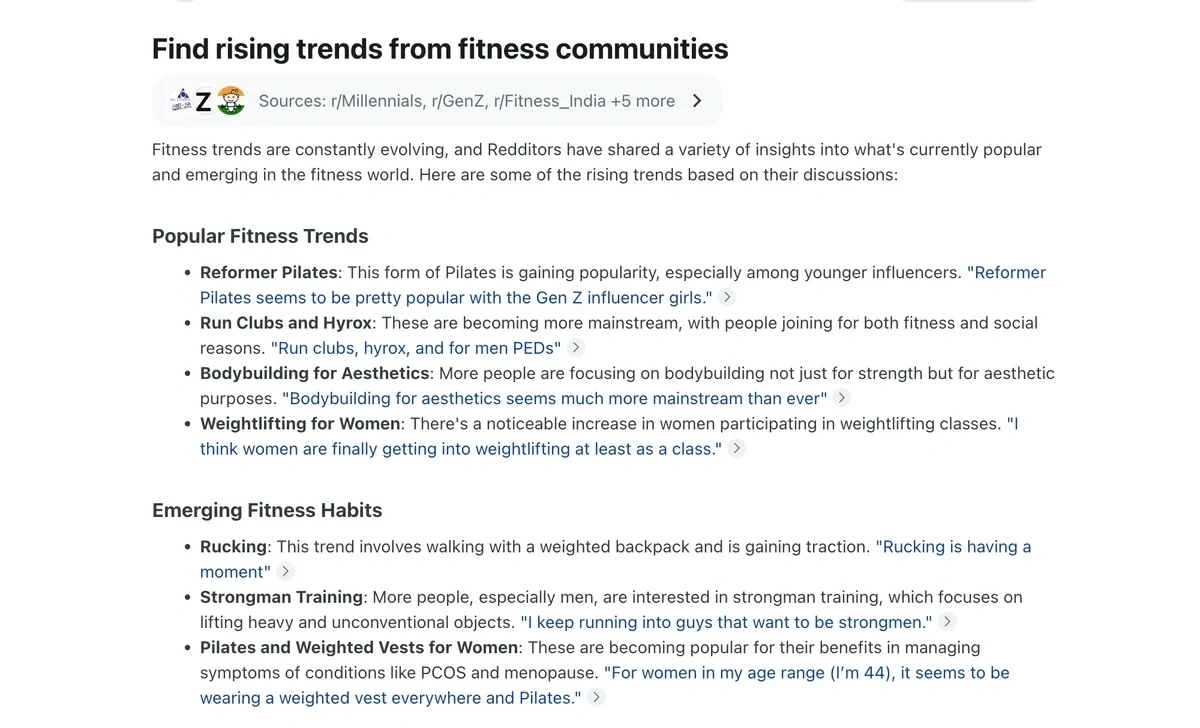
That said, you’ll still need to cross-verify manually by visiting the source posts cited by AI so you know the trend is real and not a hallucination or an outdated idea that’s already peaked.
5. Pinterest Trends
Pinterest Trends is often overlooked, but it’s a fantastic trend discovery tool for certain niches like fashion, beauty, design, travel, and lifestyle.
Currently, the tool tracks two kinds of trends: shopping and general search terms.
You can search shopping trends for popular product categories across different verticals. This list is updated weekly.
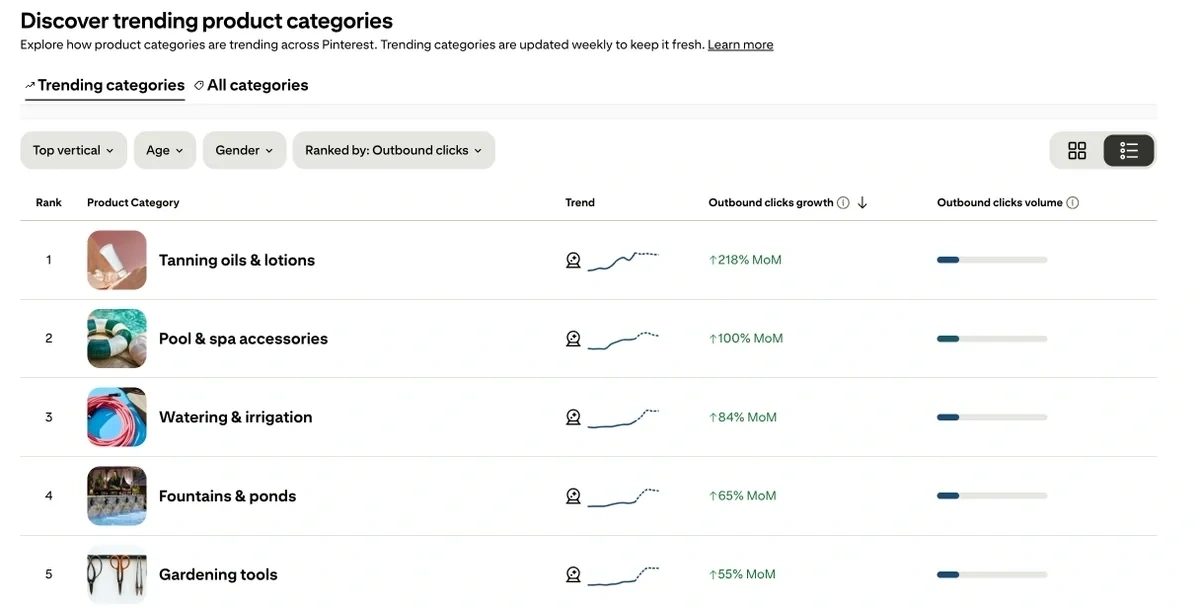
For every product category, you can see the trend for the relative search interest over time.
Pinterest even shows you the outbound click volume, which is a really good metric to have for commercial intent searches like products.
Because this tells you that people aren’t just interested in admiring product aesthetics on Pinterest. They’re actively clicking through to the source website to complete purchases.
That’s super valuable information for retail stores producing Pinterest content linking back to their sites.
The trend page for each product reveals additional metrics like engagement rate and pin saves in addition to outbound clicks and interest over time.
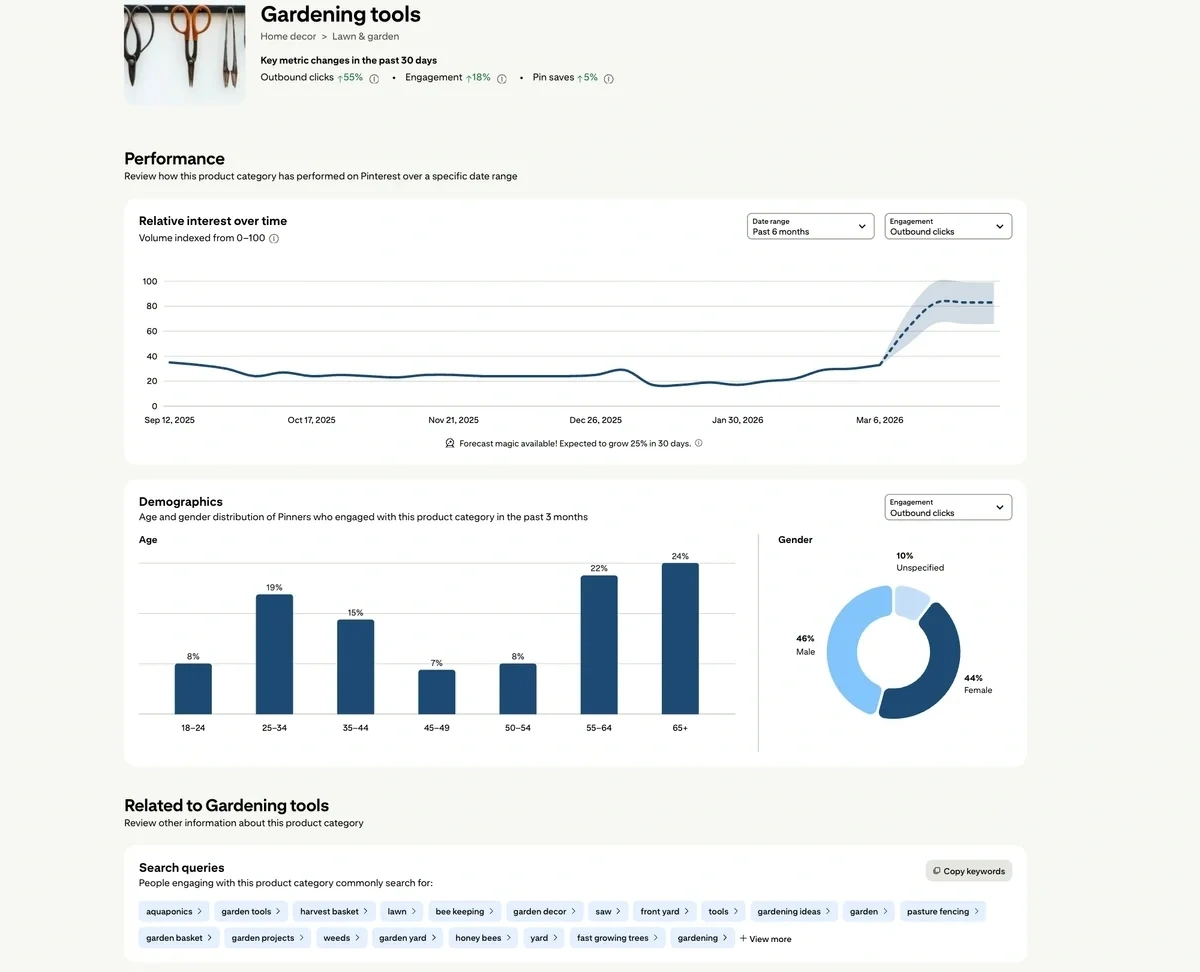
I like that you even get demographic data highlighting age and gender distribution for engagement.
To top it off, you can also find related search queries associated with the product category.
The only drawback is that all of this data is based on Pinterest engagement only.
If you want to see product data with absolute search volume along with total sales, reviews, and revenue metrics from Amazon, Exploding Topics is a more comprehensive choice.
Pinterest Trends has a separate report for exploring search trends.
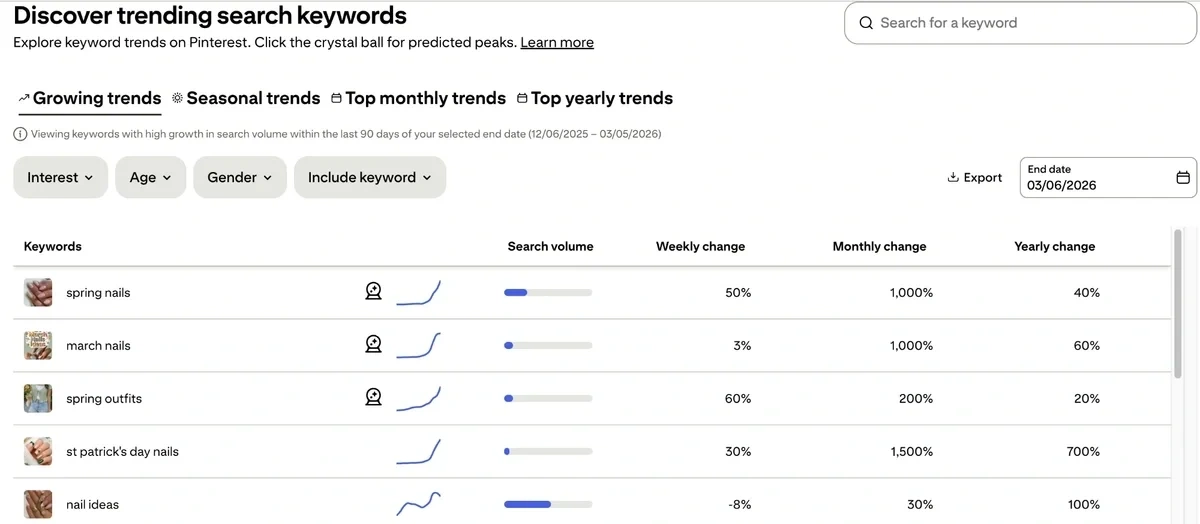
This report has additional metrics including search volume, and growth in the trends over a week, month, and year.
I like that there’s a separate tab for seasonal trends. This is great for seasonal planning for your products.
You’re not limited to just the keywords that Pinterest Trends chooses to show you by default. You can run a manual search by typing in any query.
The tool will take you to a page with detailed metrics about the trend, if it exists in the database.
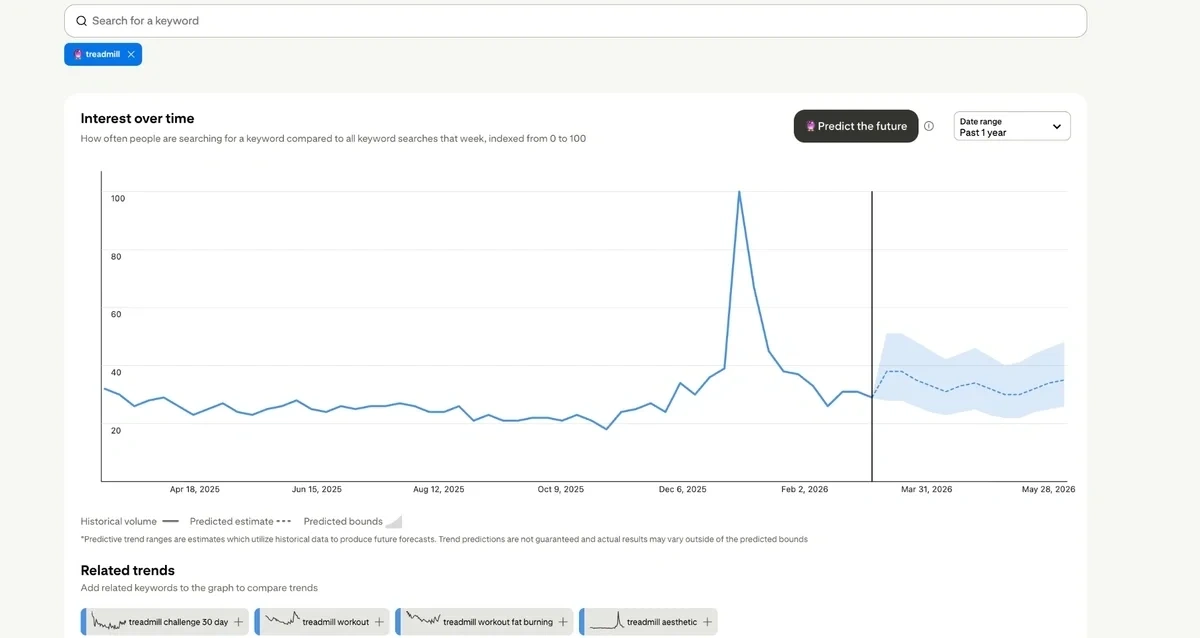
You’ll find details about related trends, which is great for identifying clusters of keywords on a similar topic.
It also shows you Popular Pins associated with the keyword you’re exploring. This is great for visual research and finding product inspiration.
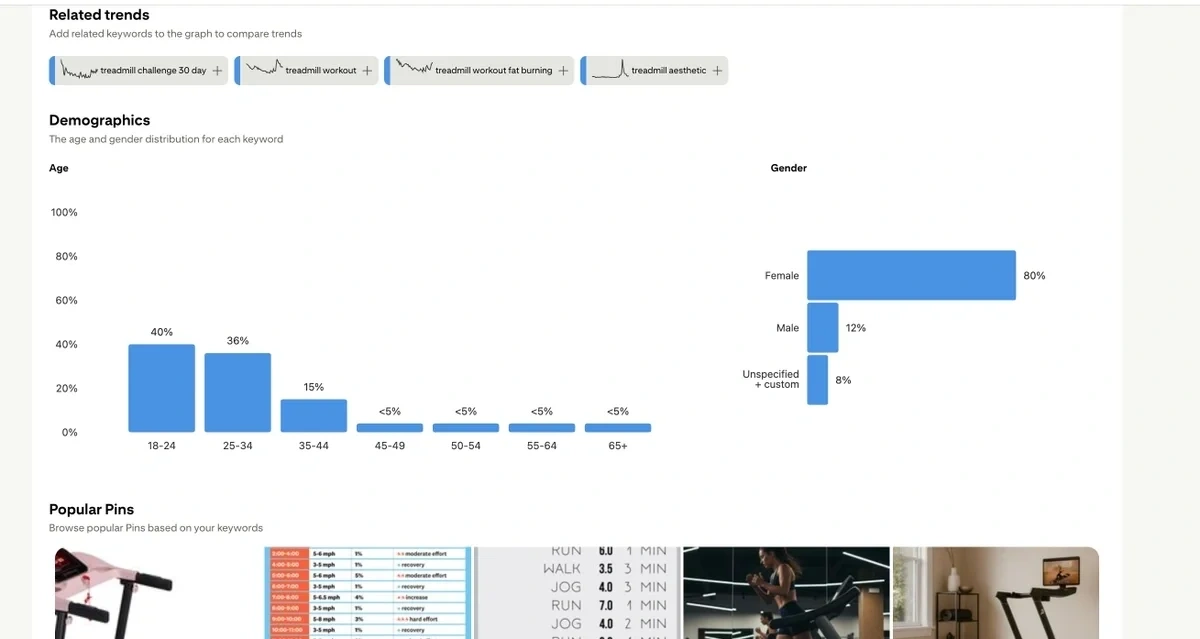
These features make Pinterest Trends a solid tool for trends analysis, especially in industries where visual content is popular.
6. Trend Hunter
Trend Hunter offers a database of trends that allows you to search by topic (e.g., Fashion, Tech, Culture, Design).

If you find an interesting trend, you can click on it to see a basic definition and a handful of images.
So how does Trend Hunter determine whether or not a topic is a trend?
First, it uses AI to scrape the web and find new topics. If the team thinks the topic is interesting, they add it to the trend database.
(Similar to how Exploding Topics works),
Once a topic is added, you'll see the following metrics:
- Popularity: This score is calculated based on how many Trend Hunter users upvote the topic.
- Activity: This score is calculated based on the clicks the topic receives weekly.
- Freshness: This score is calculated based on how recently it was added to Trend Hunter's report.
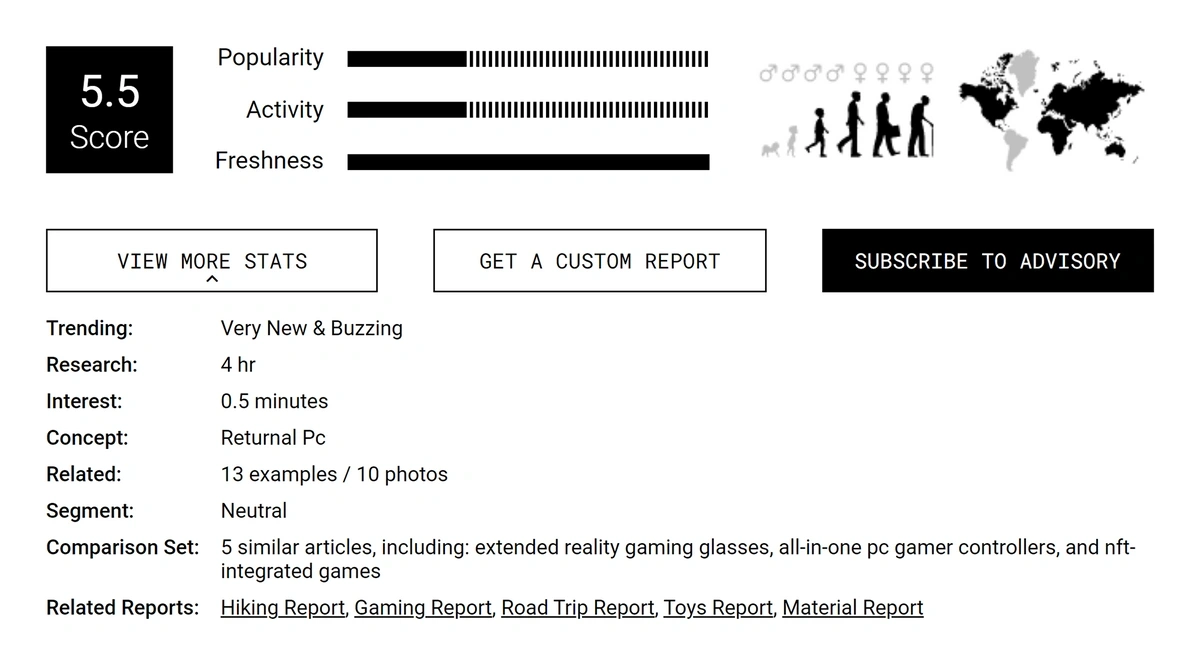
Note that these scores are calculated in relation to other trends inside the Trend Hunter database. For example, if the average trend in Trend Hunter's database receives 200 clicks per week from Trend Hunter users, a trend with 300 clicks per week from Trend Hunter users would have a high activity score.
So while this data may be interesting, it isn't particularly reliable as it is based solely on Trend Hunter's user data.
7. Glimpse
Glimpse's main product is a Chrome extension called "Google Trends Supercharged" that augments Google Trends data.
So you can go to Google Trends, type in any topic, and in addition to all of the traditional data you'd receive from Google Trends, Glimpse will also give you access to:
- Exact search volume data (rather than just the trend data)
- Related trending topics
- Channels discussing that topic (TikTok, LinkedIn, Reddit, etc.)
- "People Also Search For" related results
- Topic map
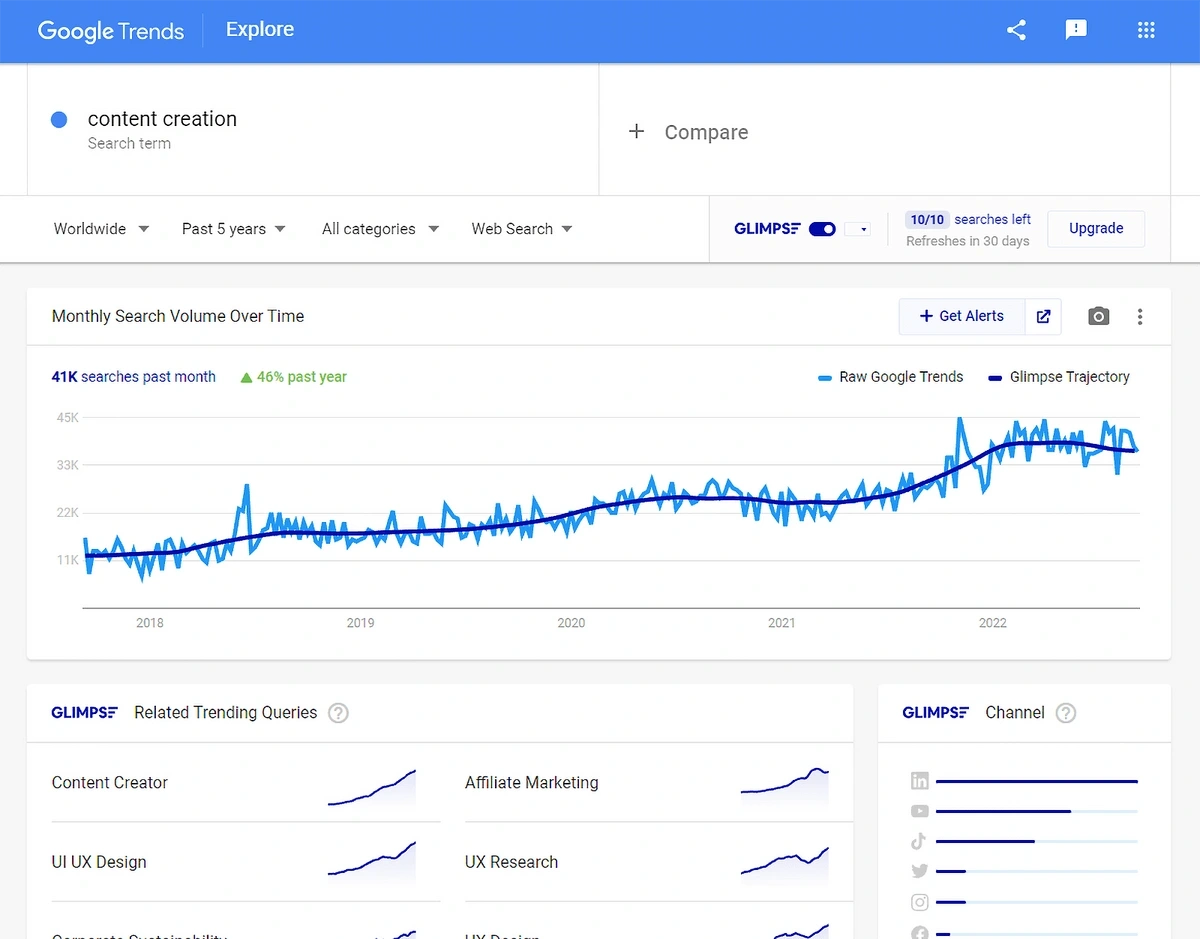
To track a particular trend, you can create an Alert inside the Google Trends dashboard, and it will send you either an auto alert (triggered by a significant change in search traffic) or a recurring alert at a quarterly, monthly, or weekly cadence.
Glimpse also offers a database of trends for various categories. It gathers data by scraping sources like TikTok, Amazon, and Reddit and then provides a list of topics with search volume trends.
8. Buzzsumo
Buzzsumo is a content ideation tool commonly used by SEO and content marketing professionals. It offers a trending topics feature that scans social networks and aggregates the most popular posts published in the last 24 hours.

All trends are divided into feeds like News, Marketing, Tech, Science, and Business, though you can also create your own feeds based on a combination of general topics, domains, and/or countries.
The trends in the database are listed in order by their Trend Score, which is a proprietary calculation based on social shares over time. It also shows total engagement across Facebook, X, Pinterest, and Reddit.
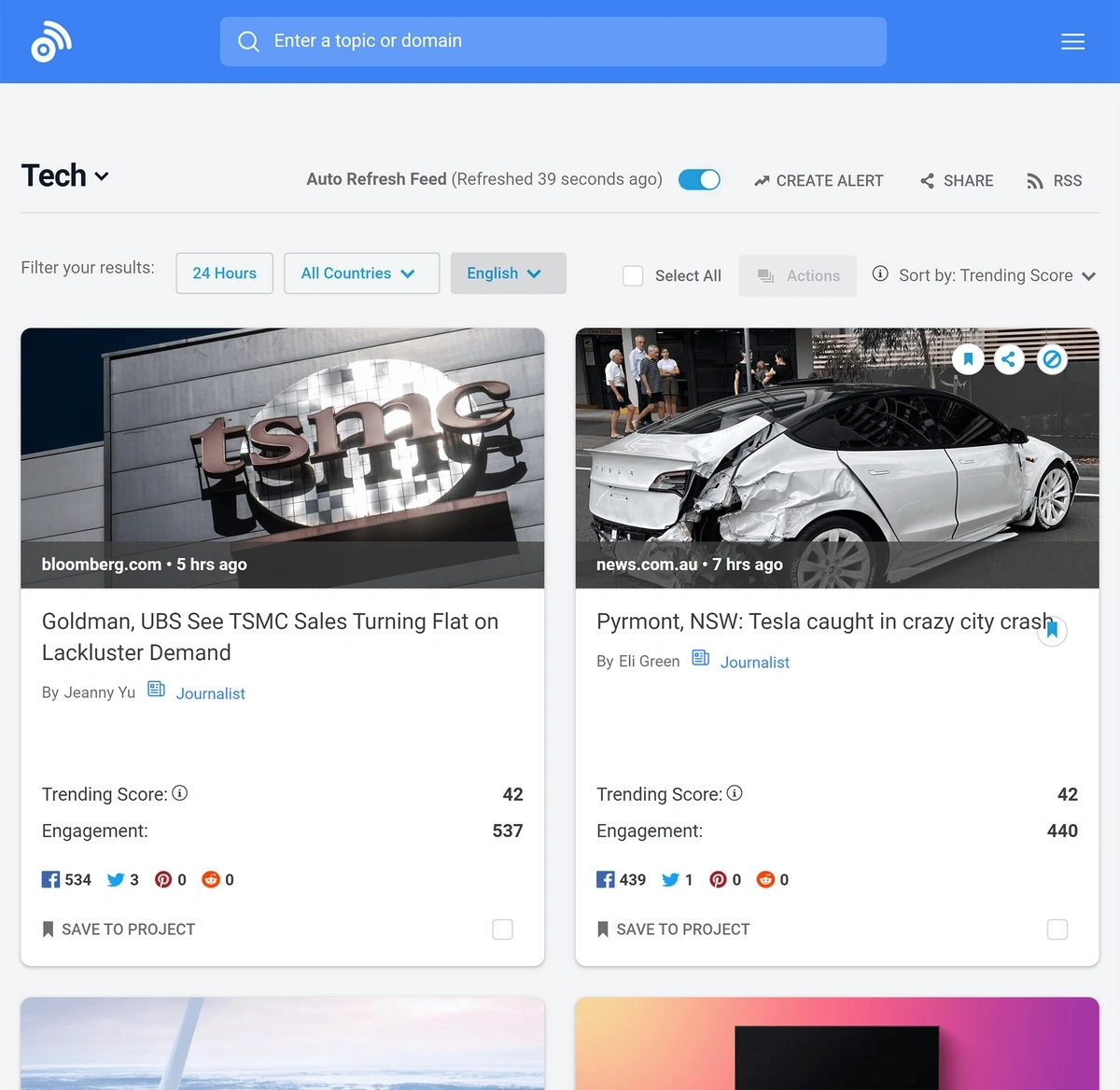
As you can see, Buzzsumo is mainly designed to guide marketing campaigns. So while it doesn't provide specific trending topic suggestions, it does show you recently trending content in a particular industry across social platforms.
9. Awario
Awario is a social listening tool with a trending topic feature similar to Buzzsumo.

You can enter a general keyword (and negative keywords) into its search bar, and then Awario produces a list of content containing that keyword. The content sources it uses include:
- X
- Vimeo
- News/Blogs
- Web
Each list is ordered by recency, though it also includes total reach data. For example, below is a list of the most popular content for the term "content clusters." You can then click on any of the posts to read the full piece of content.
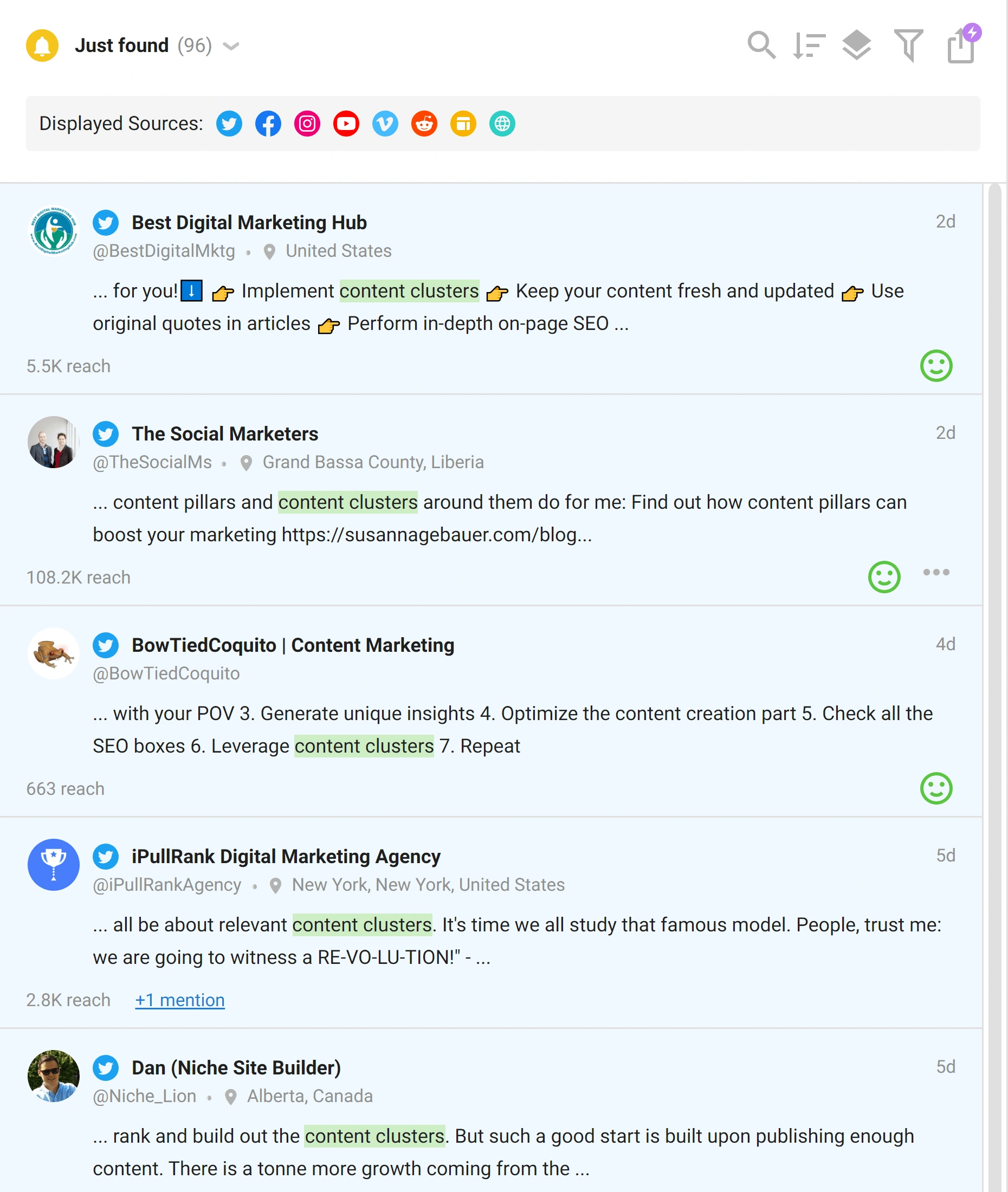
Awario's trending topics feature is primarily designed for content marketers who want to find popular content on a particular topic.
10. Ahrefs Content Explorer
Ahrefs Content Explorer allows you to type in any topic and it will automatically pull up a list of the most popular pages and websites on that topic.
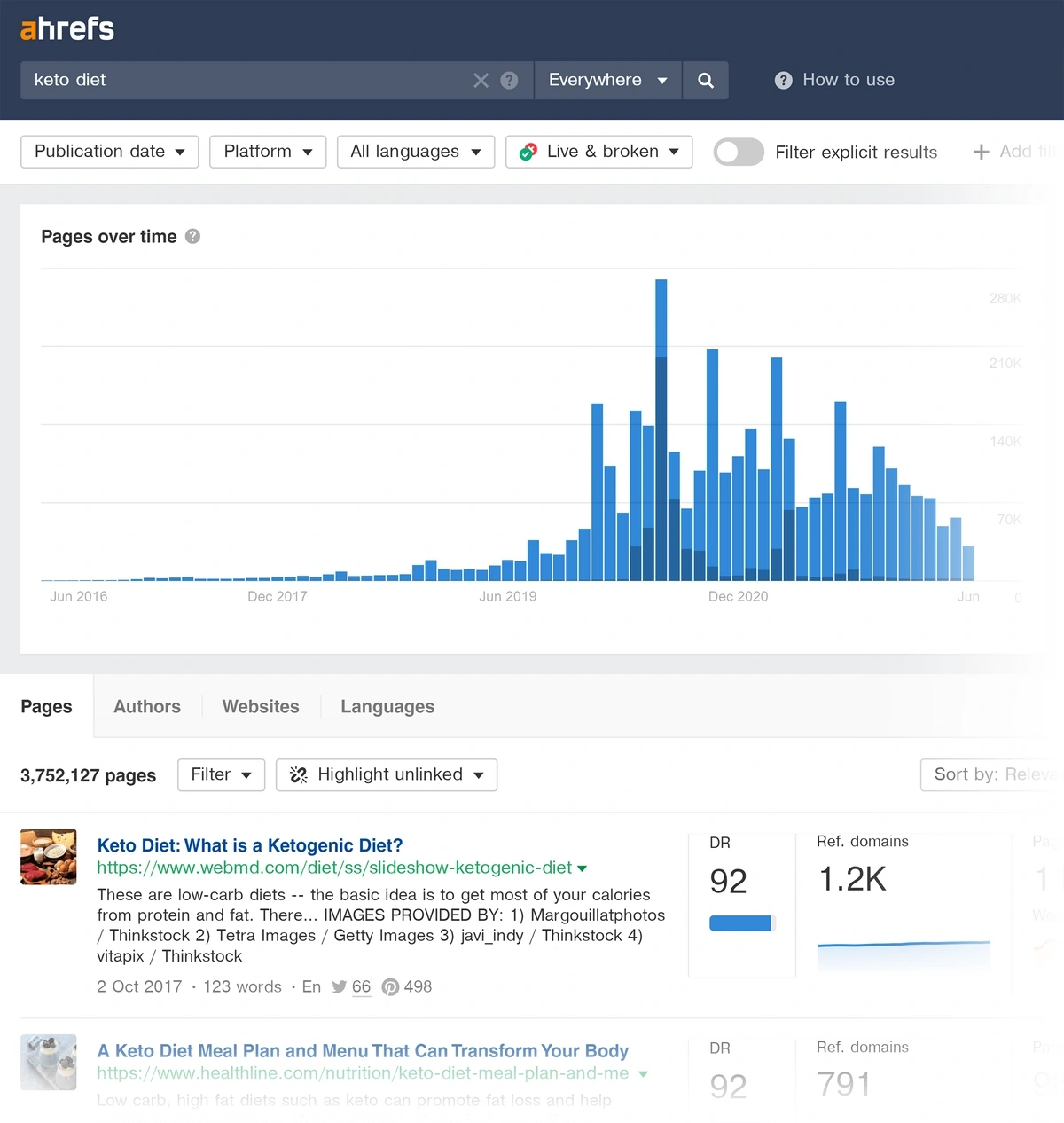
For each article, you'll be able to see the website's domain rating, the referring domains, page traffic, and traffic value.
You can also sort by news, publication date, and platform to filter the results.
You can then read through the most popular content to identify new industry trends or uncover new content ideas.
Other Tools and Techniques for Discovering Trends
Your chances of finding really good trends improve when you use multiple tools to spot and validate interesting ideas:
YouTube Search Suggestions
YouTube is one of the biggest search engines and it’s one of the first platforms to receive content around latest trends.
Head to YouTube and type in your topic in the search bar. This will reveal the specific searches related to your topic that people are interested in right now.
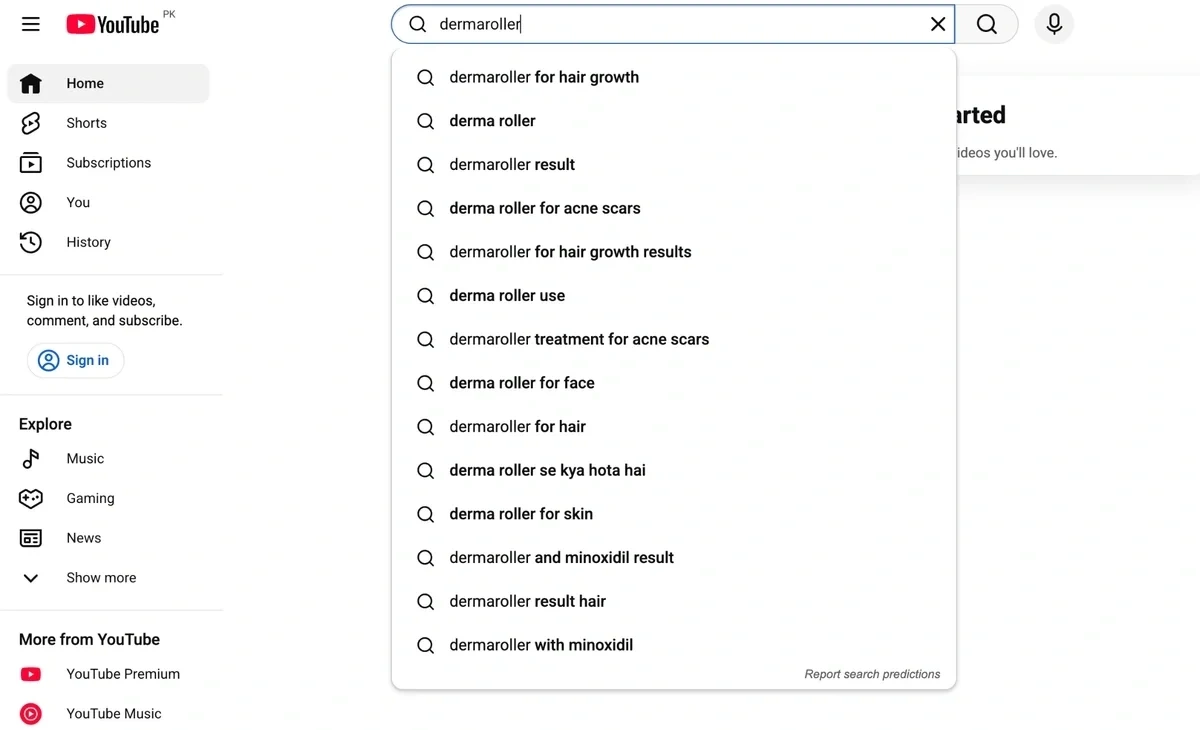
Further reading: Check out top YouTube searches rising in popularity.
It's better to access YouTube in logged-out mode using an incognito browser to remove personalized suggestions.
You need unbiased results to find trending topics actively popular right now, regardless of your personal search history.
Google Search Autocomplete & "People Also Ask"
Google search is also a handy tool for finding trending searches. Note the autocomplete suggestions as you type in a word.
Try using different combinations of words to see a bigger range of autocomplete suggestions.
Start with question queries like “how”, “why”, “ what”, and pair them with your core keyword to trigger a bigger variety of suggested trending terms.
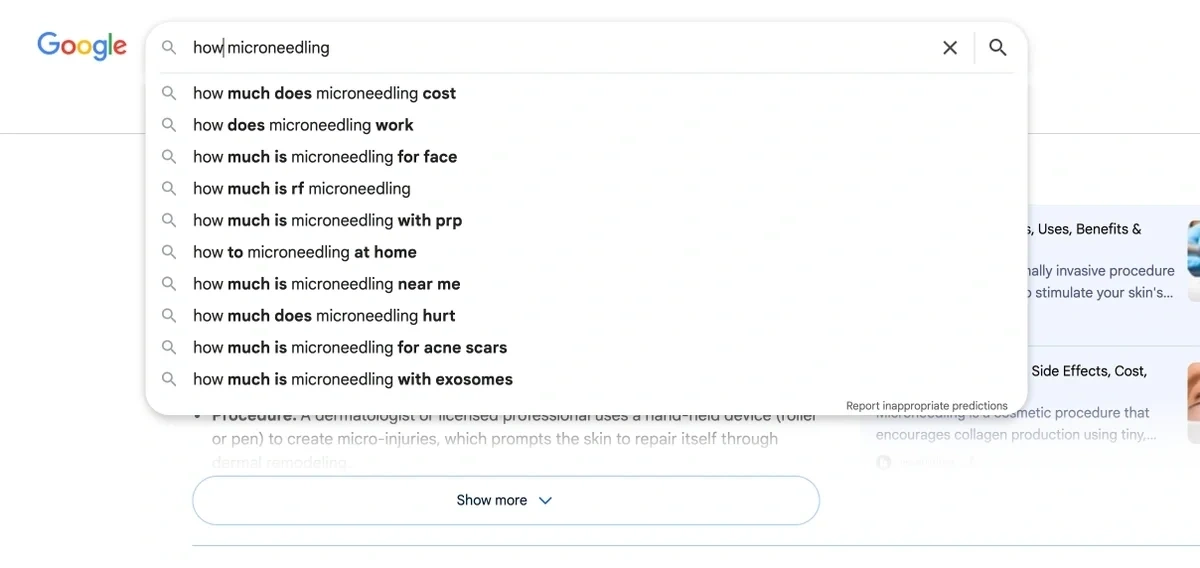
In addition, the People Also Ask section is great for finding long-tail queries. These related searches expand on the core topic.
Of course you don’t have the luxury of measuring search volume for any of these to accurately judge the popularity of these searches.
For that, you can use a keyword research tool like the Semrush Keyword Magic Tool. You can validate a keyword’s potential with this tool checking volume, recent trend, KD% and other helpful metrics for top Google questions.
Industry Publications & Newsletters
Subscribing to newsletters and publications in your niche is a good way to stay on top of trends.
The Exploding Topics newsletter curates rising trends across different niches, offering insights into what’s driving each trend.
Pro users also get access to weekly Trend reports that dive deep into a bunch of trends along with predictions about future direction.
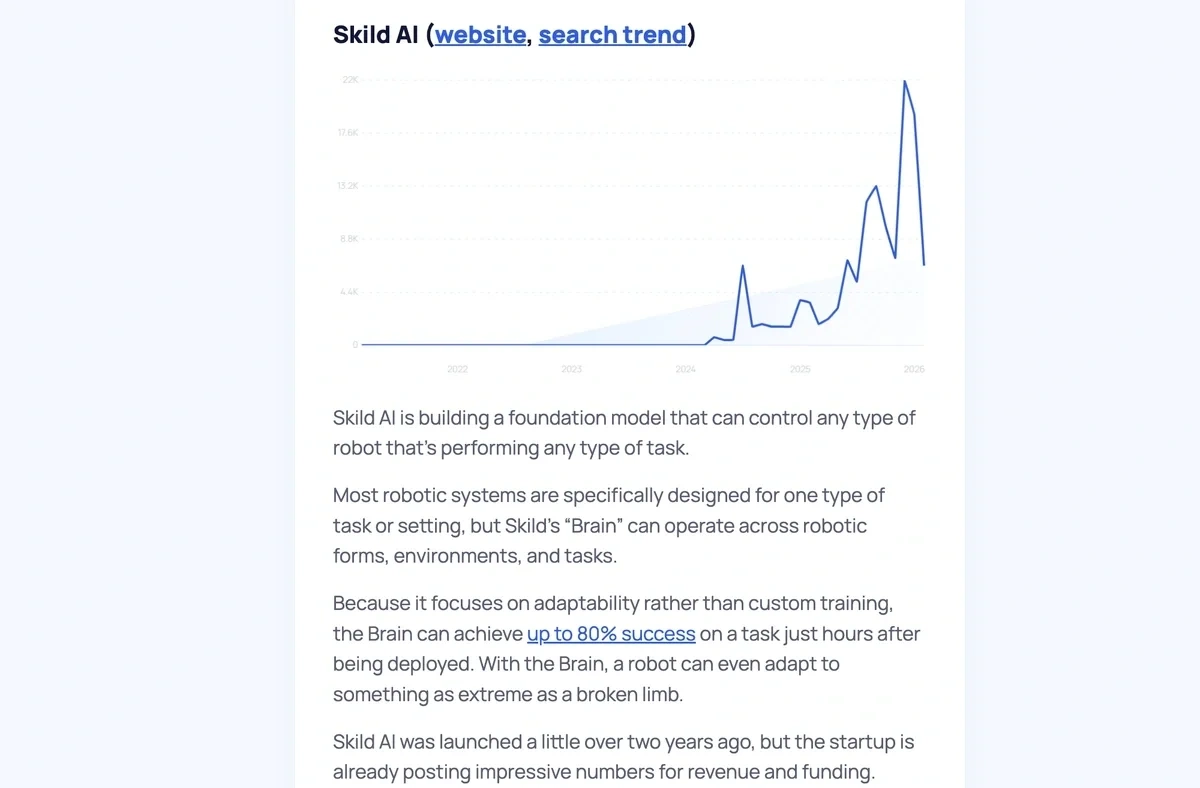
Trend Hunter is another great publication that offers annual trend reports with comprehensive coverage of rising trends to keep an eye on.
Start Finding the Right Trends Now
Each of the tools on this list can help you uncover key data points about trending topics, competitors, and more—it's all a matter of choosing the right tool for your needs.
If you're searching for trends to support your marketing work, tools like Buzzsumo and TikTok Creative Center are all good choices.
But if you're interested in trend research for investment, product development, or other purposes, a more all-purpose tool like Exploding Topics will be a solid choice.
To learn more about finding trends to support your business operations, check out our complete guide to finding trends super early—and find the best topics before any of your competitors.
Stop Guessing, Start Growing 🚀
Use real-time topic data to create content that resonates and brings results.
Exploding Topics is owned by Semrush. Our mission is to provide accurate data and expert insights on emerging trends. Unless otherwise noted, this page’s content was written by either an employee or a paid contractor of Semrush Inc.
Share
Newsletter Signup
By clicking “Subscribe” you agree to Semrush Privacy Policy and consent to Semrush using your contact data for newsletter purposes
Written By


Josh is the Co-Founder and CTO of Exploding Topics. Josh has led Exploding Topics product development from the first line of co... Read more