Exploding Topics
Remineralizing Gum search volume grew from under 100 to 27,100 monthly searches between February 2024 and January 2026.
Remineralizing gum
+5100%
GLP 1 Supplement search volume grew from 5,920 to 74,000 monthly searches between February 2024 and January 2026.
GLP 1 supplement
+1150%
Soursop Bitters search volume grew from 9,900 to 110,000 monthly searches between March 2024 and February 2026.
Soursop bitters
+1011%



Get Advanced Insights on Any Topic
Discover Trends 12+ Months Before Everyone Else
How We Find Trends Before They Take Off
Exploding Topics’ advanced algorithm monitors millions of unstructured data points to spot trends early on.
Keyword Research
Performance Tracking
Competitor Intelligence
Fix Your Site’s SEO Issues in 30 Seconds
Find technical issues blocking search visibility. Get prioritized, actionable fixes in seconds.
Powered by data from
Latest Blog Posts
Featured Case Studies
See what's trending before everyone else
Each week, we'll send you our best Exploding Topics. Plus, expert insight and analysis.
How to Use A Competitor Analysis Tool On Your Competition
This competitor analysis tool reveals valuable insights about your main competitors such as:
- Authority Score
- Backlinks
- Organic traffic
Just type the competitor's website URL at the top of the page and hit enter to start gathering intel on your competitors.
What is a Competitor Analysis Tool?
This competitor analysis tool shows you how your competitor is performing in Google search, allowing you to set benchmarks for your domain’s SEO goals.
You’ll find a handy snapshot of your competitor’s key domain metrics, including Authority Score, Total Referring Domains, and Organic Traffic.
The tool also shows you which pages are delivering the majority share of a domain’s total organic traffic, the high-value keywords they’re dominating in search, and backlink trends, all in a single, easy-to-read report.
Review your competitor analysis report to get a glimpse into your competitor’s strategy, understand their strengths, and find gaps that you can fill to outrank them.
How to Run a Competitor Analysis With This Tool?
- Enter the domain URL of the competitor you want to analyze and hit the button
- Obtain a free summary of competitor insights, including top-performing pages and ranking keywords.
You can gather useful intel about your competitors and build effective strategies to stand out in SERPs and improve your SEO.
You can uncover a fascinating level of detail about each competitor and discover meaningful content gaps by creating a free Semrush account to expand the data.
Here are a few use cases where this tool can be particularly helpful:
Use Case 1: Spot Content Gaps
Taking a quick look at your competitors' winning strategies can give you tons of great ideas for your content.
Your free competitor analysis includes several distinct insights, but there are two tables of particular importance here. These are the tables summarizing Top Pages and Top Ranking keywords of the competitor you’re analyzing.
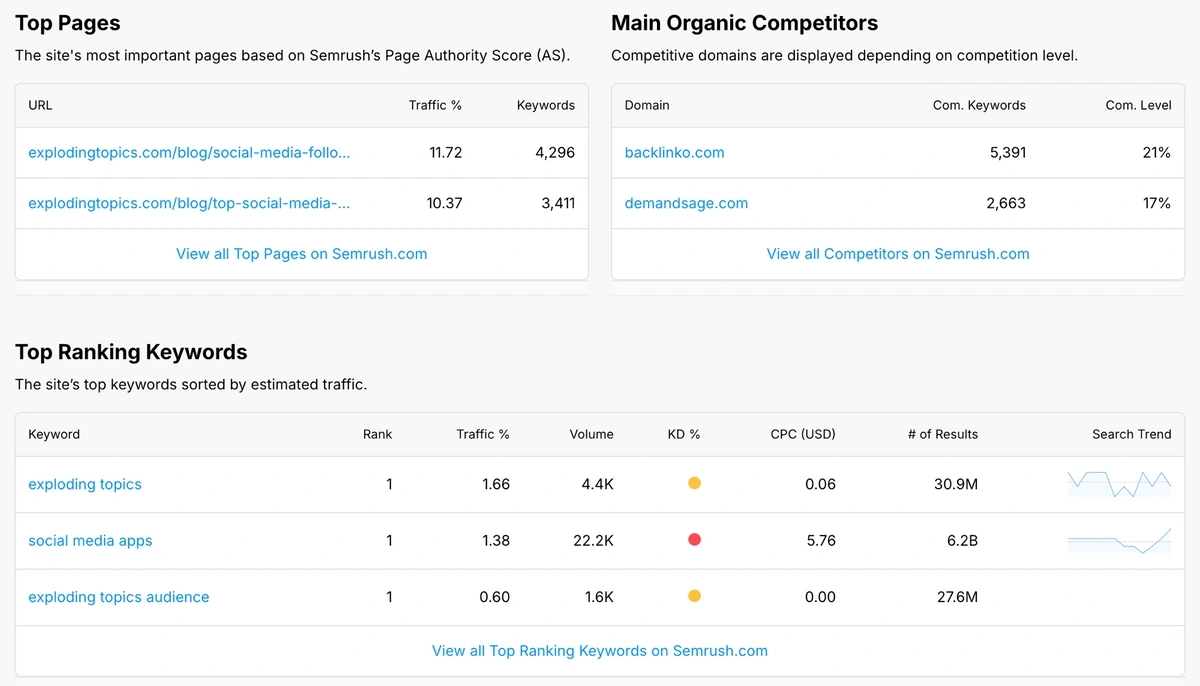
Pay attention to the pages listed here and take note of their traffic %. This represents the share of the total traffic of the website that each of these pages is pulling on its own.
Pages with high traffic % are extremely important for any website since they are responsible for bringing the majority of the traffic.
Here’s a simple workflow to help you get the most out of these competitor insights:
- Look at which pages drive the highest “Traffic %” to the site.
- Visit those URLs and analyze format, angle, depth, internal linking, and calls to action.
- Use those insights to design your own high‑performing content assets (guides, tools, databases, or blog posts) that match search intent but deliver more value.
Remember: competitor analysis is not about copying other websites in your space.
It’s about understanding what’s working for them and using your creativity and expertise to find gaps, and using those to provide value beyond existing generic content.
Use Case 2: Find quick‑win keyword gaps
Most websites have untapped potential with keyword opportunities they’re missing.
This report shows you exact metrics like total ranking keywords, search volume of top-ranking queries, traffic share, and keyword difficulty.
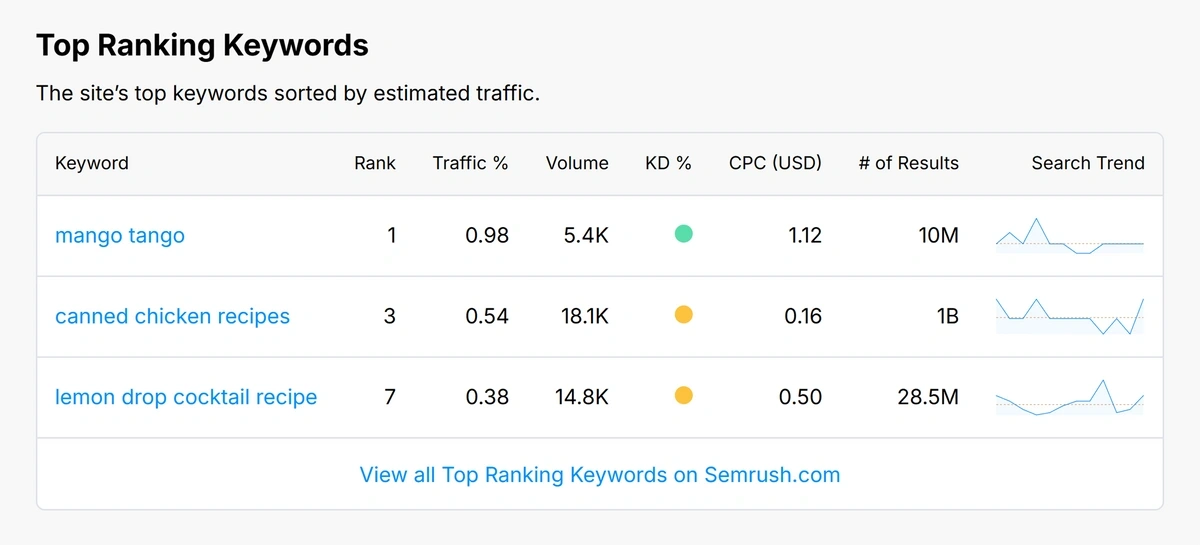
Use this data to spot keywords your competitors rank for but you don’t:
- Scan the Top Ranking Keywords section to see which terms are sending the most traffic to your competitor right now.
- Note their positions and keyword difficulty (KD %) to identify realistic targets you can outrank with superior content and optimization.
- Build a “gap list” of high‑volume, low‑difficulty keywords that fit your products, then turn that list into focused landing pages, blog content, or resource hubs.
The goal is to grab a piece of the traffic and visibility share from your competitors, focusing on pages that are driving the highest traffic for them.
Use Case 3: Map Your Real Organic Competitors
You are in competition with many brands. But your top organic competitors may be different from the brands you assume are your main rivals.
Websites that are competing strongly for the same keywords you are targeting are the competitors you need to be thinking about more.
These are the websites that you will be in competition with, whether you’re looking at classic SERP rankings or AI visibility.
- Review “Com. Keywords” and “Com. Level” to see the degree of Google SERP overlap that exists between your site and others.
- Discover new players in your niche that you may not be watching yet, but who are actively attracting a sizeable share of search traffic that could be yours.
- Find domains to track regularly for new content, ranking changes, and link-building patterns.
Having a clear idea of who your real competitors are is an important first step in building a roadmap for your future SEO strategy.
This turns a simple one‑page report into an ongoing intelligence engine for your niche, helping you stay ahead instead of constantly reacting.
Use Case 4: Weigh Keyword Difficulty vs. Traffic Potential
The best keyword opportunities meet two requirements:
They must be realistically achievable and have reasonable traffic potential.
High-volume keywords may look appealing because of their ability to drive substantial traffic, but they can pose a real challenge if the KD% is too high.
Here’s how to prioritize keywords to maximize your chances of SEO success:
- Check the keyword volume and KD% of your competitor’s top-ranking keywords and choose lower KD% keywords first for improved chances of SEO success.
- Keywords with high traffic % should be a part of your content plan, but make sure to build authority on those topics first if the KD% is too high.
- Review the CPC column to estimate the commercial value of a keyword and prioritize based on your goals (informational vs. revenue-generating content).
Picking the right keywords is a matter of prioritizing low-hanging fruit first and moving on to more challenging opportunities later as your domain and SEO performance mature.
Use Case 5: Analyze Backlink Trends for Competitive Advantage
Competitors can outmatch you in many different ways. One powerful way is to have a strong backlink profile consisting of links from authoritative domains in your niche.
The Referring Domains and Backlinks charts in our competitor analysis tool give you a clear picture of how far ahead (or behind) a competitor is in terms of their backlink growth or decline in the past 12 months.
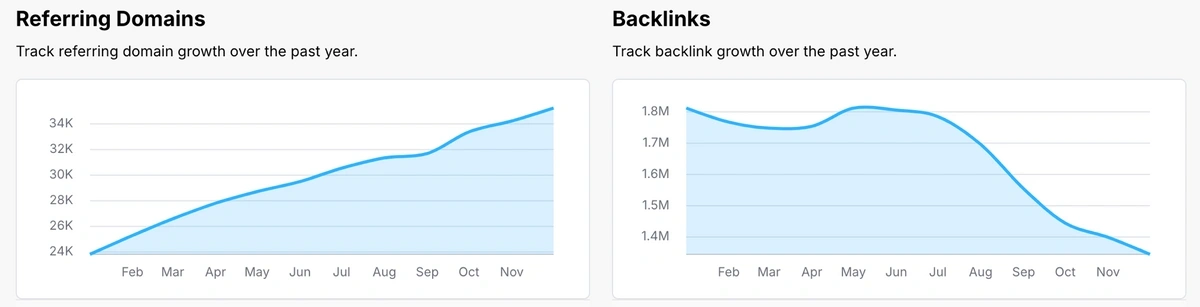
- Use Total Referring Domains as a benchmark for how many unique sites are linking to your competitors compared to you.
- Review Backlinks trend chart and compare with Referring Domains to estimate the ratio of total links vs links from unique domains; useful when reverse-engineering competitor backlink strategies.
Competitors with declining backlinks indicate an opportunity for you to capitalize on.
With targeted outreach campaigns, you can win the links your competitors are losing and acquire an advantage that helps you boost rankings and overall SERP visibility.
You can see tips for implementing this strategy along with other link building methods in our detailed guide on the subject.
Use Case 6: Benchmark SEO Authority
The quality of a domain can be gauged by looking at SEO metrics like Authority Score, Total Referring Domains, and Organic Search Traffic.
These provide a clear benchmark for where you stand versus key players in your space.

- Authority Score gives a high‑level view of a domain’s strength. It’s a combination of both on-page and off-page signals indicating trust and quality to search engines.
- A high referring domain count shows the breadth and diversity of a site’s backlink profile.
- Organic traffic numbers indicate the scale of opportunity you’re competing against, representing the available share of traffic that you can earn by outranking competitors.
SEO metrics help you understand a domain's overall standing. But it’s important to interpret these metrics in relation to your own domain.
Set realistic targets for your growth based on your competitor’s domain strength and prioritize areas where you’re currently behind the competition.
What do the key metrics in this competitor analysis report mean?
- Authority Score: A Semrush metric that evaluates the overall quality of a domain on a scale of 0-100. Roughly speaking, it’s a measure of the linking power of a website. The higher the score, the more impact acquiring links from the domain can make.
- Total Referring Domains: The number of unique domains linking to the URL you’re analyzing. Link diversity helps expand your off-page footprint, so search engines and AI tools trust you more.
- Ranking Keywords: The total organic keywords for which a domain is ranking on SERPs. Dominant websites can rank for hundreds of thousands of unique keywords.
- Organic Search Traffic: The average traffic a website generates from Google SERPs only, excluding other sources of traffic. A high organic search traffic indicates a strong SEO focus.
- Traffic %: The fraction of a website’s total traffic that a specific page is receiving. Pages with a high traffic % warrant priority since they’re responsible for driving a sizable chunk of a domain’s total traffic.
- Volume: The average number of times users search for a particular keyword in a month on Google. This metric helps you predict the potential traffic you can generate by ranking for the keyword.
- KD%: Short for keyword difficulty, this metric measures the SERP competition and the authority of ranking pages to help you estimate your chances of ranking for the same keyword.
CPC: Short for cost per click, it’s an estimate of the amount advertisers are paying to run sponsored ads for a keyword. High CPC indicates a strong commercial interest since brands are actively paying to acquire space in sponsored results.Analyze and Repeat Your Competitor Analysis
Analyze Your Competition to Stay Ahead
Competitor analysis works best as a focused tool for making specific business decisions. When done regularly, it helps you spot opportunities, avoid market blind spots, and build stronger market positions.
Our free competitor analysis tool is great for getting a high-level overview of what a competitor is doing.
For more information, check out how to find low-competition keywords and learn how keyword gap analysis can help you create content that challenges your top competitors.
Frequently Asked Questions
Do I need to create an account or add a credit card to use this tool?
No, you don’t need to create an account or add a credit card to use this tool. You can use this tool free of cost for up to 3 competitor reports per day.
To access comprehensive reports and analysis with Semrush, you can later create a free account to check up to 10 domains per day.
What does this free competitor analysis tool actually show me?
The tool gives you a quick snapshot of the SEO strength of a domain, including authority score, organic search traffic, ranking keywords, and referring domains. It also highlights a site’s top pages, main organic competitors, and top ranking keywords sorted by estimated traffic.
How can I use this report to find SEO opportunities?
This tool helps you find SEO opportunities by scanning the top-performing pages and keywords driving traffic and conversions for your competitor. With this data, you can identify keyword gaps, content ideas, and link opportunities your own site is not yet targeting.
What is the Authority Score and why does it matter?
The Authority Score is compost number calculated by Semrush, reflecting a domain’s overall strength and trustworthiness. It is based on organic traffic, quantity and quality of backlinks, and various other domain-level factors.
Comparing your score with competitors helps you evaluate their strengths and how you stack up.
How accurate is the traffic and keyword data in the report?
All SEO metrics reported by our tool come from Semrush’s databases and clickstream data. As one of the most accurate market analytics tools on the market, these numbers provide reliable directional data to help you compare websites and discover actionable trends.
What’s the difference between this free report and using Semrush directly?
This free tool gives you a simplified competitor snapshot for a single domain, right in your browser.
With Sermush, you can unlock full access to all metrics along with historical data that includes all backlinks, ranking keywords, top pages, and even AI visibility in depth.
Stop Guessing, Start Growing 🚀
Use real-time topic data to create content that resonates and brings results.
Exploding Topics is owned by Semrush. Our mission is to provide accurate data and expert insights on emerging trends. Unless otherwise noted, this page’s content was written by either an employee or a paid contractor of Semrush Inc.
Share
Newsletter Signup
By clicking “Subscribe” you agree to Semrush Privacy Policy and consent to Semrush using your contact data for newsletter purposes