Exploding Topics
Remineralizing Gum search volume grew from under 100 to 27,100 monthly searches between February 2024 and January 2026.
Remineralizing gum
+5100%
GLP 1 Supplement search volume grew from 5,920 to 74,000 monthly searches between February 2024 and January 2026.
GLP 1 supplement
+1150%
Soursop Bitters search volume grew from 9,900 to 110,000 monthly searches between March 2024 and February 2026.
Soursop bitters
+1011%



Get Advanced Insights on Any Topic
Discover Trends 12+ Months Before Everyone Else
How We Find Trends Before They Take Off
Exploding Topics’ advanced algorithm monitors millions of unstructured data points to spot trends early on.
Keyword Research
Performance Tracking
Competitor Intelligence
Fix Your Site’s SEO Issues in 30 Seconds
Find technical issues blocking search visibility. Get prioritized, actionable fixes in seconds.
Powered by data from
Latest Blog Posts
Featured Case Studies
See what's trending before everyone else
Each week, we'll send you our best Exploding Topics. Plus, expert insight and analysis.
How to Use Bing’s AI Performance Dashboard to Grow Your LLM Visibility

 Add Exploding Topics on GoogleAdd Exploding Topics as your preferred source to see more of our stories on Google.
Most marketers chasing AI visibility are focused on a few top platforms: ChatGPT, Google's AI Overviews, and Perplexity, for example. Microsoft Copilot rarely makes the list, despite Copilot surpassing 100 million monthly active users across Windows, Edge, Microsoft 365, and Bing.
In February 2026, Bing Webmaster Tools launched AI Performance, a native dashboard showing how and when your content gets cited in Copilot and AI-generated Bing answers. It tracks which pages are being referenced, the queries that triggered those citations, and how citation volume shifts over time.
In this guide, I’ll show you how to grow your LLM visibility by learning how to read Bing’s data, identify gaps in your coverage, build content that Copilot is more likely to cite, and use trend research to get ahead of the topics your competitors haven't touched yet.
What is Bing AI Performance?
AI Performance is a free reporting dashboard inside Bing Webmaster Tools, launched in February 2026.
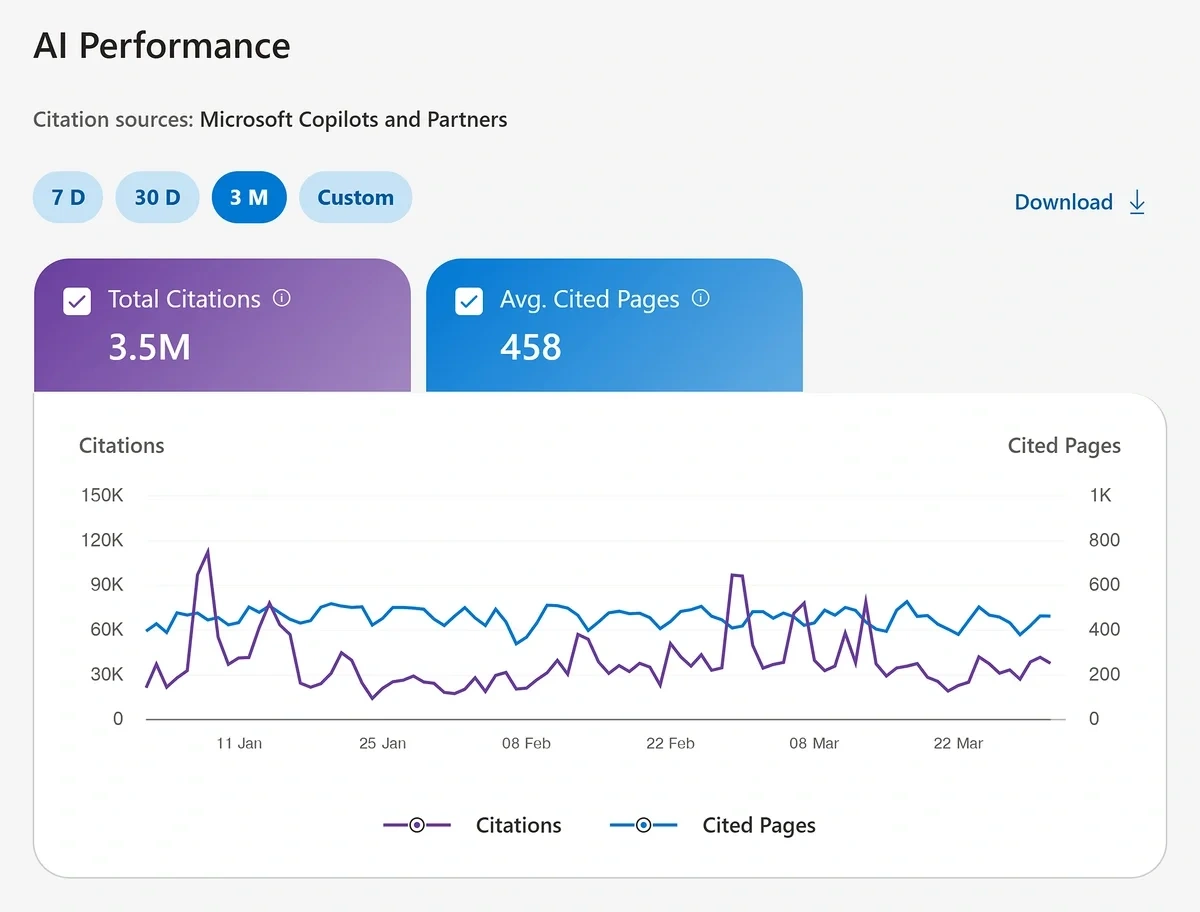
It gives website owners their first look at how content is cited across Microsoft's AI experiences—specifically Microsoft Copilot, AI-generated summaries in Bing, and select partner AI integrations.
Before this, publishers had no direct way to measure their Copilot visibility. You could track traditional Bing search performance, but citations in AI-generated answers were completely invisible. AI Performance changes that by showing you four types of data:
- Total citations: How many times your content was referenced in AI-generated answers during your selected date range
- Average cited pages: The average number of unique pages from your site cited per day
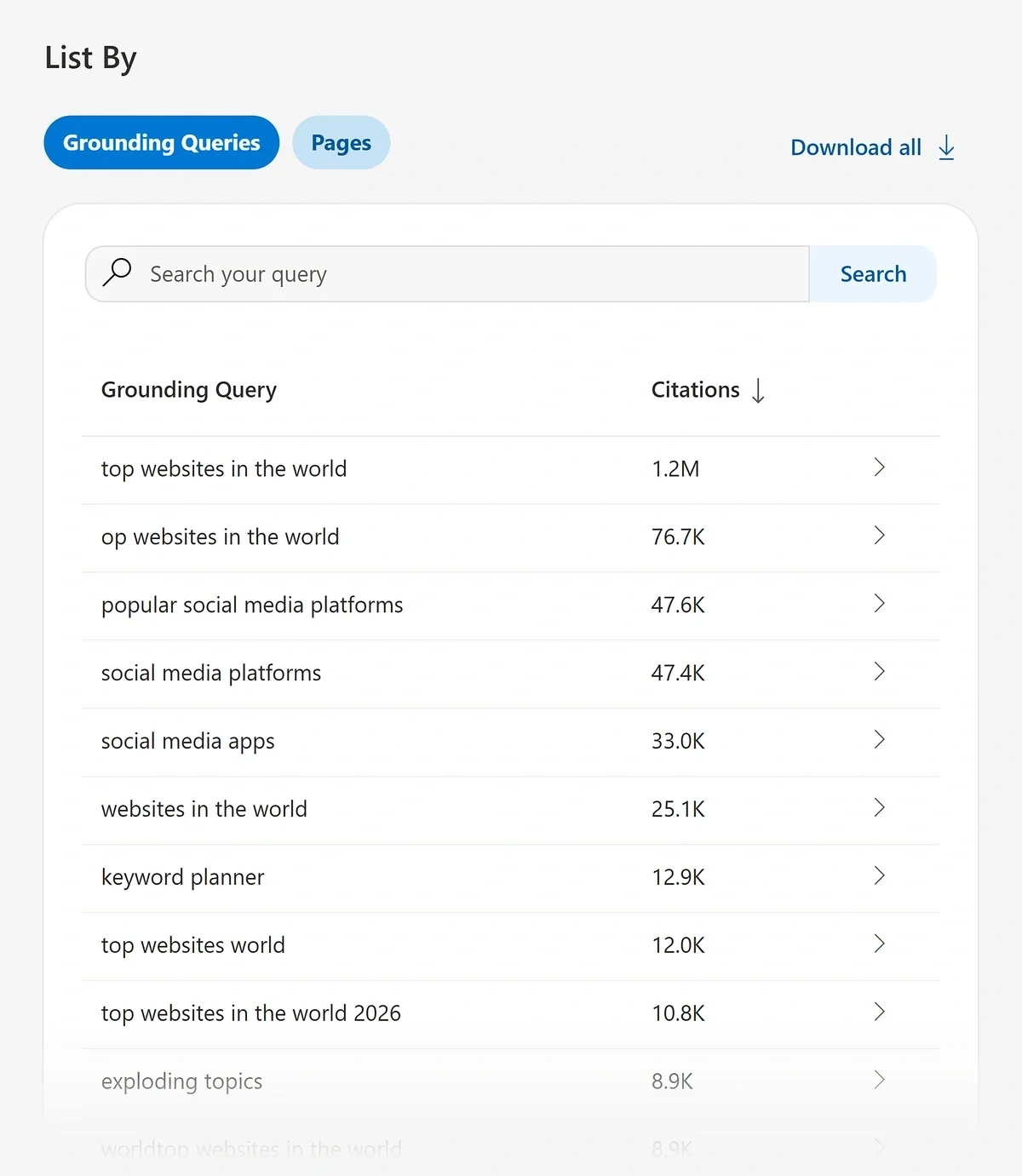
- Grounding queries: The short phrases AI used when retrieving your content (essentially the topics your site is being pulled in for)
- Page-level citation activity: A URL-by-URL breakdown of which pages are cited most frequently
One important note: citations are not clicks. A citation means your content was visibly referenced in an AI-generated answer, not necessarily clicked on. These metrics are designed for trend analysis and visibility benchmarking, not as a replacement for traditional performance data.
How to Read Bing’s AI Performance Dashboard
Log into Bing Webmaster Tools, select your verified property, and open the “AI Performance” dashboard:
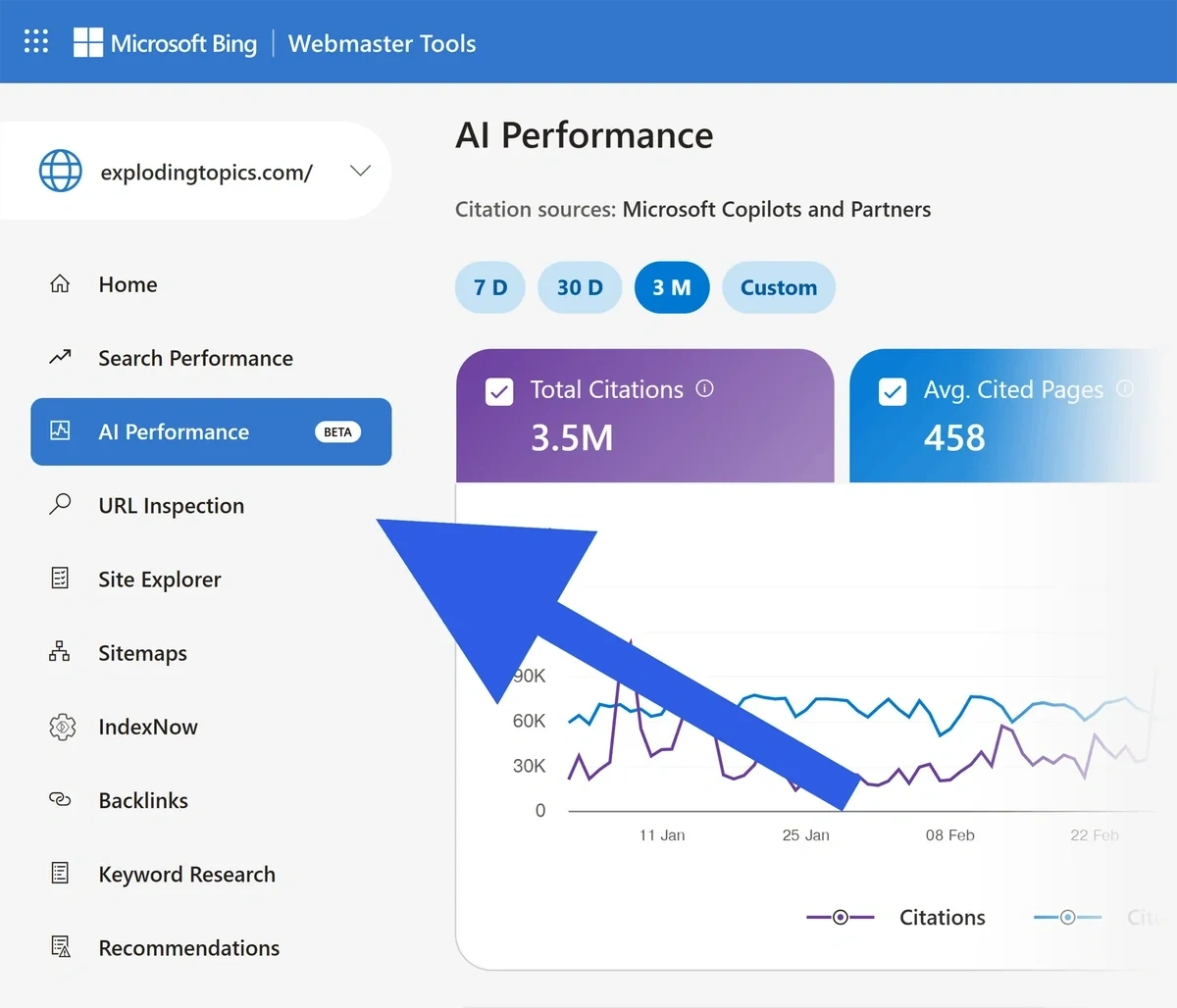
You'll see citation data for the past 3 months by default, with options to view 7 days, 30 days, or a custom range.
To read and gain insights from the report:
- Start with the timeline. The visibility trend chart shows how your total citation volume changes over time. Spikes and dips can reflect changes in user query volume, content updates, or model changes on Microsoft's end. The dashboard can't tell you which factor caused a shift, so treat the trend line as something to investigate, not a verdict.
- Then, move to grounding queries. This tab is the most actionable part of the dashboard. Each row shows a short phrase (not a full user prompt) that represents a topic cluster your content was cited for. Higher numbers mean your content was referenced more frequently for that phrase during the selected period.
A few things to know about how to interpret this data:
- One grounding query can be associated with multiple pages from your site
- One page can appear under multiple grounding queries
- Short or vague-looking phrases are normal—the dashboard groups citation activity into generalized topics (called “Grounding Queries”) - Finally, check page-level citation activity. This view ranks your URLs by citation count. Your most-cited pages show your current areas of AI authority. These are the topics where Copilot trusts your content enough to cite it as a source.
If you see no grounding queries at all, it typically just means citation activity is too sparse to surface in the dashboard yet.
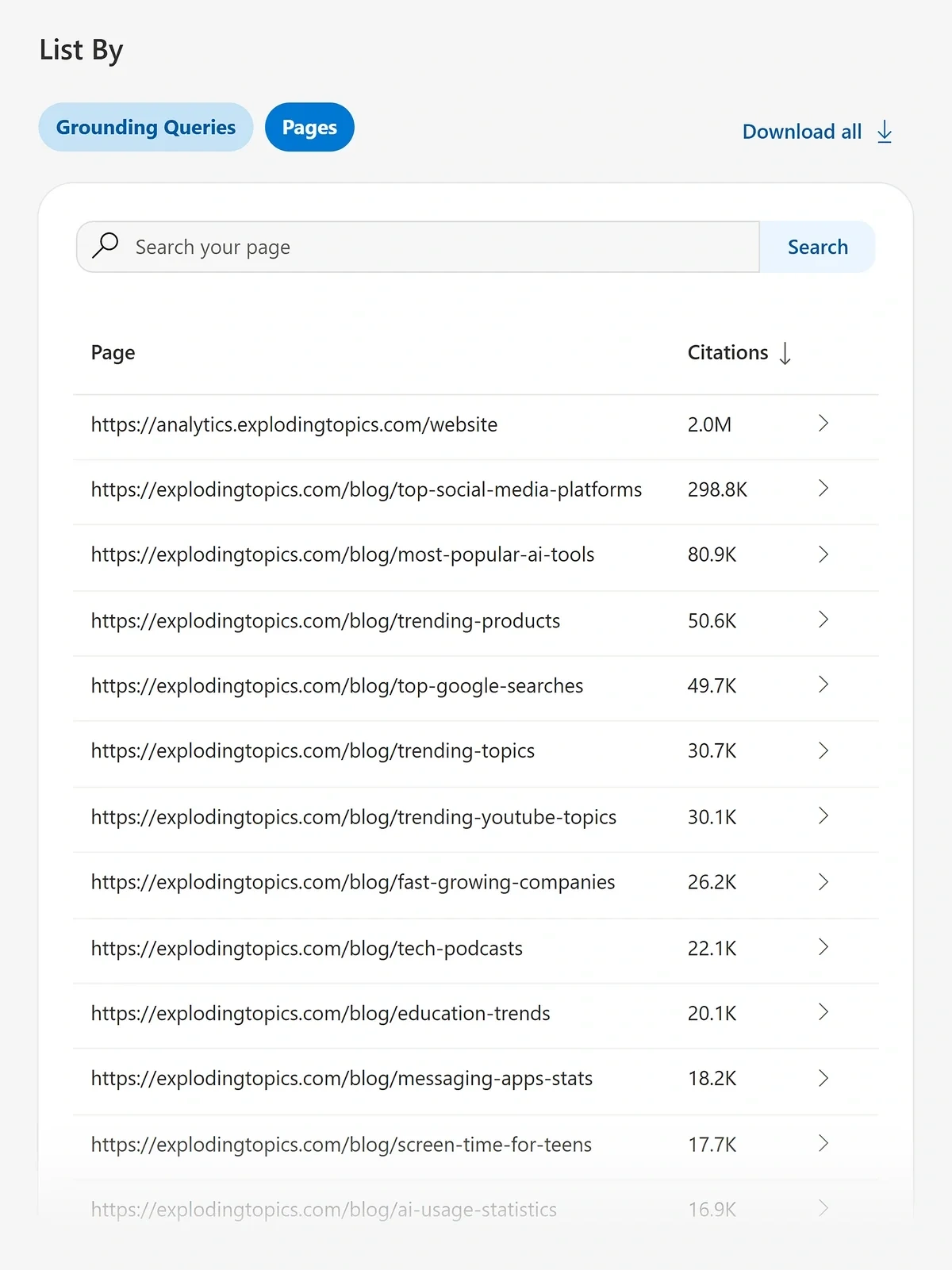
Once you understand where you’re currently being cited, the next step is identifying where you’re not showing up.
Let’s take a look at how to find gaps in your citation coverage.
Finding Gaps in Your Copilot Coverage
Your cited pages and grounding queries help you figure out where Copilot already trusts your content. The gaps (topics in your niche that aren't appearing in your grounding queries report) are where you have room to grow.
Here are a few ways to find those growth opportunities:
Compare your grounding queries against your content inventory.
If you publish broadly about a topic but only a narrow slice of it shows up in the dashboard, that's a signal your content in those other areas lacks the depth or clarity AI systems need to cite it confidently.
I’ll go over writing great content for AI citations in the next section.
Look for missing subtopics.
If a grounding query like "email automation" appears but "email automation for small businesses" doesn't, you may have a coverage gap at the subtopic level. AI systems cite content that matches query intent closely, so broad coverage of a topic doesn't guarantee visibility across all the related, more niche questions users ask.
Cross-reference against your uncited pages.
Pages that are indexed and receiving traditional search traffic but never appearing in citations might share some of these characteristics: they're thin on specifics, structured for reading rather than referencing, and/or covering topics with strong competition from other authoritative sources. These pages are candidates for a content audit before you create anything new.
Think you need to create new content (or update existing content) in order to show up in Copilot for more topics?
Next, I’ll give you a few tips for creating the types of content that Copilot wants to cite.
How to Create Copilot-Friendly Content
Content that gets cited in AI-generated answers is:
- Clearly structured
- Focused on a specific topic
- Written so that a key point can be extracted without losing context
To create content like that, follow these guidelines.
1. Lead with the answer.
AI systems frequently pull from the opening sentences of a section, so front-load your main point rather than building toward it.
Example: A section about project management software that starts with "Project management software helps teams track tasks, deadlines, and dependencies" is more citable than one that opens with background context.
2. Use descriptive headings.
Headings that are clear and descriptive give AI systems an explicit signal about what the section covers. Vague or clever headings make it harder for the model to match your content to a grounding query.
Example: Go with "How to Set Up Email Automation for Ecommerce" over “Getting Started” to begin your tutorial.
3. Add FAQ-style sections.
Question-and-answer formatting matches how users prompt AI tools. A clear question followed by a concise, self-contained answer is exactly the kind of chunk Copilot can cite accurately.
Example:
[Heading] What are the best books for small business owners?
The best books for small business owners are…
4. Support claims with specific data.
Data points, named examples, and cited sources make content more trustworthy as a reference. Vague assertions get passed over by Copilot and other LLMs in favor of content that gives AI something concrete to trust.
Example: According to Semrush research, AI search visitors are projected to surpass traditional search visitors by early 2028. Some industries may see this tipping point even sooner.
5. Keep content current.
Outdated information gets deprioritized as AI systems favor fresher sources. If a cited page starts losing citation volume, a content refresh is often more effective than creating a new page on the same topic.
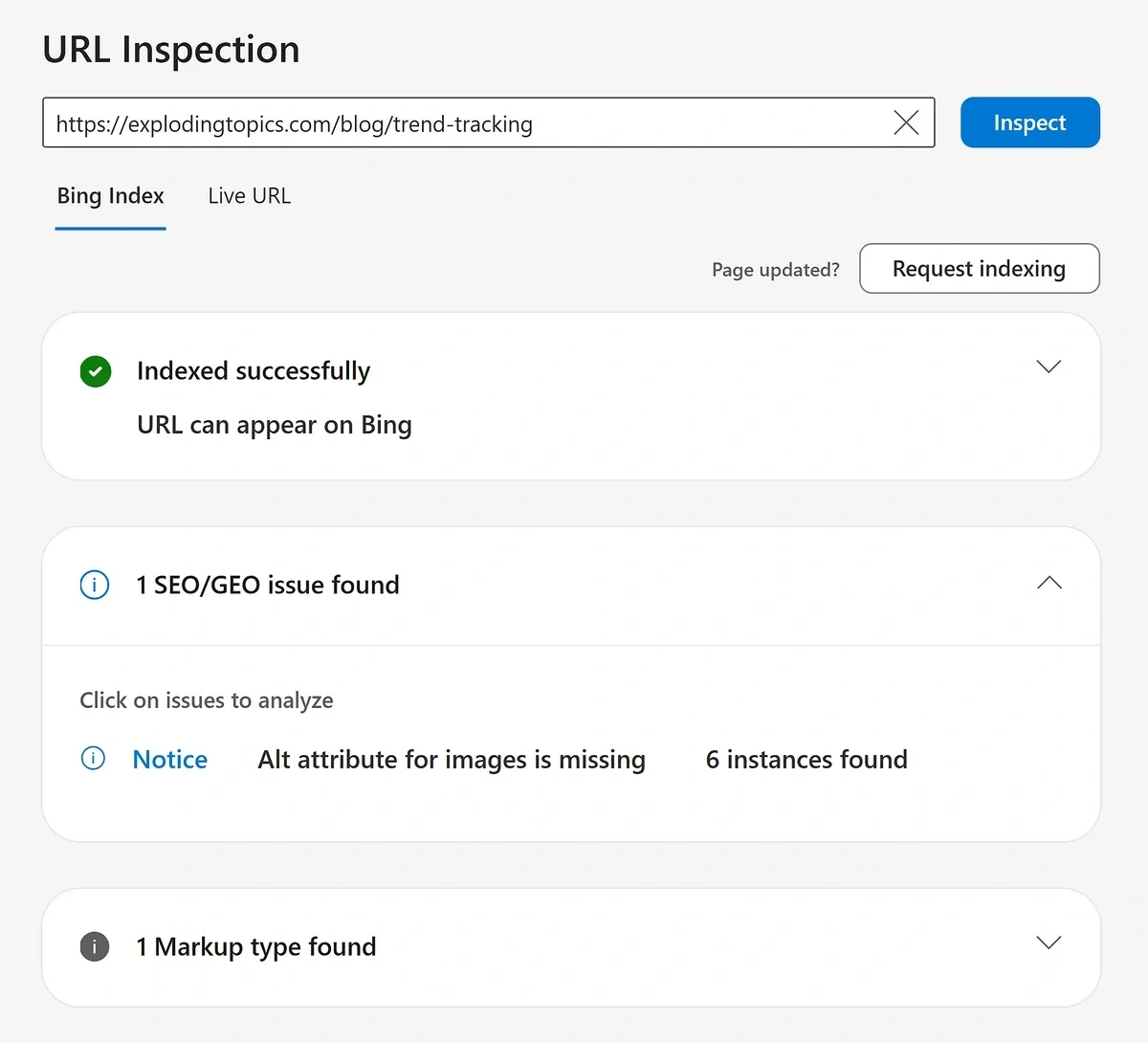
When you do update content, consider telling Bing to crawl it right away. To do that, use the “Request Indexing” button inside Bing’s URL Inspection tool:
Now you know how to identify content gaps and create the kind of content Copilot and other LLMs will want to cite.
The next step in gaining more visibility in Copilot involves being really strategic with the content you’re adding to your website.
Creating citable content improves your chances of being referenced, but one-off articles can only take you so far. To scale your visibility across related queries, you need to expand that authority outward using topic clusters.
Build Topic Clusters Around Your Copilot Citation Wins
Your most-cited pages are typically your strongest starting point for expanding AI visibility. If Copilot already cites a page, that’s a sign that your content has established credibility on that topic. You can take advantage of that credibility by building out your content strategically—in topic clusters.
Topic clusters are a group of interlinked pages that cover a broad subject and its subtopics in depth, signaling to both search engines and AI systems that your site has far-reaching authority in that area.
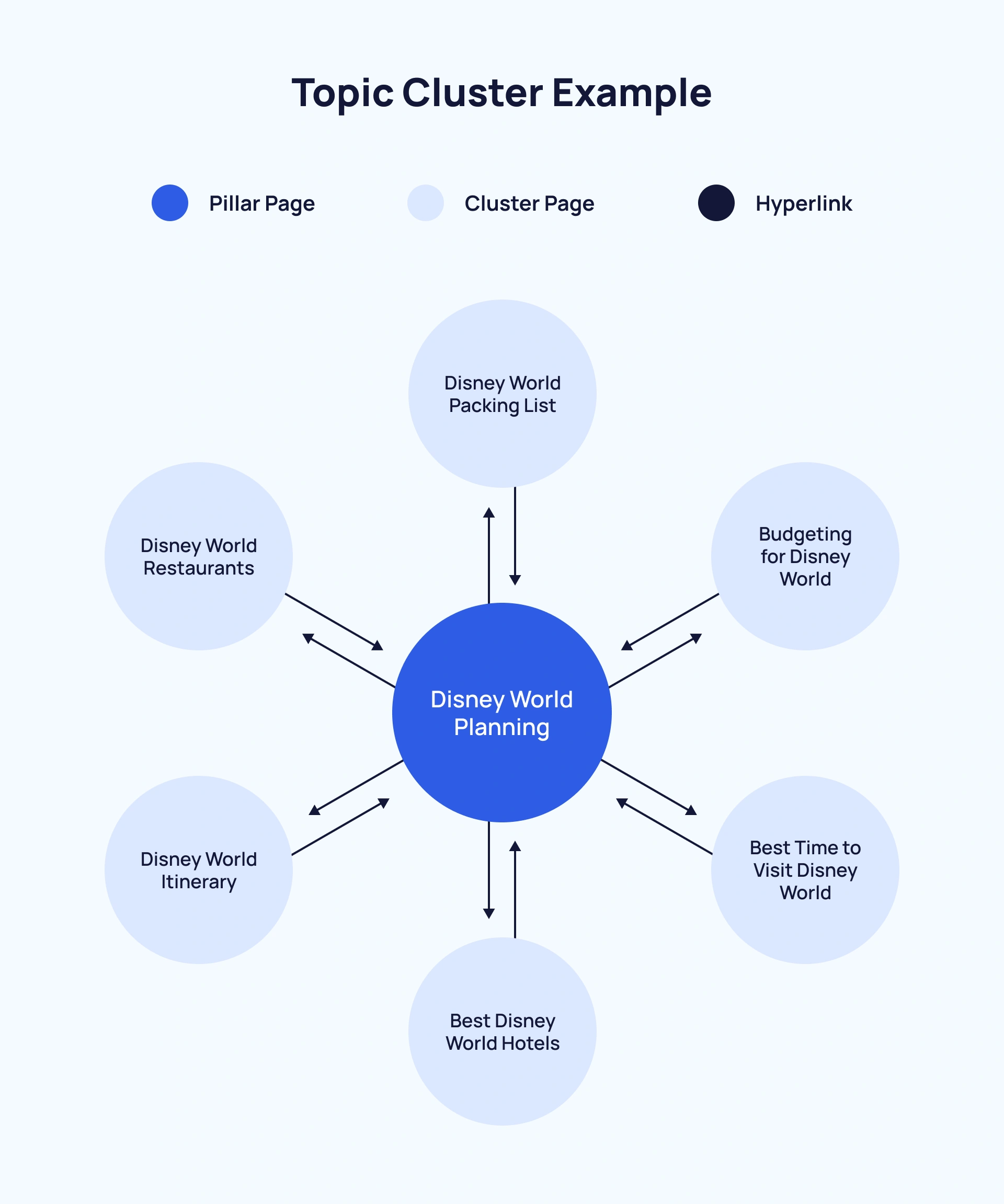
Here are a few tips for creating successful topic clusters that boost your visibility in Copilot and other LLMs:
First, treat each cited page as a hub. Map out the subtopics, related questions, and adjacent concepts that surround it. A cited page on "home office setup" can anchor a cluster covering ergonomic desk chairs, monitor placement, lighting for video calls, and productivity tools for remote workers. Each supporting page deepens your topical authority and gives AI more of your content to draw from when answering related queries.
Then, match new pages to grounding query gaps. Go back to your Grounding Queries data in the AI Performance dashboard and think about phrases that are close to your cited topics but not yet appearing. Those are the subtopics your cluster is missing.
Writing directly to fill those gaps increases the likelihood that your new content will get pulled into citations on related queries.
Next, link cluster pages to each other deliberately. Internal links help both search engines and AI systems understand the relationship between your topics and pages. A cluster that's well-connected helps LLMs and search engines understand your widespread topical coverage.
Finally, prioritize depth over volume. Instead of focusing on publishing a lot of thin content on every subtopic, take your time and cover topics with thoughtful, in-depth, well-researched pieces. AI systems typically cite this type of content that fully addresses a question rather than just touches on it.
So far, you’ve been working on expanding visibility based on existing citation data. But to get ahead, you need a way to identify topics before they show up in your dashboard.
Using Exploding Topics to Find Your Next Big Visibility Opportunities
In the AI Performance dashboard, the Grounding Queries data tells you where you have visibility today. It doesn't tell you about the topics that are quietly gaining momentum in your industry that you might be able to grab Copilot visibility around tomorrow.
But Exploding Topics will.
The Exploding Topics Trends Database tracks over 1.1 million trends across industries, surfacing topics before they hit the mainstream. For your AI visibility strategy, finding emerging topics can be a huge win because getting cited early is significantly easier than trying to displace established sources once a topic is saturated.
To find emerging topics in your niche, start with the Trends Database. Filter by your industry category and sort by growth stage.
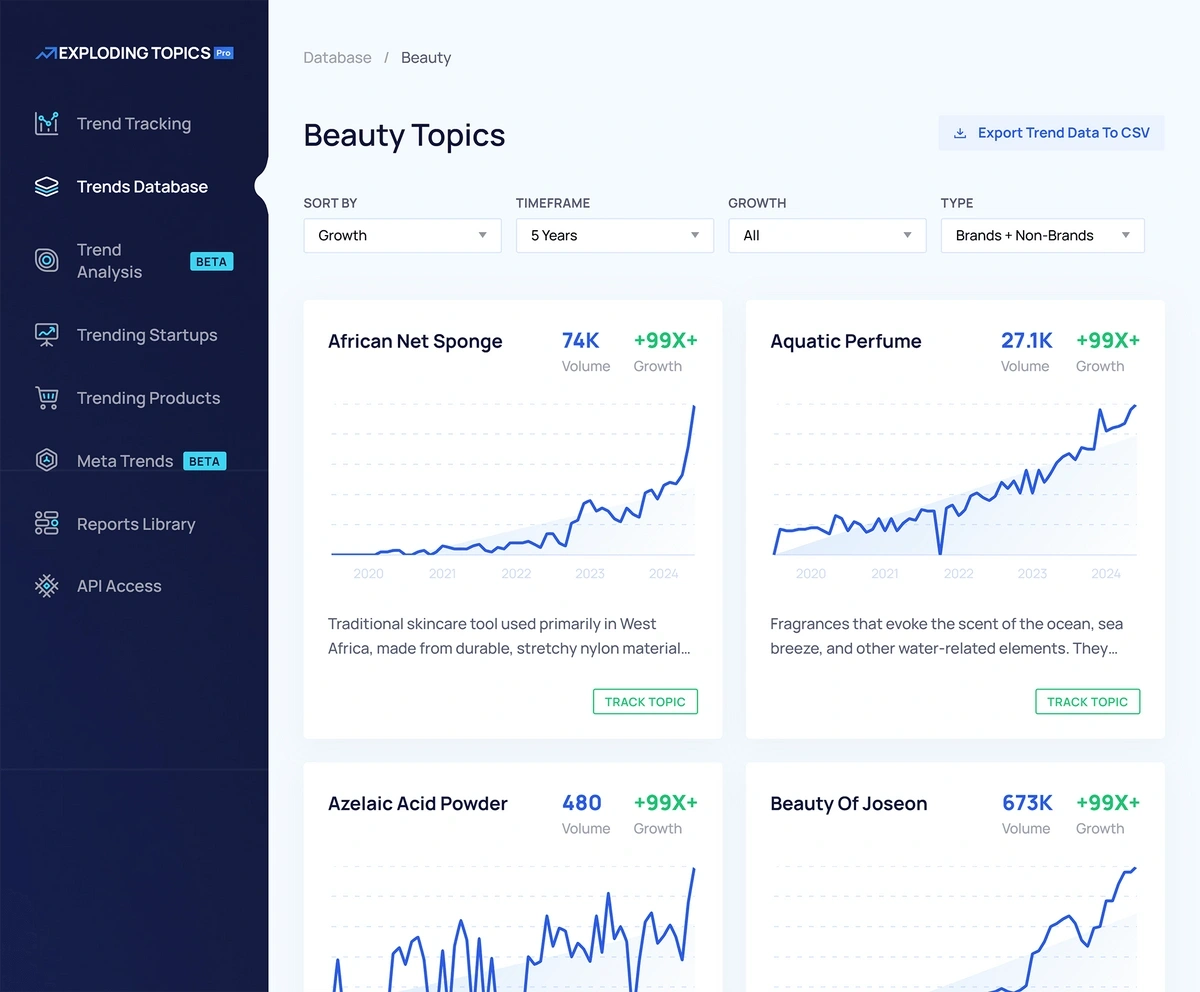
Topics categorized as "Exploding" or "Peak" with relatively low existing content competition are your best opportunities—you can publish authoritative content while the competition is still fairly low.
Next, map trends to your grounding query themes. Cross-reference emerging topics against the grounding query themes already appearing in your AI Performance dashboard. A trend that's adjacent to a topic you're already being cited for is lower-risk, because you're expanding authority in an area where Copilot already recognizes your site, rather than starting from scratch.
Make sure to also take a look at the Meta Trends report. This section groups individual trends into bigger related clusters:
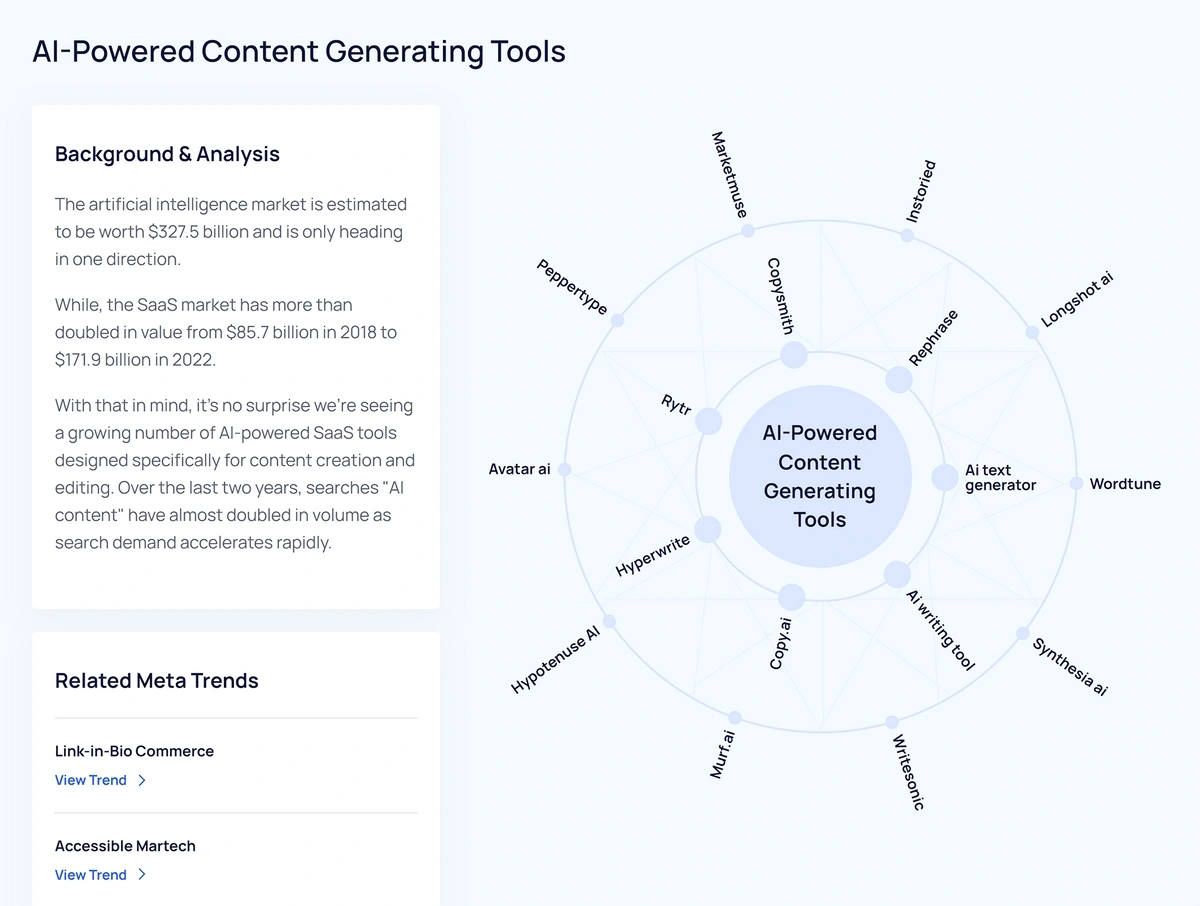
If you find a meta trend that aligns with your industry, the trends within it are ready-made cluster topics. Each one is a candidate for a new page targeting an emerging grounding query.
Publishing on a trend three to six months before it peaks gives your content time to get indexed, earn citations from other sources, and build the credibility signals AI systems use when deciding what to cite.
Start Building Your Copilot Visibility Now
You now have a system: measure your visibility, identify gaps, build citable content, expand authority through clusters, and get ahead of emerging topics.
Marketers are excited about Bing’s AI Performance because it gives you something that didn't exist until recently: a direct window into how Microsoft's AI ecosystem uses your content. If you act on that data early, your authority will be harder to displace once the space gets more competitive.
The other side of that equation is knowing which topics are worth building around in the first place. Exploding Topics helps by surfacing trends in your industry before they reach their peak search volume, so you can publish authoritative content while competitors are still catching up.
Start an Exploding Topics Pro trial today to find the emerging topics you can use now to gain more visibility in Copilot and other LLMs.
Stop Guessing, Start Growing 🚀
Use real-time topic data to create content that resonates and brings results.
Exploding Topics is owned by Semrush. Our mission is to provide accurate data and expert insights on emerging trends. Unless otherwise noted, this page’s content was written by either an employee or a paid contractor of Semrush Inc.
Share
Newsletter Signup
By clicking “Subscribe” you agree to Semrush Privacy Policy and consent to Semrush using your contact data for newsletter purposes
Written By


Jolissa Skow is a senior content writer and content strategist with a background in SEO, Google Analytics, and WordPress. She's be... Read more