


Get Advanced Insights on Any Topic
Discover Trends 12+ Months Before Everyone Else
How We Find Trends Before They Take Off
Exploding Topics’ advanced algorithm monitors millions of unstructured data points to spot trends early on.
Keyword Research
Performance Tracking
Competitor Intelligence
Fix Your Site’s SEO Issues in 30 Seconds
Find technical issues blocking search visibility. Get prioritized, actionable fixes in seconds.
Powered by data from
Latest Blog Posts
Featured Case Studies
See what's trending before everyone else
Each week, we'll send you our best Exploding Topics. Plus, expert insight and analysis.
My 90-Day Trend-Matched Editorial System for Content Calendar Planning

 Add Exploding Topics on GoogleAdd Exploding Topics as your preferred source to see more of our stories on Google.
Content calendar planning is a task I genuinely enjoy. It requires creativity to come up with topics and write hooks that will capture people’s attention, but also strategic thinking, organization, and—especially if you’re managing a team of writers—balancing workloads.
As much as I like to wrangle topics into a perfectly ordered plan, content calendar management comes with challenges. One I’m all too familiar with is missing the growth peak of a trending topic because I didn’t schedule it for the ideal publication date.
When you publish a topic after it’s passed its peak, you miss out on organic traffic. A lot of time and effort goes into researching, writing, and optimizing content, but timing is a significant factor in its success.
Developing a trend-matched editorial system for content calendar planning involves incorporating trend projection into your decision making when choosing publication dates. You can then write the content before the topic peaks and publish it while interest is still building.
The Role of Trend Momentum in Content Calendar Planning
When it comes to creating content around trending topics, there are two factors you have to keep in mind: how long it will take you to create the content, and the trend’s growth rate or momentum.
If you can match your content production timeline to a trend’s momentum, you can publish it before it peaks and capitalize on its increased search volume.
Your production timelines will be specific to your team and the type of content you publish.
Trend momentum, however, can be defined by the following stages:
- Regular: Topics with moderate search volume growth, several months from peaking.
- Exploding: Topics with exceptional search volume growth. The peak for these topics will occur within a couple of months.
- Peaked: Topics with declining interest.
- Seasonal: Topics that follow a cyclical growth pattern.
With these stages in mind, you can strategically position topics on your content calendar according to when they will peak and how long it will take you to produce each piece.
The 90-Day Trend-Matched Editorial System
Aligning trend momentum and content production timelines sounds simple enough, right?
To build a sustainable system, there are a few more steps to keep in mind. The guide that follows is my recommendation for how to set up your trend-matched content calendar and incorporate monitoring and analysis for continuous refinement.
I’ve included estimates for how long each step should take. The result is a 90-day plan to align your calendar with trend trajectories for optimal publishing.
Step 1: Define Your Content Production Timeline (1–2 Days)
Before you can start looking into trends, you need to gather some information about your content production capacity.
First, look back through past content you’ve published and determine how long it takes to produce a piece of content from the time the writer picks up the topic to publication. This means you need to include the time it takes to edit and revise the content in addition to how long it takes to write the first draft.
Checking your project management app or other tools you use to manage your workload should help you track down this information.
If you publish multiple types of content—blog posts, videos, newsletters, social media content, white papers—repeat this process for each. Consider the balance of content types as well. Social media content is usually published more frequently than blog content, which is usually published more frequently than research-heavy pieces like white papers.
Then factor in the size of your team. If you work alone, there’s no need to worry about this step. Otherwise, multiply what you can publish each month according to how many people you’re working with.
Here’s an example. Say you have a team of three writers, and your content production timelines are as follows:
- Blog posts: one week
- White papers: two weeks
- LinkedIn thought leadership posts: three days
Writer A will publish one white paper and two blog posts per month. Writers B and C will each publish one blog post and five LinkedIn posts.
This brings your total monthly capacity to one white paper, four blog posts, and ten LinkedIn posts.
Step 2: Identify Trends That Align With Your Timeline (2–3 Days)
Once you know your content production timelines, you can start looking for trends to produce content about.
Head over to the Trends Database and choose a category that’s relevant to your niche.
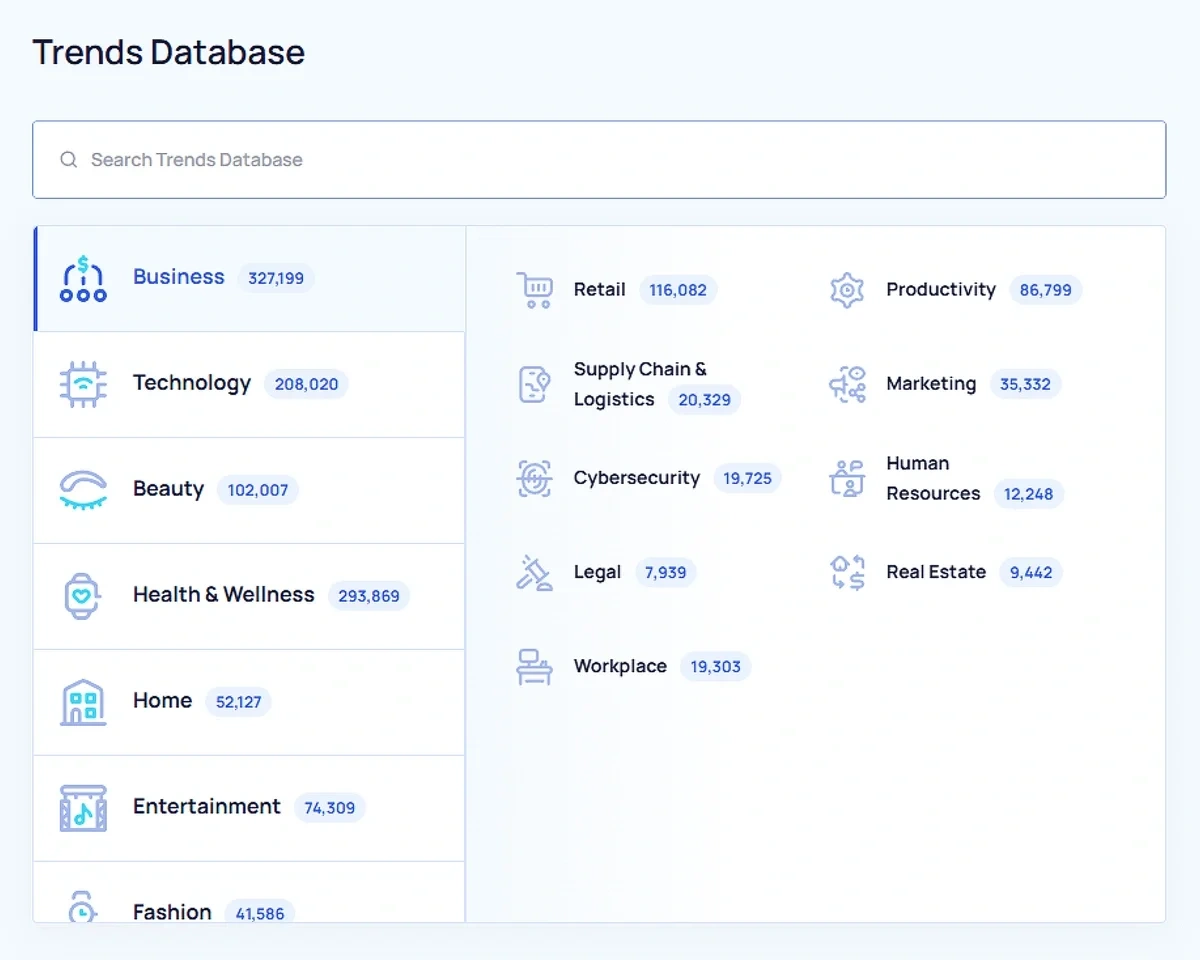
Then set the filters as follows:
- Sort by Growth to see trends with the greatest increase in search volume first.
- Set the Timeframe to 6 months to see trends with consistent growth trajectory and recent interest.
- Adjust the Growth filter to Regular or Exploding, depending on the production timeline for the type of content you’re planning.
- The Type is up to you—include or exclude branded topics depending on if it fits your own brand style.
- Set the Volatility to Stable to avoid planning content for trends that have sudden, unexpected drops in growth.
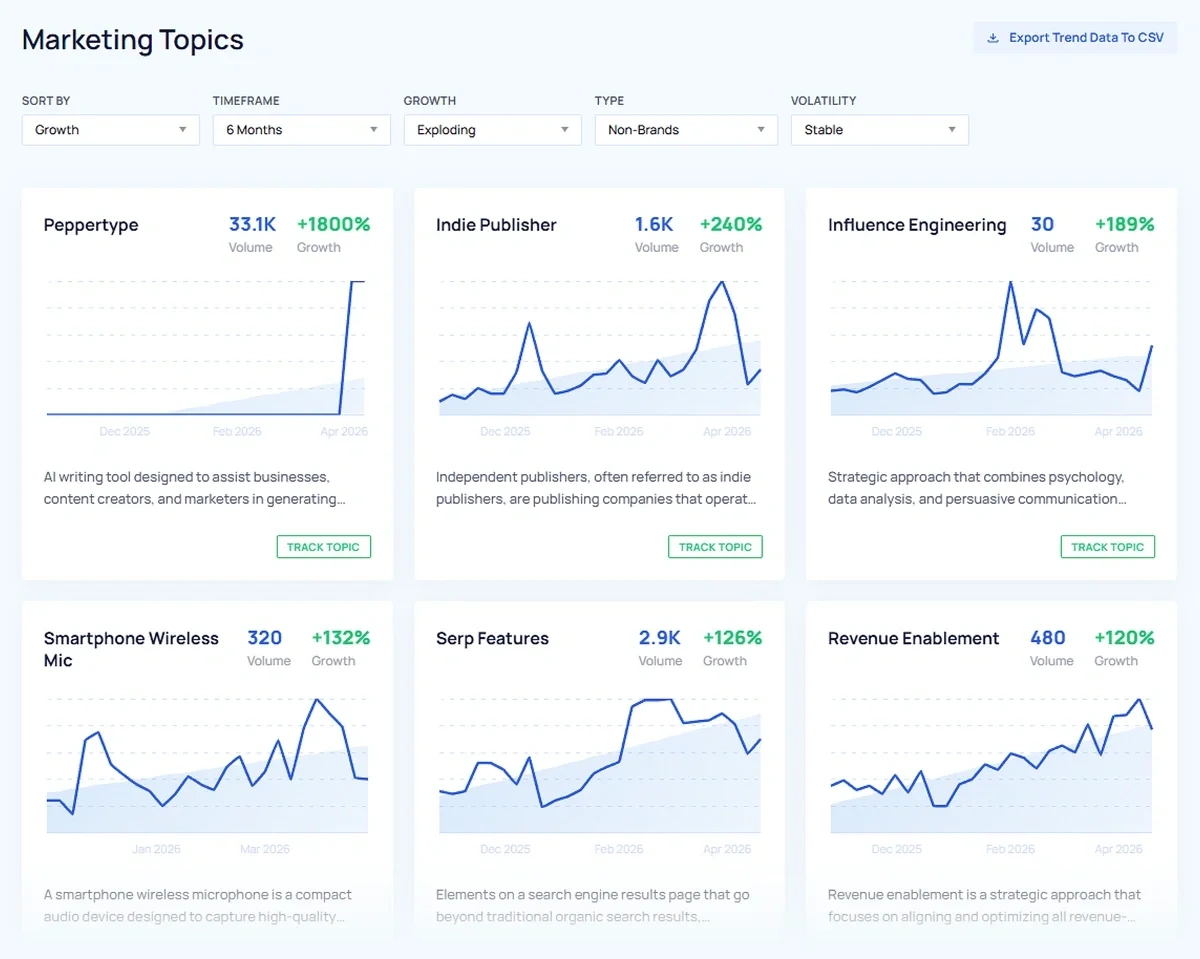
Comb through the results for trends that are relevant to your brand, or export all the results to a CSV file and sort through them that way.
One feature I like to check when analyzing trends is the Trend Forecast.
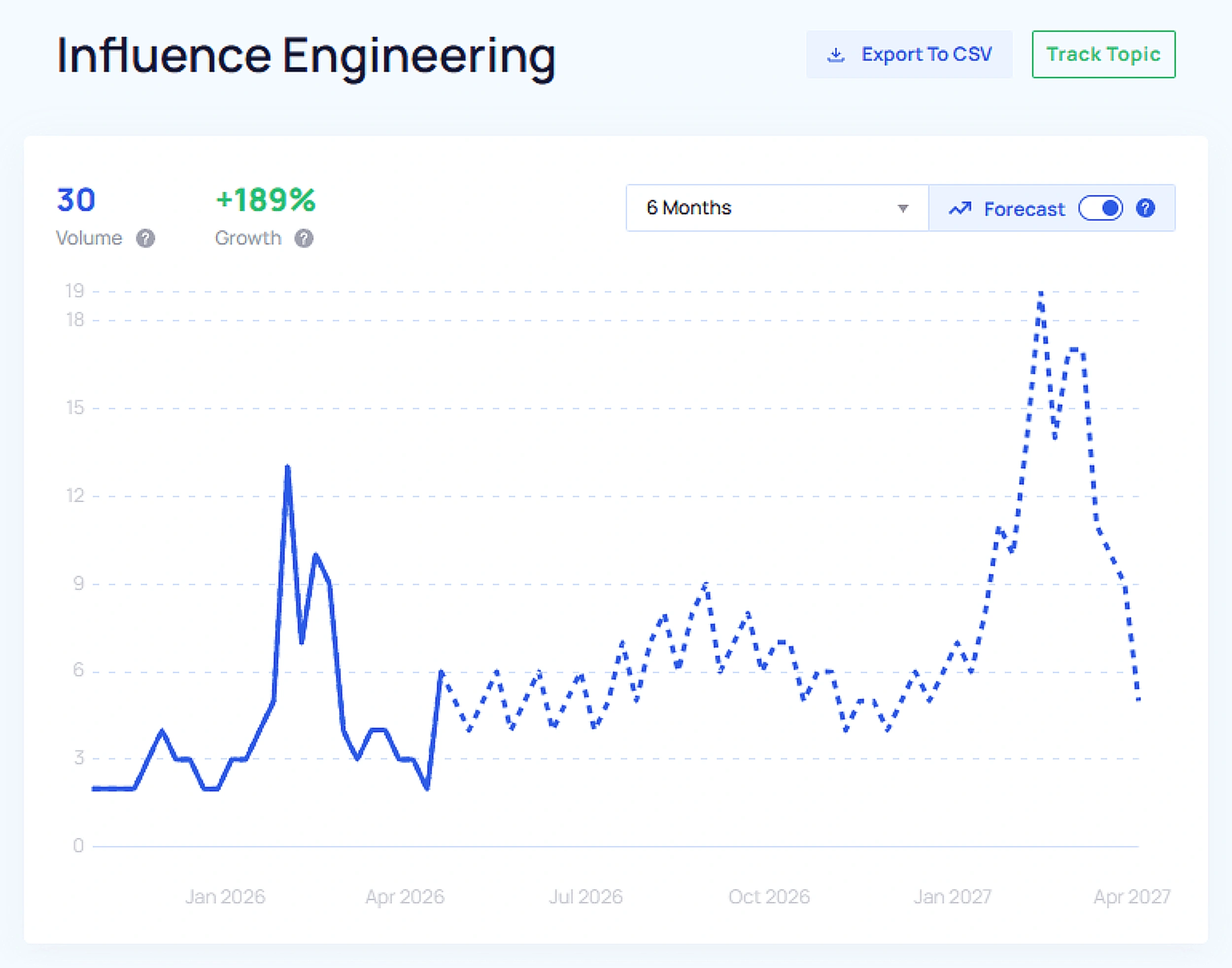
This is helpful for estimating when the topic will peak, which is valuable information when adding content to your calendar. Making a note of the likely peak of topics you’re interested in will help with the next step.
Keep in mind the timeframe of the calendar you’re planning. For instance, if you’re planning your Q1 calendar, you want to look for topics peaking in mid to late January through late April, or possibly a bit later.
You might need to repeat this process a few times if you have multiple categories to cover and multiple content types to produce with different production timelines (and therefore requiring trends with different growth stages).
Going along with our example from the previous step, I’d be looking for three white paper topics, twelve blog posts, and 30 LinkedIn posts. The white paper and blog post topics should be experiencing more moderate growth, while I would focus on exploding topics for the LinkedIn posts.
Step 3: Fill Your Quarterly Content Calendar (1 Week)
Now it’s time to actually fill in your calendar. It may take some tweaking along the way, so don’t be surprised if you need to step away and come back a few times before it’s ready.
The easiest way to go about it is to work backwards. Start with your latest peak date and count back approximately two weeks—that’s the date you want to publish your content for that topic.
Then count back again however many days or weeks you need to produce the type of content you’ve planned for that topic. Going back to our example, for a blog post, this would be another two weeks. This is the date you want to start production.
Repeat this process to fill your whole calendar.
If you’re planning content for a team, make sure to consider assignments carefully and keep them balanced. The amount of time between publication and peak can be flexible, and might be shorter for social media content compared to longform content. You can adjust it slightly to accommodate workloads or other conflicts.
Step 4: Set Up Trend Monitoring for Your Chosen Topics (1 Week)
Your calendar is planned, but there’s still work to do. Trends can shift quickly, so the next order of business is to set up some trend monitoring so you can pivot your content plan if needed.
In the Exploding Topics app, go to Trend Tracking and create a new project. Name it “Q1 Content Calendar” or something similar that will be easy to identify.
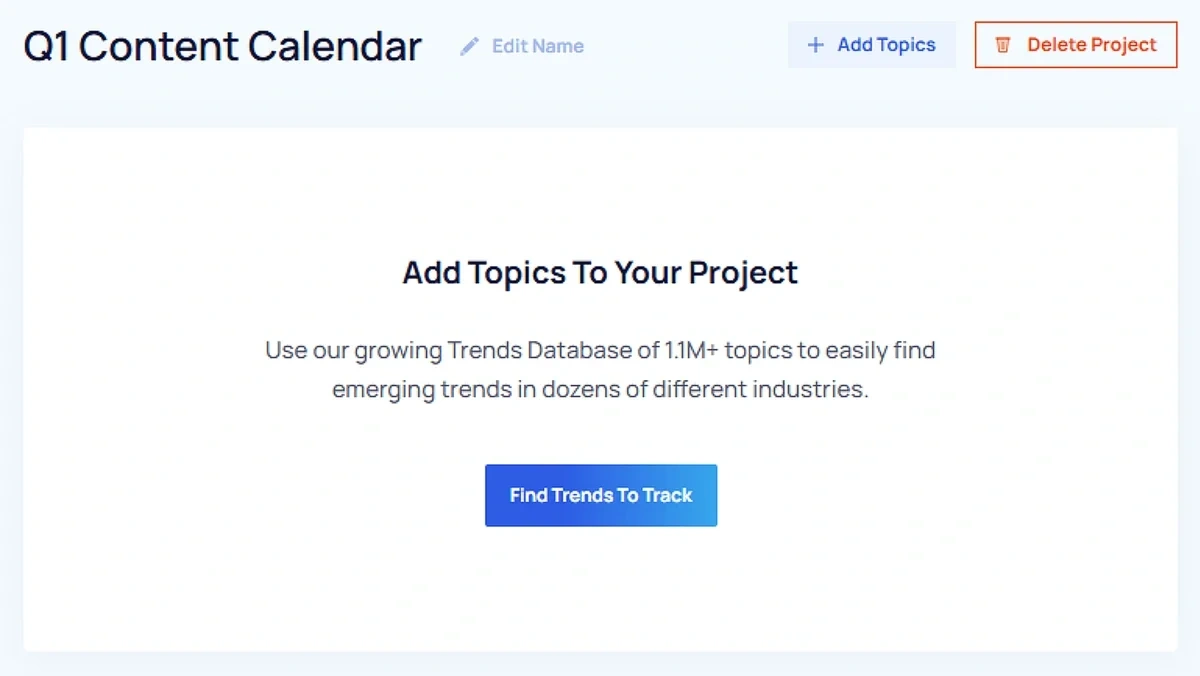
Then add all the topics you put on your content calendar to your project so you can easily find them again. Check this project at least once a week, just in case a topic has experienced unexpected growth (or lack of growth).
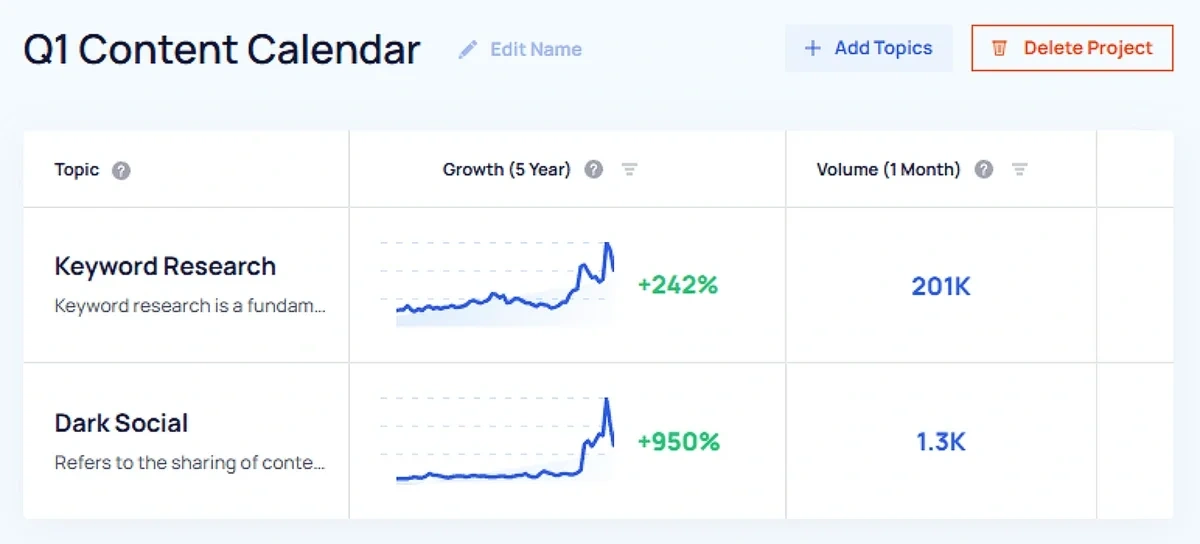
You can shift its place on your calendar or remove it if you feel it’s no longer a good opportunity for you. For topics that are already exploding, it may be beneficial to check in more frequently, as growth can spike suddenly.
Another tack you might take is to change the type of content you produce based on adjusted peaks. For example, say a topic you had planned for a blog post starts to peak earlier than you expected. If you can quickly pull together a LinkedIn post about the same topic instead, you might still be able to benefit from its growth.
To enhance this step further, you can also layer in competitor monitoring. Using Semrush’s EyeOn competitor monitoring tool, you can see when they publish new content. If that content overlaps with topics you have on your calendar, you can tweak your approach.
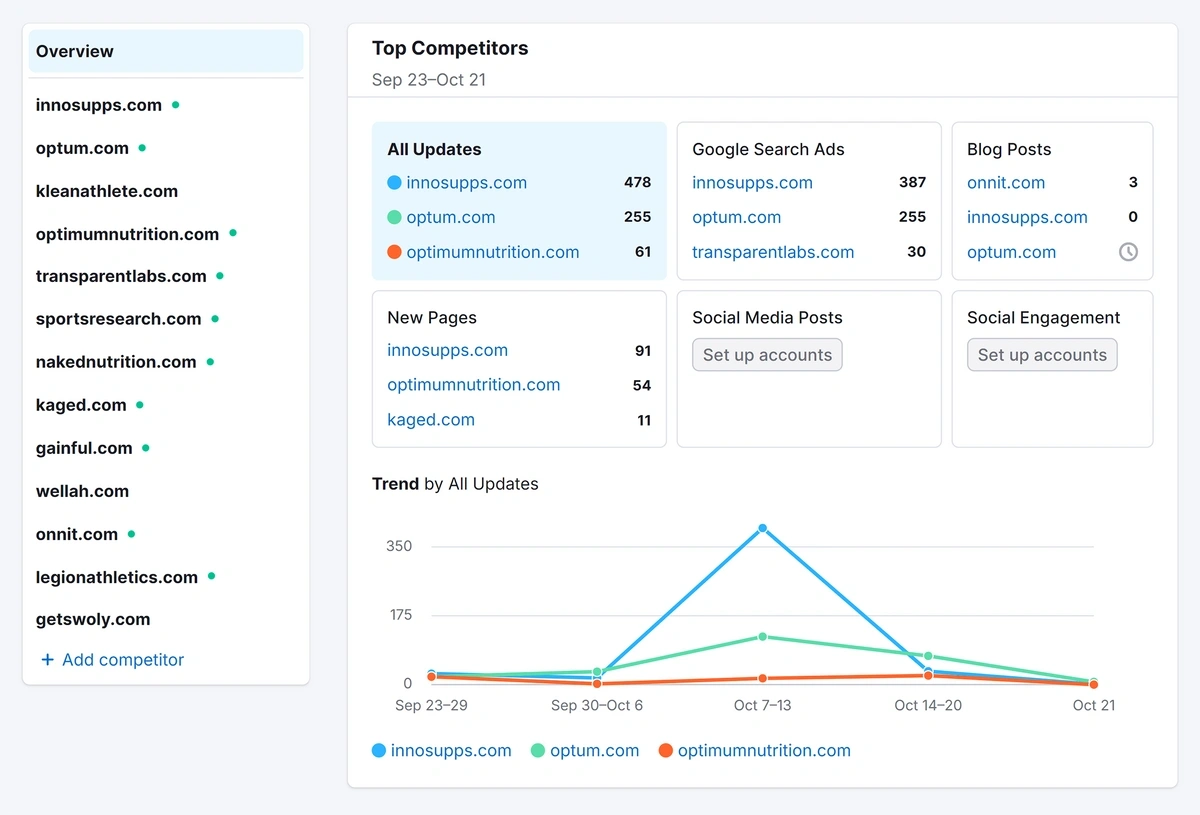
Perhaps your product review becomes a comparison post, or you spot content gaps in your competitor’s piece and make sure to cover the missing information in your own version.
Step 5: Execute and Optimize Your Content Calendar (8 Weeks)
As you start to publish the content on your calendar, there’s some ongoing maintenance and optimization you’ll need to perform.
First, take this opportunity to track your production timelines and make sure they align with what you estimated at the beginning of this process. This will help you adjust your trend matching during your next calendar planning cycle.
Next, take note of the trend’s status and growth volume on its publication date.
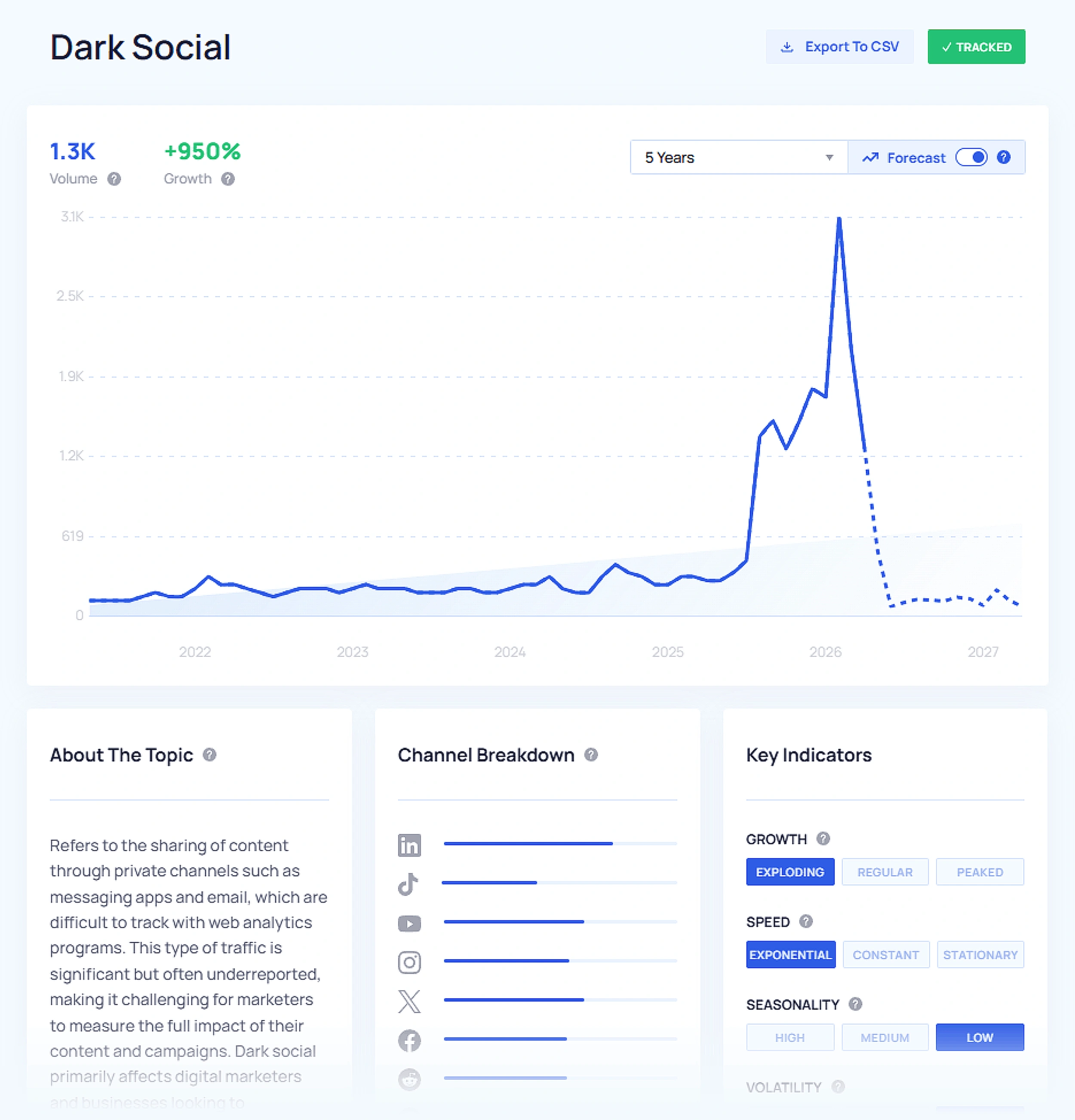
This will help you determine how closely you were able to align trend growth with your content production timeline. Did you publish as close to the trend’s peak as you intended? Did you publish too late? Use this information to inform your next planning cycle.
Finally, choose a set timeframe after publication (I recommend 30 days) and check in on your content’s performance metrics. As you repeat the trend matching process, you can experiment with publishing at different growth stages to see if it impacts traffic and engagement.
Enjoy a Smoother Content Planning Process With Exploding Topics Pro
When it comes to content marketing, there’s so much that’s out of your control. Trend matching your content calendar can help you take back some control by accounting for a topic’s growth trajectory when choosing its publication date.
To enhance your content planning process further, incorporating Semrush into your workflow can help you at every stage, from keyword research to monitoring search engine and AI visibility after publication.
Semrush Pro is the perfect plan to start with. Try it out today and pair it with Exploding Topics Pro to kickstart your trend-matched editorial system and find the perfect publication date for every piece of content.
Stop Guessing, Start Growing 🚀
Use real-time topic data to create content that resonates and brings results.
Exploding Topics is owned by Semrush. Our mission is to provide accurate data and expert insights on emerging trends. Unless otherwise noted, this page’s content was written by either an employee or a paid contractor of Semrush Inc.
Share
Newsletter Signup
By clicking “Subscribe” you agree to Semrush Privacy Policy and consent to Semrush using your contact data for newsletter purposes
Written By


Molly is a technical content writer with a passion for making technology easy for anyone to understand. She specializes in content... Read more