Exploding Topics
Remineralizing Gum search volume grew from under 100 to 27,100 monthly searches between February 2024 and January 2026.
Remineralizing gum
+5100%
GLP 1 Supplement search volume grew from 5,920 to 74,000 monthly searches between February 2024 and January 2026.
GLP 1 supplement
+1150%
Soursop Bitters search volume grew from 9,900 to 110,000 monthly searches between March 2024 and February 2026.
Soursop bitters
+1011%



Get Advanced Insights on Any Topic
Discover Trends 12+ Months Before Everyone Else
How We Find Trends Before They Take Off
Exploding Topics’ advanced algorithm monitors millions of unstructured data points to spot trends early on.
Keyword Research
Performance Tracking
Competitor Intelligence
Fix Your Site’s SEO Issues in 30 Seconds
Find technical issues blocking search visibility. Get prioritized, actionable fixes in seconds.
Powered by data from
Latest Blog Posts
Featured Case Studies
See what's trending before everyone else
Each week, we'll send you our best Exploding Topics. Plus, expert insight and analysis.
How to Use Google Trends for E-Commerce Growth

 Add Exploding Topics on GoogleAdd Exploding Topics as your preferred source to see more of our stories on Google.
One of the best things you can do for improving your e-commerce sales is to focus on trending topics. With a good understanding of what's currently trending, you can plan effective (and even viral) marketing campaigns, deliver exactly what your customers need, get ahead of competitors, and develop products that people really want to buy.
And if you're new to e-commerce or trend research, Google Trends is a good place to start.
What is Google Trends?
Google Trends is a free trend spotting tool that uses data from the Google search engine. The platform shows you metrics related to:
- Google search interest
- Related queries
- Popular search locations
- Search interest rate over time
You can access Google Trends via any web browser, and you don't need to sign into your Google account.
Note: Google Trends only looks at data from Google products. If you're looking for trends that are specific to a social media platform, such as TikTok trends, you'll need to use a different tool.
How to Find Relevant Trends with Google
You can use Google Trends for topic discovery in two different ways.
Trending Now
The "trending now" page lets you view all of the trending topics in a specific location or industry over a given time range.
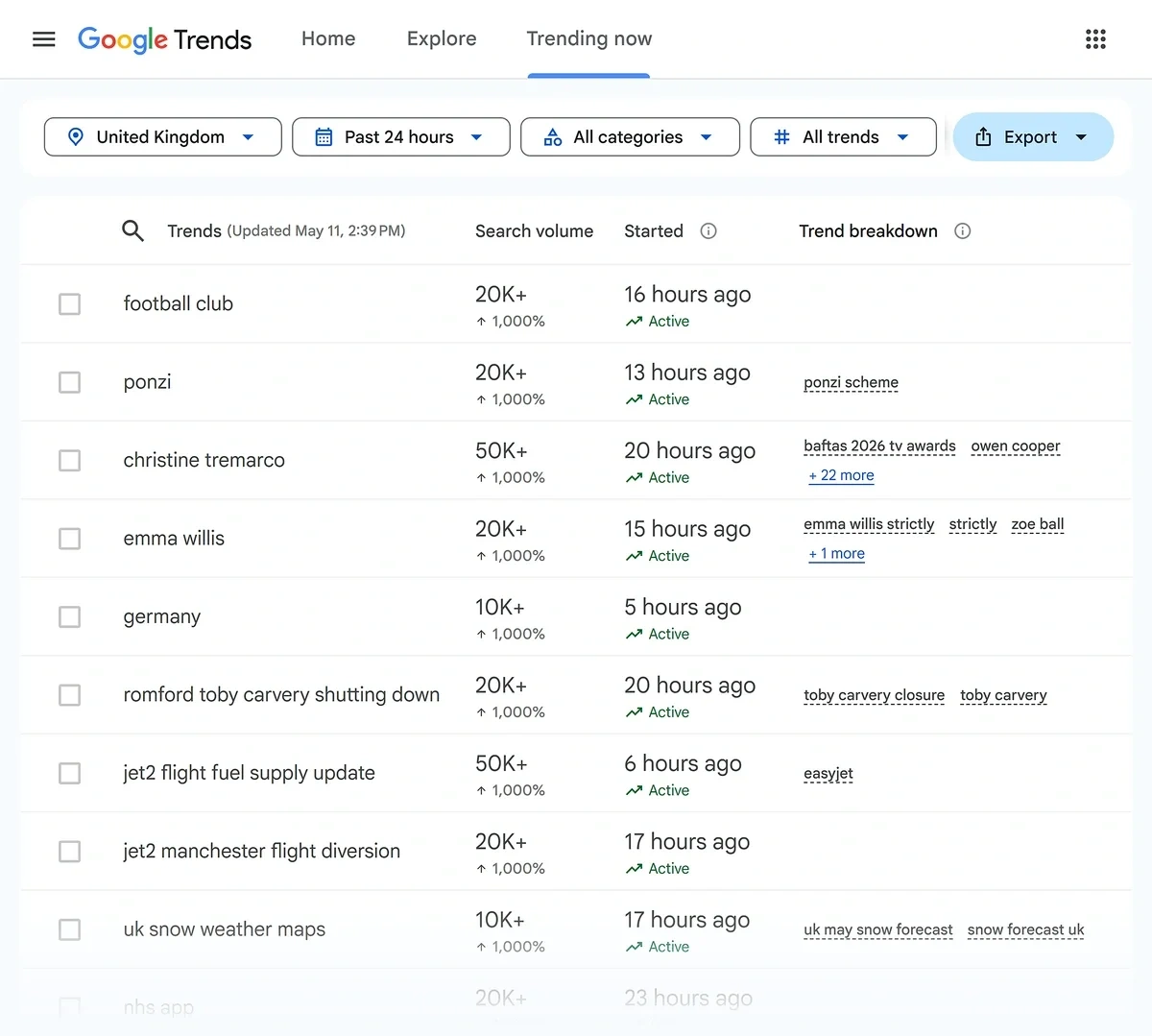
This is useful when you:
- Aren't sure where to begin your research
- Want to tap into cultural events in order to expand the reach of your marketing
- Want to get an idea of what's trending across your industry
From this page, you can:
- View total search volume
- See when the trend started to spike in popularity
- Explore related trends
Explore
The Google Trends Explore page is the place where you can search for a specific trending topic and narrow the results by:
- Location
- Time period
- Search type (web, image, news, shopping, and YouTube)
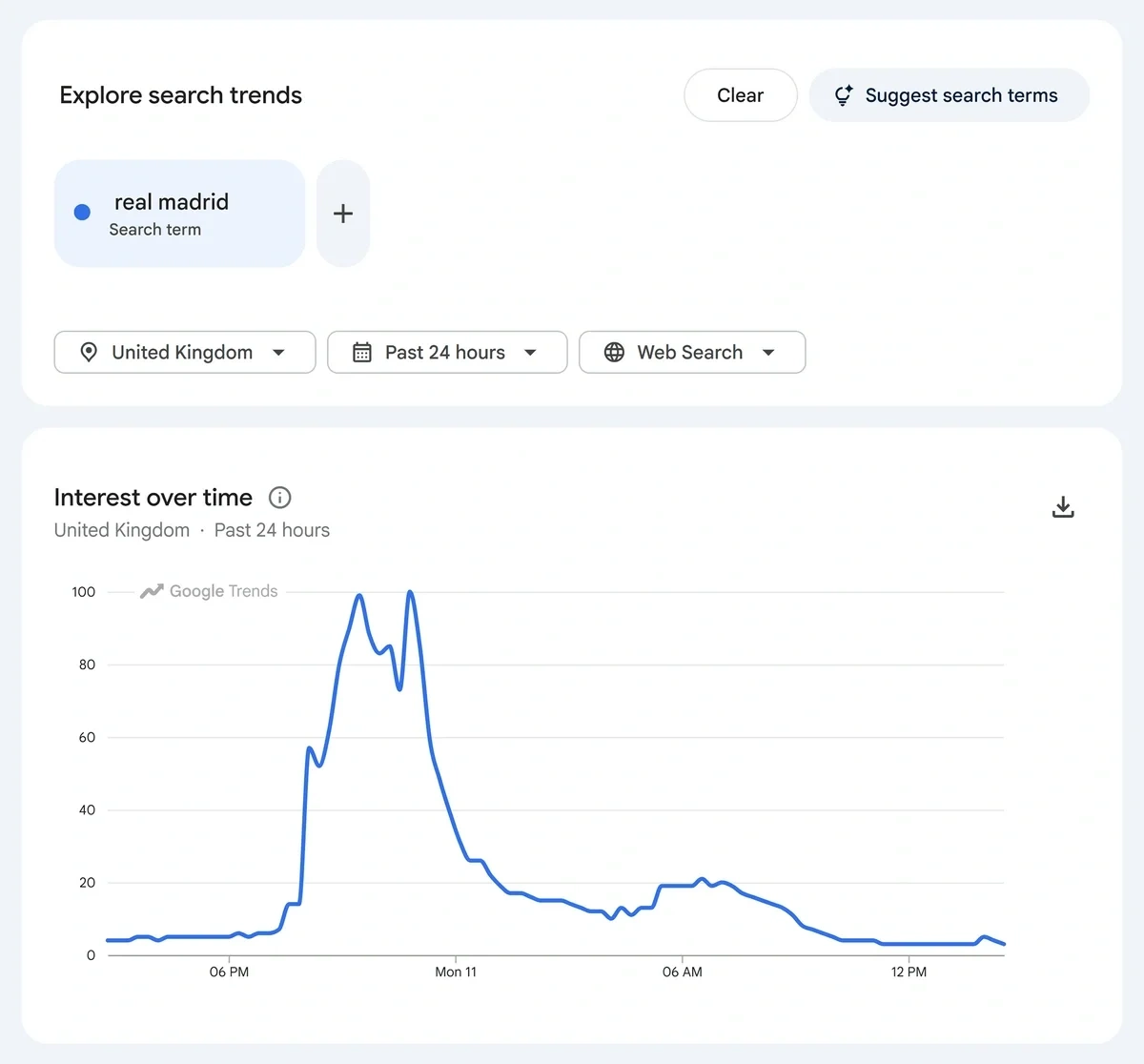
I like to use the explore feature when I have an idea or have heard about a specific topic and want to see if it's broadly popular.
Google's individual trend pages are easy to read. Each page includes a graph of interest fluctuations over a specified time period, related search queries, and related popular topics.
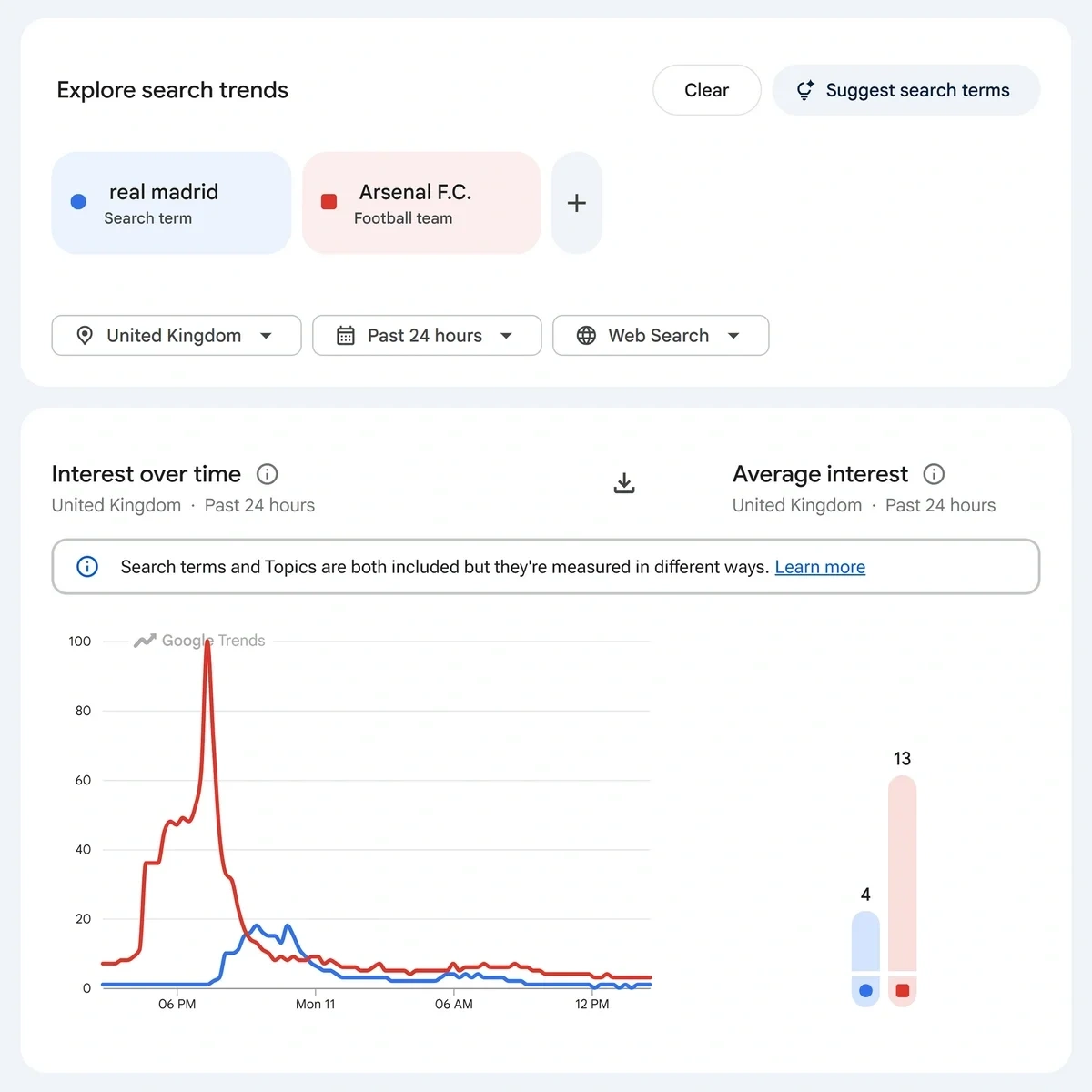
One of the things I like best about Google Trends is how you can directly compare trends by changes in interest over time:
5 Ways E-Commerce Businesses Can Use Google Trends
The ability to find trends is great, but you have to know how to use that information in order to make Google Trends data valuable to your business. I find there are five specific ways in which Google Trends can help you grow and optimize an e-commerce business.
1. Find Opportunities with Industry Trend Research
First, Google Trends is a helpful tool for evaluating trends across your industry. You can start broad and narrow down your research further in order to find the right trends for your niche.
Let's say I run a stationery store and I'm interested in selling products for people who journal. I could start by typing in "journaling" and:
- Checking to see whether there's any interest in this broad trend
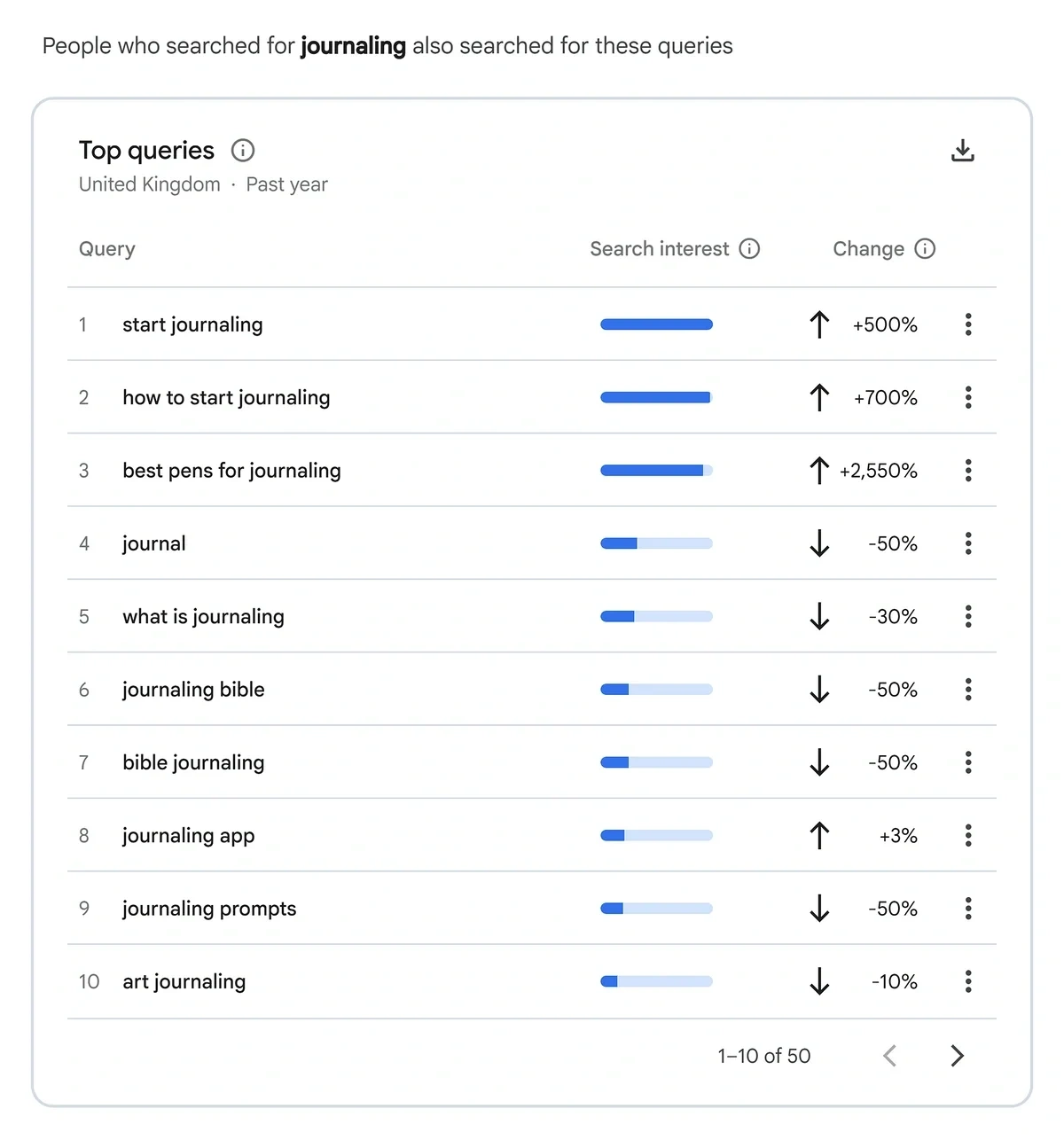
- Evaluating what related topics people are searching for such as journaling supplies, journaling tips, and journaling techniques
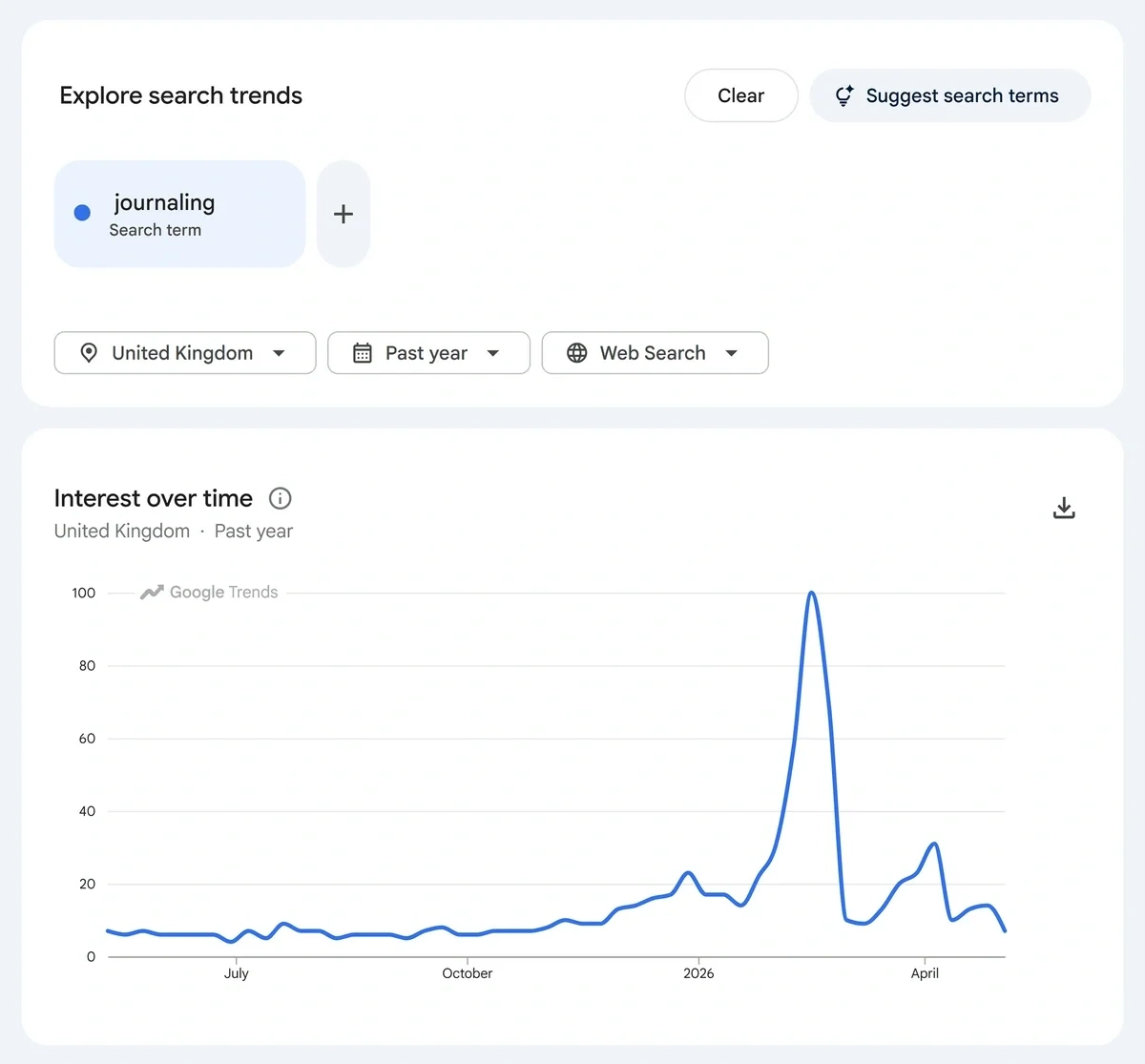
Based on these results, I can see that while interest in journaling as a broad topic is declining, searches for journaling pens are on the rise. I could then explore this subtopic further to identify what brands of pens are most popular with my target audience.
Tip: To be sure that the search trend information you gather is relevant to your audience, I recommend using a more comprehensive tool like Exploding Topics. When you search for a trend in the Exploding Topics database, you can see how it performs across all social media channels in addition to organic search.
2. Conduct Competitor and Product Research
In situations where you know you sell a very specific product to a defined audience—such as basketball shoes for athletes—you can use Google Trends to evaluate interest in competing brands.
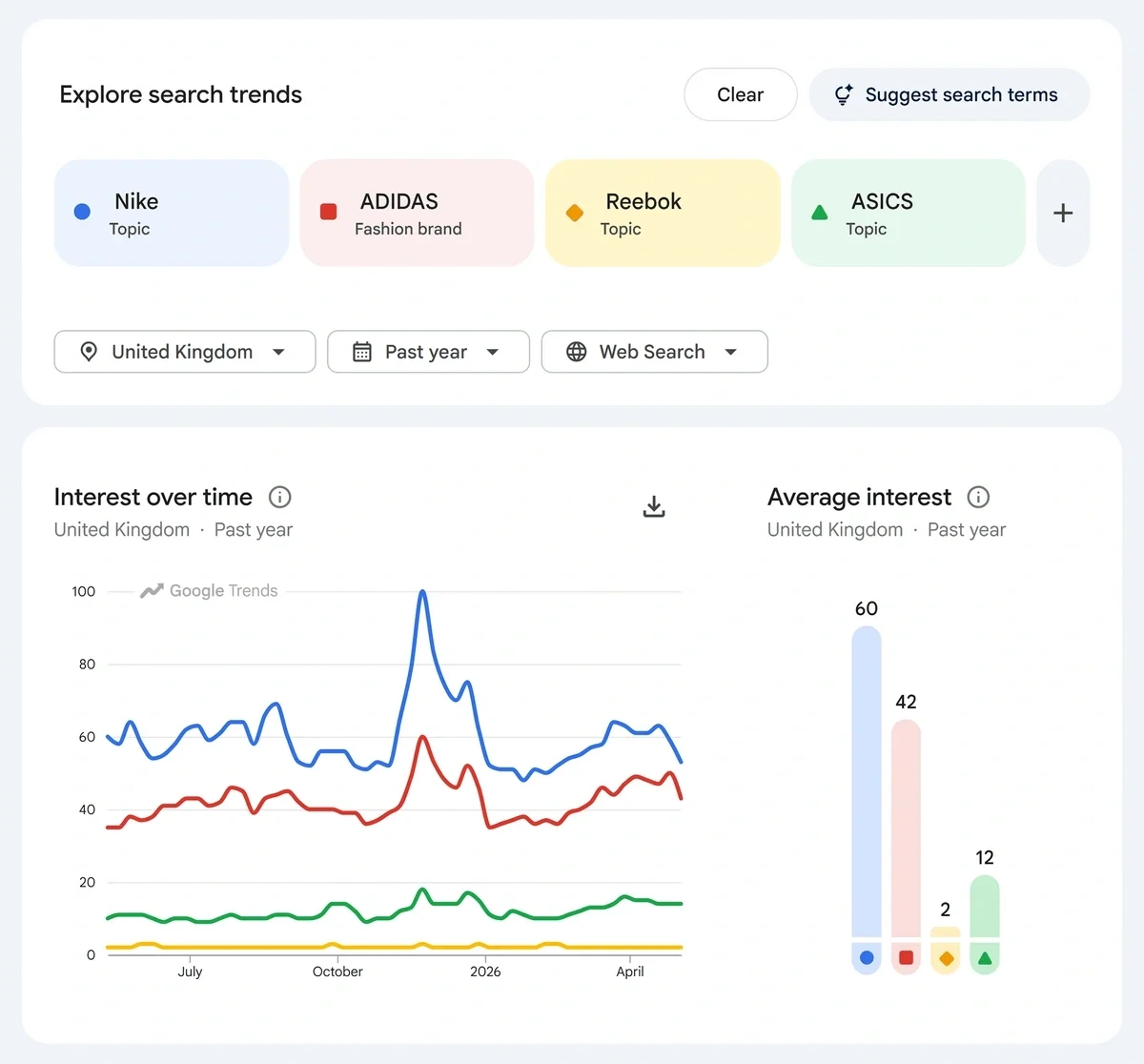
In this case, I can see that Nike is the most popular, followed by Adidas. I could then further research each brand’s trending products along with the digital marketing techniques that they're using. All of this information can then inform my product development, inventory, and promotional decisions.
3. Identify Emerging Regional Trends
Google Trends is also useful for pinpointing where a trend is most popular. This is particularly helpful if your brand sells goods internationally, or if you're planning to expand into a new market.
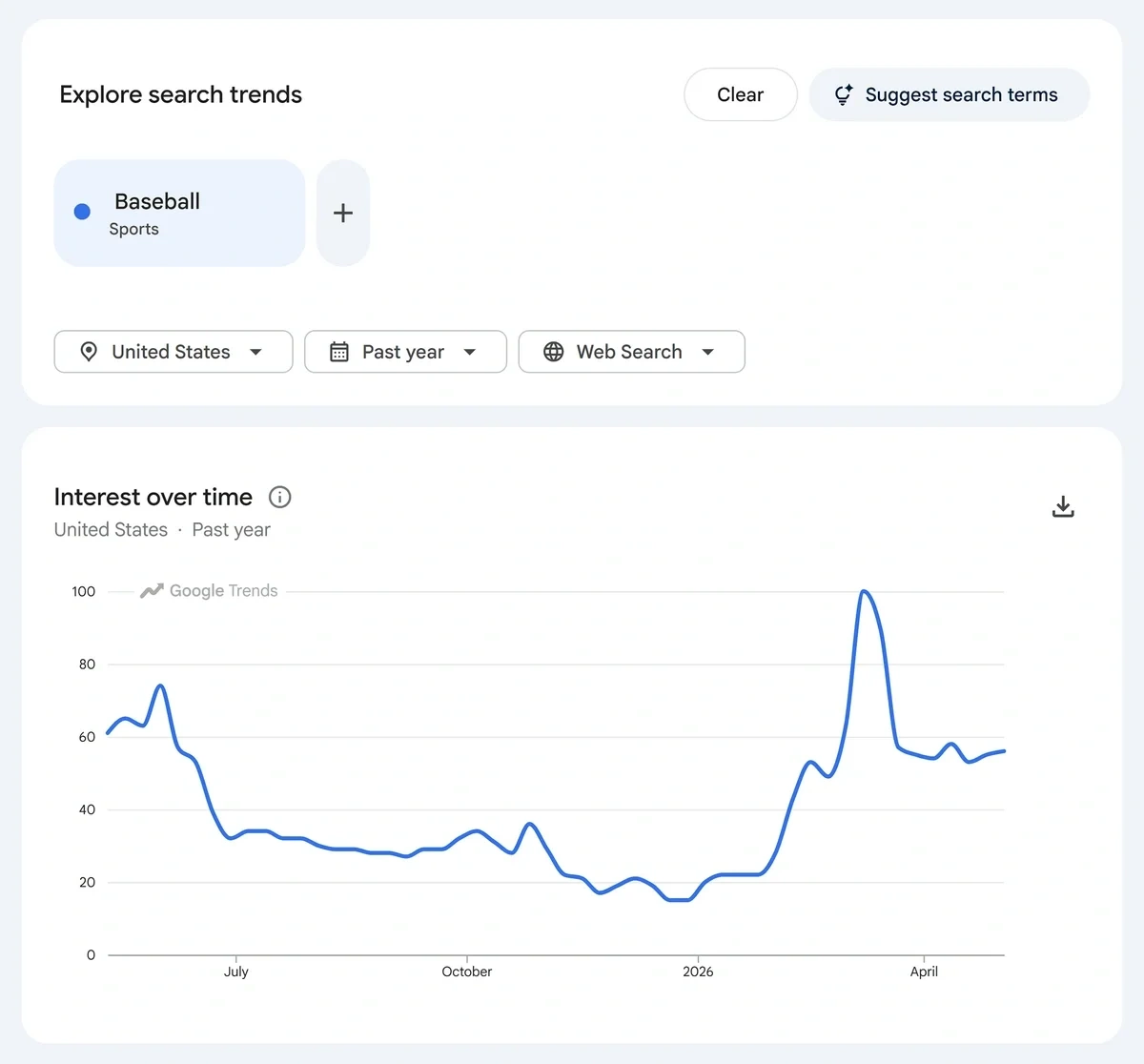
To explore popularity by location, simply change the location filter on a trend page or view the top "trending now" topics for a region.
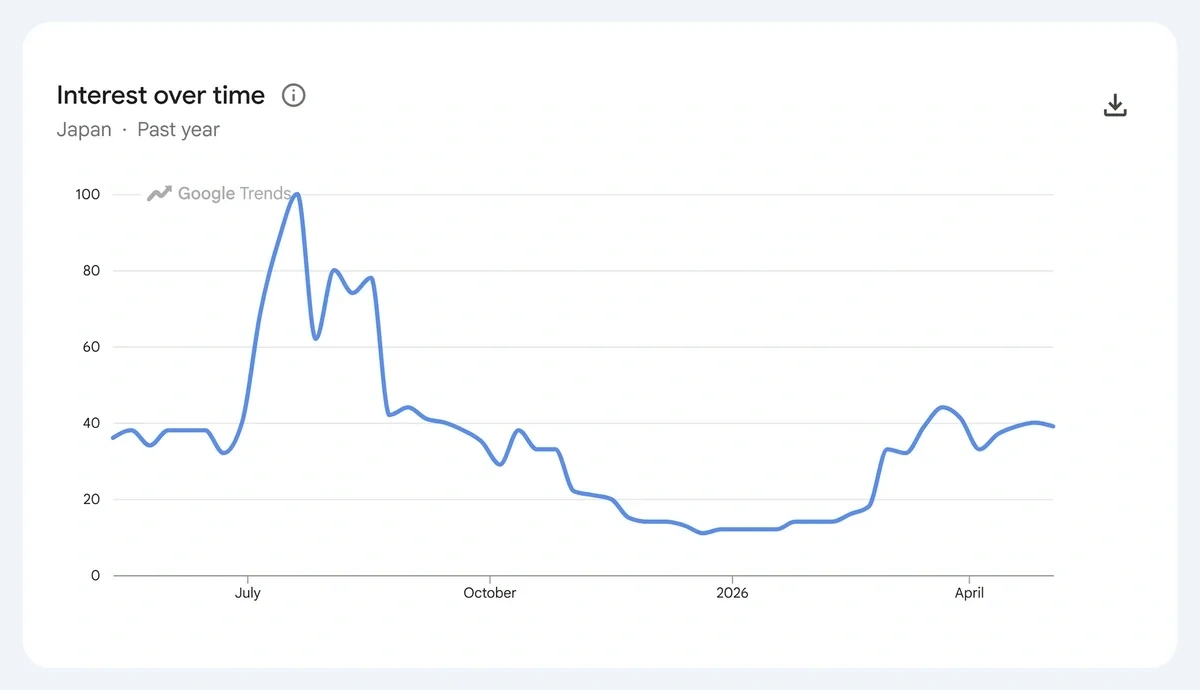
The ability to view trends by location is also useful if you know a trend typically starts in one location before moving to where your business is located.
Jason Stewart, of Cape Town, South Africa, watches global trend movement in order to plan his marketing strategy. His company, Probitec, sells high-quality, delayed-release probiotic capsules that are unlike anything else on the South African market.
"A lot of trends that are global can be hidden in South Africa until a little bit later," said Stewart. "In an emerging market like our country, we have some time to act on trends."
Stewart finds and monitors future trends by reading the Exploding Topics newsletter each week.
4. Look for Seasonal Trends to Leverage
You can also assess seasonal demand related to specific topics when using Google Trends. Seasonality isn’t clearly labeled by Google, though, so you’ll need to make sure you’re looking at year over year trend patterns to spot repeated peaks and dips.
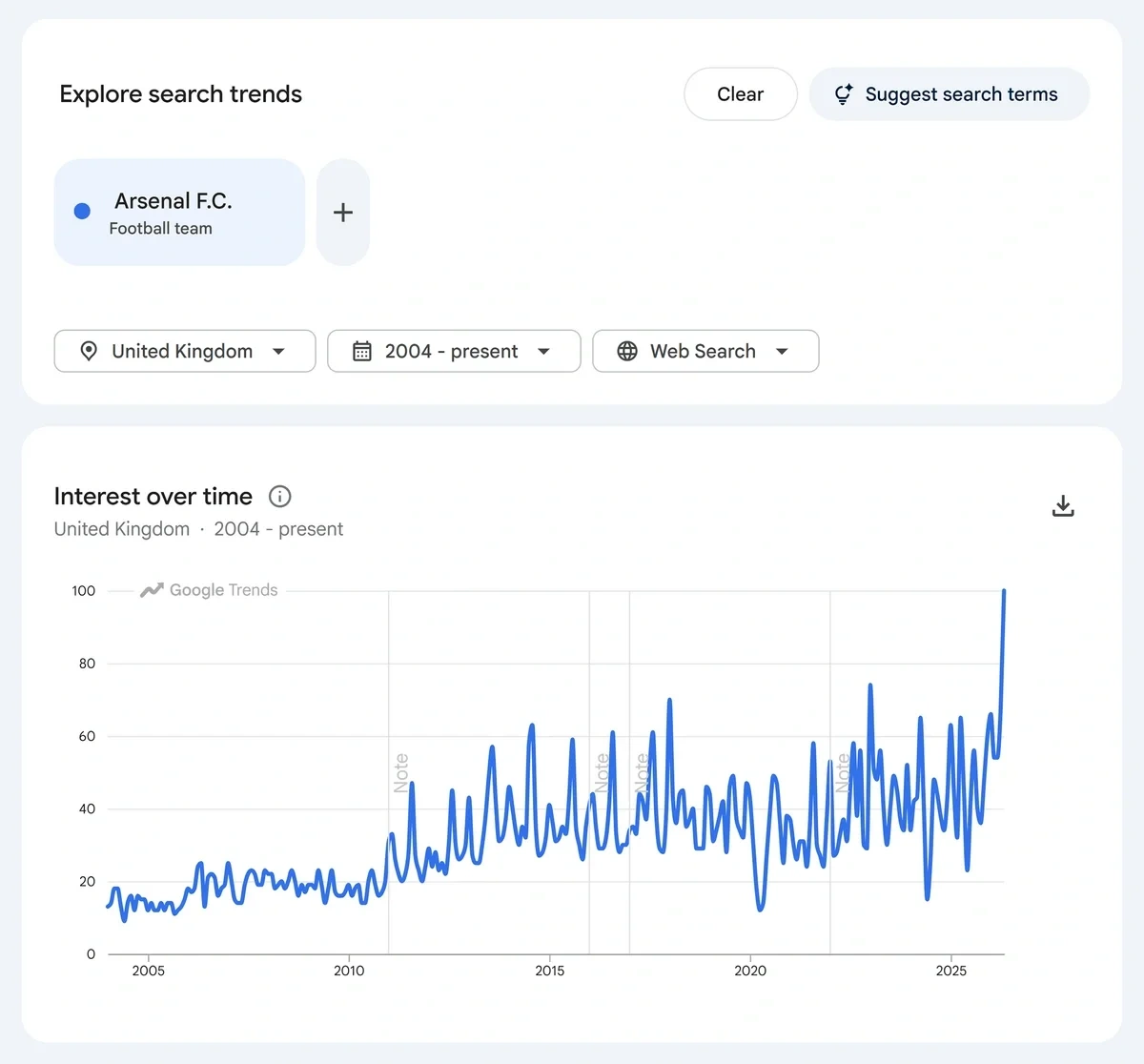
You can set the Google Trends data range to go back to 2004, making it easy to see spikes in search term popularity.
Tip: Use Exploding Topics Pro to make the process of assessing seasonal popularity even easier. Each trend detail page has a list of clearly highlighted key indicators that make it simple to quickly assess a trend’s seasonality, current popularity, consumer sentiment, and more.
5. Choose a New, Profitable Niche
Google Trends can also be a useful tool to check out before you even launch your e-commerce site. By researching emerging trends, you can find the most profitable niche that aligns with your business plan.
For example, planning an e-commerce business around the concept of "fitness" may be far too broad. As a topic, fitness can include everything from at-home workouts to elite athletics.
By looking at the Google Trends page for fitness, I can see that many of the related searches are names of various gym chains.
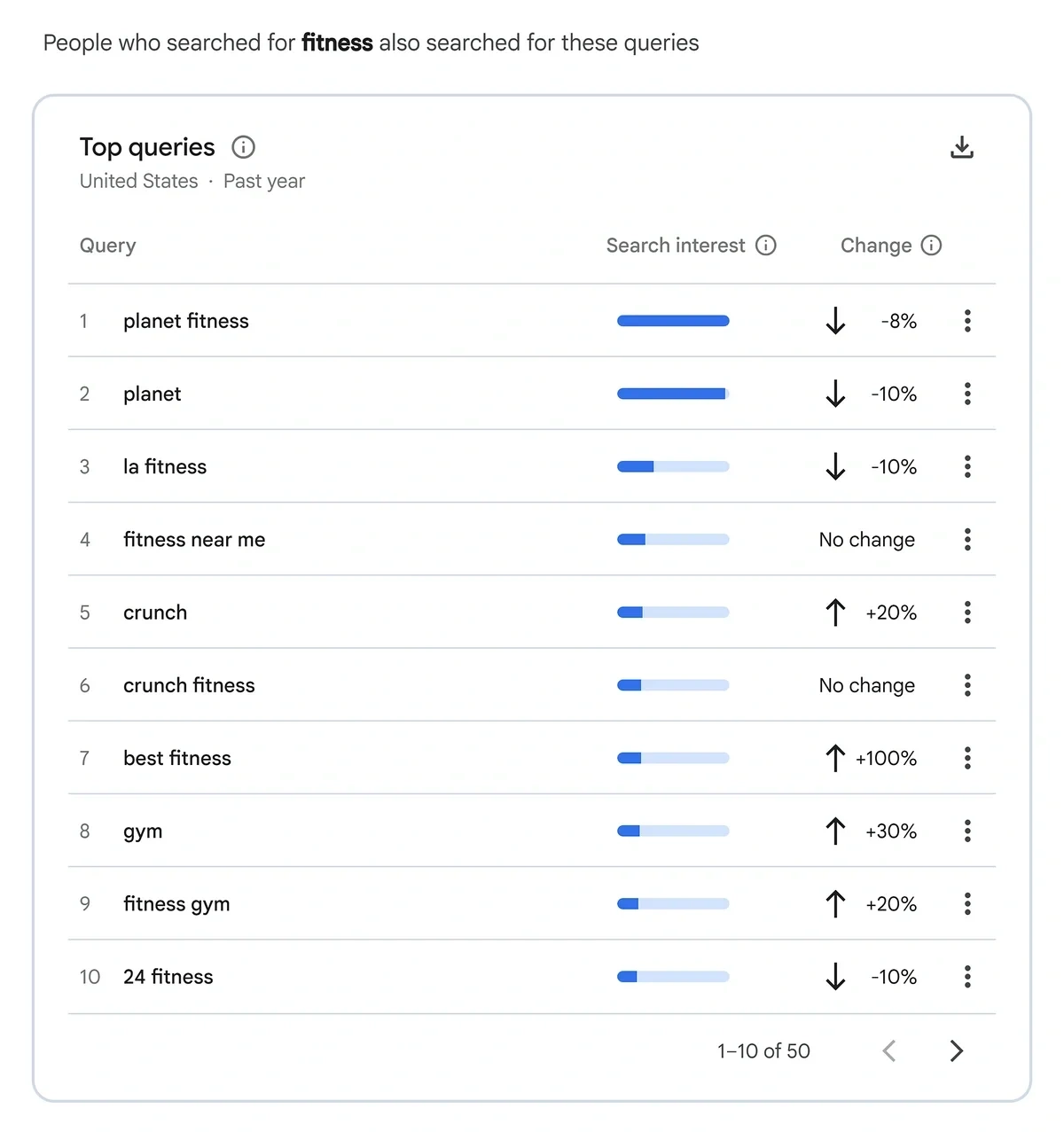
As a result, I may want to consider honing my "fitness" niche idea down to more specifically focus on:
- Workout books and card decks that are easy to take to the gym
- Small, portable items that can enhance a gym workout, like sweat belts and shaker cups
- Affordable fitness tracking tech
Can You Use Google Trends to Find SEO Keywords?
A lot of people are curious about how well Google Trends works for finding SEO keywords, and while you can use it as a jumping-off point for your research, it's not my first choice.
Here's why: Google Trends shows you search volume, but it doesn't show you:
- What the keyword difficulty score is
- If the search results contain any special features
- Whether the result triggers an AI overview
- What the search intent is
You absolutely need to know what the search intent is and how competitive the keyword is in order to accurately pick SEO keywords for your content strategy development and campaigns. Knowing if an AI overview is present in the search engine results page (SERP) is very important now, too, as people increasingly rely on Google's AI tools to find answers.
To see all of that information, you'll need to use a dedicated keyword research tool in addition to Google Trends.
Tip: Use Google Trends to find popular topics, then use selected trends as seed keywords. Enter these seed keywords into a keyword research tool (like the Semrush Keyword Magic Tool) to find other terms and long-tail keywords that relate to your topic of choice.
The Verdict: Is Google Trends Useful for E-Commerce?
Yes, Google Trends is useful for e-commerce entrepreneurs and marketers who want to get a free, broad overview of:
- Search behavior
- Trend popularity
- Topic seasonality
But Google Trends isn’t the best choice for doing detailed SEO research or getting a better picture of the products that are most popular on Amazon or TikTok. For that you’ll need other tools.
I recommend starting with Exploding Topics. The app’s trend newsletters, free trend lists, and free SEO tools (not to mention the complete trend database for subscribers) will all allow you to gather more relevant information to inform your e-commerce marketing and product development.
Stop Guessing, Start Growing 🚀
Use real-time topic data to create content that resonates and brings results.
Exploding Topics is owned by Semrush. Our mission is to provide accurate data and expert insights on emerging trends. Unless otherwise noted, this page’s content was written by either an employee or a paid contractor of Semrush Inc.
Share
Newsletter Signup
By clicking “Subscribe” you agree to Semrush Privacy Policy and consent to Semrush using your contact data for newsletter purposes
Written By


Emily is a freelance content writer at Exploding Topics. A former news correspondent, she has over 15 years' experience creati... Read more